UM1775 Rev 4 19/39
UM1775 Hardware layout
38
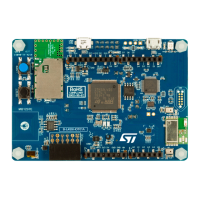
6.2.2 External power supply inputs: 5V_IN or USB USER CN3
The external power source 5V_IN or USB USER CN3 is automatically detected. In this case
the current consumption of the STM32L053 Discovery board and its extension board may
exceed the allowed current on the USB. In this condition it is still possible to use the USB for
communication, for programming or debugging only, but it is mandatory to power supply the
board first using 5V_IN or USB USER CN3 then connecting the USB cable to the PC.
Proceeding this way ensures that the enumeration occurs with the support of the external
power source.
The following power sequence procedure must be respected:
1. Connect the external power source to 5V_IN or USB USER CN3.
2. Power on the external power supply 5V_IN or USB USER CN3.
3. Check that LD2 is turned on.
4. Connect the PC to USB connector CN2.
If this order is not respected, the board may be supplied by V
BUS
first, then by 5V_IN or USB
USER CN3. Consequently, the following risks may be encountered:
1. If more than 300 mA is needed by the board, the PC may be damaged or the current
supply can be limited by the PC. As a consequence the board is not powered correctly.
2. 300 mA is requested at enumeration (since JP2 must be OFF) so there is a risk that the
request is rejected and the enumeration does not succeed if the PC cannot provide
such current. Consequently the board is not power supplied (LED LD2 remains OFF).
6.3 LEDs
• LD1 COM:
LD1 default status is red. LD1 turns to green to indicate that communication is in
progress between the PC and ST-LINK/V2-1.
• LD2 PWR:
The red LED indicates that the board is powered.
• User LD3:
The green LED is a user LED connected to the I/O PB4 of the STM32L053C8T6.
• User LD4:
The red LED is a user LED connected to the I/O PA5 of the STM32L053C8T6.
6.4 Pushbuttons
• B1 USER:
User and Wake-Up button connected to the I/O PA0 of the STM32L053C8T6.
• B2 RESET:
The pushbutton connected to NRST is used to RESET the STM32L053C8T6.


 To Next Page