6000 COUNTS DIGITAL MULTIMETER
12
3.2 Measurement Functions
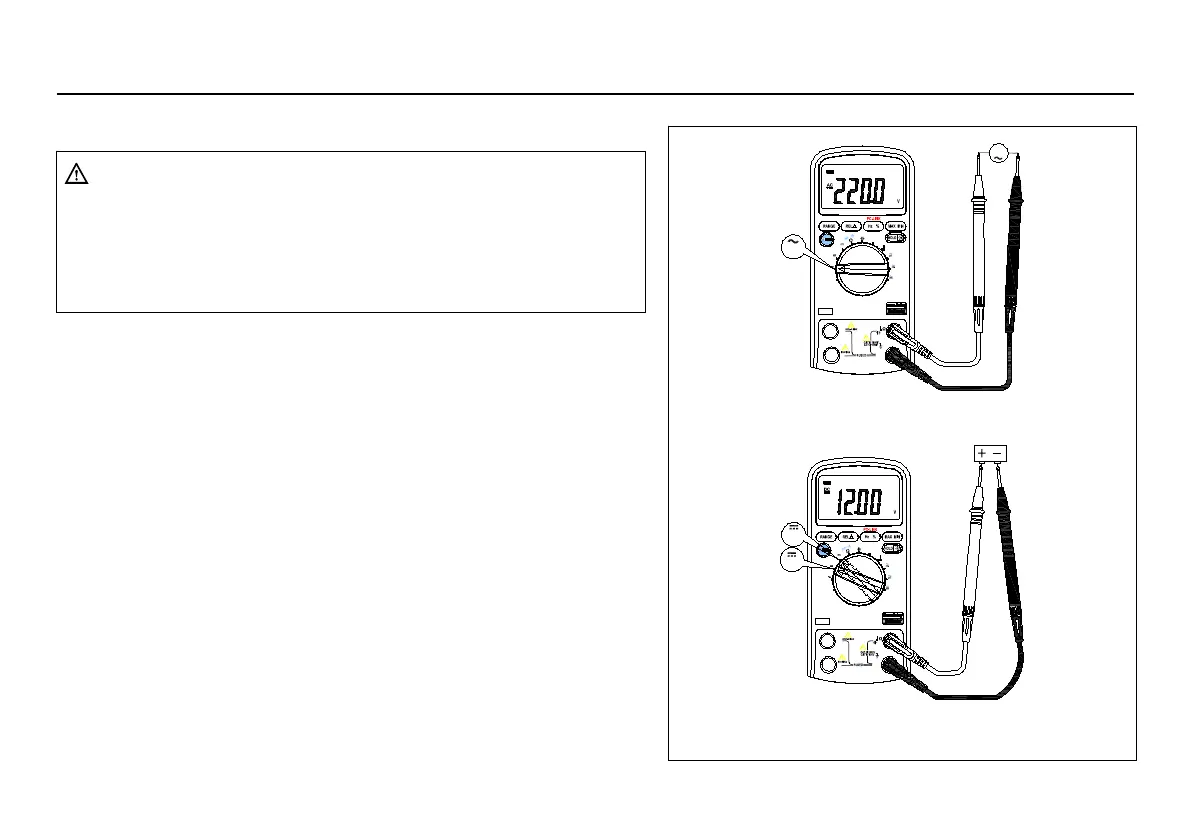
3.2.1 AC and DC Voltage measurement
COM
A
V
Hz
mA
uA
V
A
mA
uA
C
。
Hz
mV
V
V
OFF
F
。
V
A
mA
uA
C
。
Hz
mV
V
V
OFF
COM
A
V
Hz
F
。
mA
uA
mV
V
Figure3-1 Measuring AC and DC Voltage
To avoid electrical shock and/or damage to the
instrument, do not attempt to take any voltage
measurement that might exceeds 1000Vdc or 1000Vac
To avoid electrical shock and/or damage to the
instrument, do not apply more than 1000Vdc or
1000Vac rms between the common terminal and the
The Meter's voltage ranges are 600.0mV, 6.000V, 60.00V,
To measure ac or dc voltage (set up and connect the Meter as
1. Set rotary switch to the DCV, ACV or DCmV range.
2. Connect the black and red test leads to the COM and V
3. Connect the test leads to the circuit being measured
4. Read the displayed value. The polarity of red test lead
connection will be indicated when making a DCV
Unstable display may occur especially at 600mV range,
even though you do not put test leads into input terminals
For better accuracy when measuring the dc offset of an ac
voltage, measure the ac voltage first. Note the ac voltage
range, then manually select a dc voltage range equal to or
higher than the ac range. This improves the accuracy of the dc
measurement by ensuring that the input protection circuits are



 To Next Page