6000 COUNTS DIGITAL MULTIMETER
13
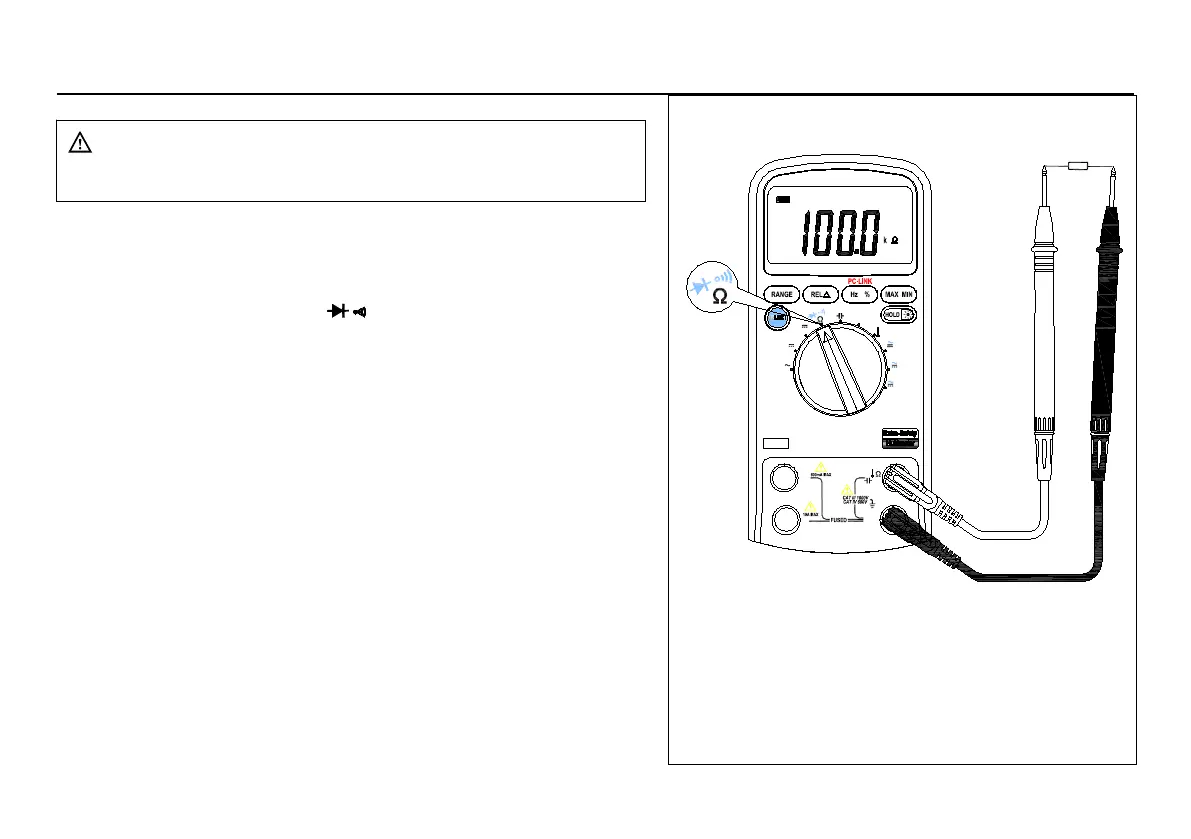
3.2.2 Resistance measurement
COM
A
V
Hz
mA
uA
A
mA
uA
C
。
Hz
mV
V
V
F
。
Figure 3-2 Measuring Resistance
To avoid electrical shock and/or damage to the
instrument, disconnect circuit power and discharge
all high-voltage capacitors before measuring
The Meter's resistance ranges are 600.0
To measure resistance (set up the Meter as shown in figure
1. Set the rotary switch to
2. Connect the black and red test leads to the COM and V
3. Connect the test leads to the circuit being measured and
read the displayed value.
Some tips for measuring resistance:
The measured value of a resistor in a circuit is often different
from the resistor's rated value. This is because the Meter's test
current flows through all possible paths between the probe
In order to ensure the best accuracy in measurement of low
resistance, short the test leads before measurement and
memory the test probe resistance in mind. This necessary to
subtract for the resistance of the test leads.
The resistance function can produce enough voltage to
forward-bias silicon diode or transistor junctions, causing them
to conduct. To avoid this, do not use the 60M
in-circuit resistance measurements.
range, the meter may take a few seconds to
stabilize reading. This is normal for high resistance measuring.
When the input is not connected, i.e. at open circuit, the
figure "OL" will be displayed for the overrange condition.



 To Next Page