The STABILA 196-2 Electronic-IP65 is an inclinometer designed for precise measurement of angles and slopes. It features an electronic module with a digital display and various functions to assist in leveling and plumbing tasks. The device is built to be robust, with an IP65 rating, indicating it is dust-tight and protected against water projected by a nozzle from any direction.
Function Description:
The primary function of the STABILA 196-2 Electronic-IP65 is to measure and display angles and slopes. It can operate in different measurement units or "modes," including Degrees, Percentage of slope, Millimeters per Meter, and Inches per foot (both decimal and fractional). The device is equipped with a calibration function to ensure accuracy, a sound feature to indicate level or plumb without visual inspection, a hold function to lock measurements, and an auto shut-off to conserve battery life. It also includes an illumination feature for the display, making it usable in various lighting conditions. A unique "Reference" function allows users to set any angle or slope as a "0" reference point, simplifying repetitive tasks and ensuring consistency.
Important Technical Specifications:
- IP65 Code: International Protection Rating.
- 6 (Dust tight): Complete protection against dust.
- 5 (Water projected): Protected against water projected by a nozzle from any direction; not submersible.
- Operating Temperature Range: -10°C to +50°C (14°F to 122°F).
- Storage Temperature Range: -20°C to +65°C (-4°F to 149°F).
- Measuring Accuracy at 0° and 90°: +/-0.05°.
- Measuring Accuracy from 0.1° to 89.9°: +/-0.2°.
- Measuring Accuracy of Level (Normal Position & Overhead): +/-0.029° = 0.50mm/m.
- Power Supply: 2 x 1.5V Mignon (AA) Alkaline batteries.
- Operating Time: > 150 hours (based on a measuring cycle of 5 minutes measuring, instrument off for 1 minute, every 30th measurement with 30 seconds illumination).
- Resolution: Two digits after the decimal in degree mode.
Usage Features:
- On/Off Button: Powers the electronic module on and off.
- CAL (Calibration) Button:
- Enables re-calibration of the level at any time.
- How to use: Press the level against a solid vertical surface, adjust until the horizontal vial bubble is centered. Hold the level still and press the CAL button once, then again (safety mechanism). Hold for approximately 4 seconds while the module takes 128 measurements. The LCD will show "RDY" and the module will beep, indicating successful calibration.
- 4-Point Calibration: Press CAL and MODE simultaneously. The display shows four positions; follow arrows to calibrate each position. The first position is adjusted with the vial. Do not move or shake the instrument during calibration to avoid "err" messages. Inclinations > 1° above 0° are blocked.
- Sound Button (<):
- Enables the level to emit a sound when precisely level or plumb.
- How to use: Press the sound button to turn it on or off.
- Explanation: A beeping tone starts when within 2 degrees of level or plumb. The closer to level/plumb, the faster the beeping. A solid tone indicates precise level/plumb. Beeping in a different tone indicates passing level/plumb in the other direction, aiding in directional movement.
- MODE Button:
- Controls the measurement unit (language) displayed.
- How to use: Press the MODE button to switch between Degrees, Percentage of slope, Millimeters per Meter, and Inches per foot (decimal and fractional). The last selected mode is retained when the device is powered off and back on.
- A symbol in the upper right corner of the screen indicates the current mode.
- Allows for conversions between different units.
- Pressing the mode button can also toggle the higher resolution (two digits after decimal) on or off.
- REF (Reference) Button:
- Designed for quicker and more consistent work when performing the same angle or slope continuously.
- How to use: Adjust the level to the desired angle/slope, then press the REF button once. The LCD will read "0.0" at this new reference. Digits will blink to indicate it's in Reference mode, not true level.
- To recall the original angle/slope being referenced, press REF briefly (displays for 2 seconds).
- To return to calibrated level, press REF for 3 seconds, then release, or power the level off and on again.
- In REF mode, the "auto-off time" is increased to 2 hours.
- HOLD Button:
- Locks the current measurement on the LCD screen.
- How to use: Move the level to the desired position and press HOLD. The measurement remains on the screen. Arrows on either side of the digital readout blink to indicate HOLD function is active and not necessarily level.
- Illumination Button:
- Switches the display illumination on/off.
- How to use: Press briefly for approx. 60 seconds (auto off). Press longer (confirmed by acoustic signal) for permanent illumination. Press again to switch off. Applicable even in keylock mode.
- Auto Shut-off:
- Explanation: Factory preset is 10 minutes after the last movement to conserve battery life. Can be extended to 2 hours.
- How to use: To switch to 2-hour auto shut-off, press the sound button and HOLD button simultaneously. A clock symbol appears in the lower right corner of the screen. Repeat the step to revert to 10 minutes.
Maintenance Features:
- Cleaning:
- The inclinometer and display windows should be cleaned with a moist cloth or brush.
- Attention: Do not use solvents or diluting agents, as they may harm the surface of the inclinometer.
- Changing Batteries:
- A battery symbol on the display indicates low battery voltage.
- The battery compartment is on the back side. Remove the cover, replace used batteries with new AA alkaline batteries (Mignon, LR06, MN1500), ensuring correct polarity.
- The inclinometer can operate with one battery, but this reduces battery lifetime.
- Please note: Do not leave used batteries in the inclinometer, as they may corrode and release chemicals, which can be dangerous and damage the compartment. Dispose of used batteries properly.

 Need help?
 General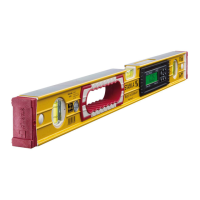

 To Next Page