PAGE 5 of 26 PFWS_2010
OWNER'S MANUAL
®
PERSONAL FIREPROOF AND
WATERPROOF SAFES
STEP 2
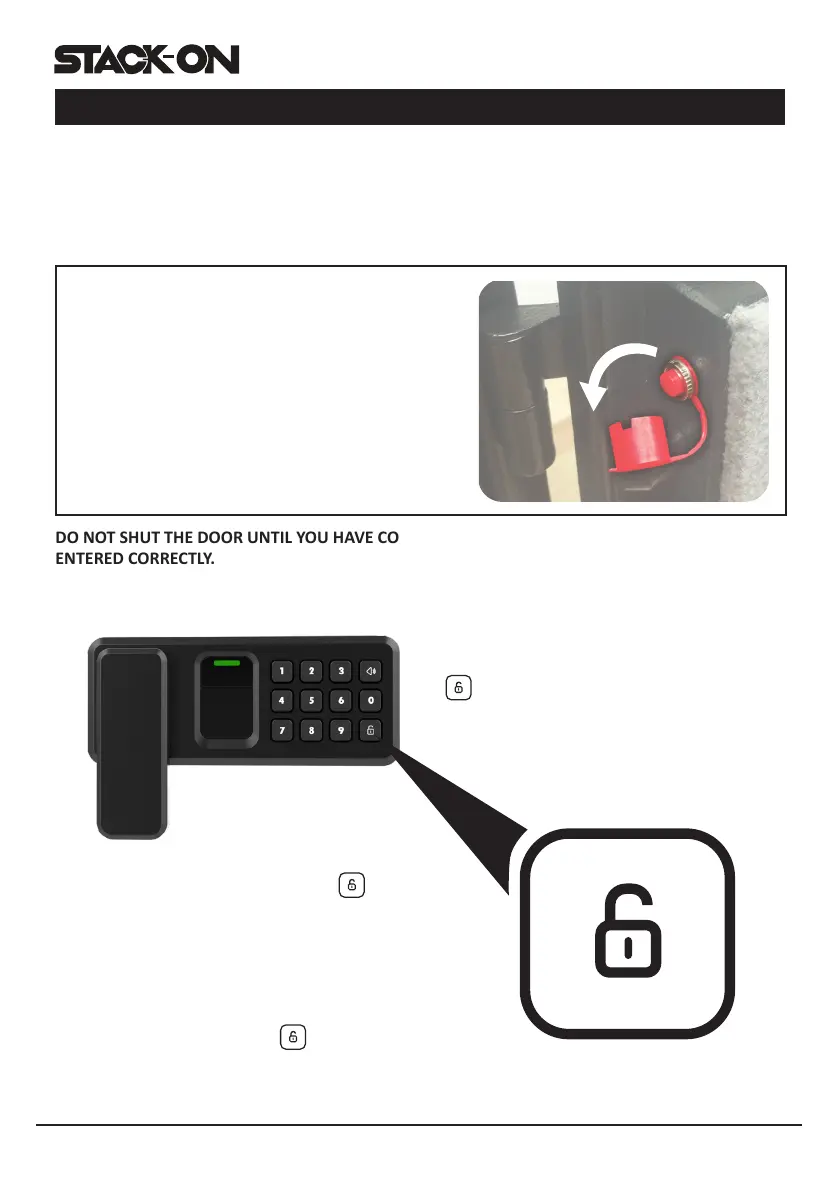
With the door open, enter your own personal
security code, which can be 3-8 digits long,
and conrm your new code by pressing the
key on the electronic touch pad.
STEP 1
To enter your own security code you will need to follow the steps listed below:
Aer installing the baeries, locate the reset buon on the edge of the hinge side of the door.
Press the red reset buon and then release it, you will hear a beep.
DO NOT SHUT THE DOOR UNTIL YOU HAVE CONFIRMED YOUR NEW SECURITY CODE HAS BEEN
ENTERED CORRECTLY.
inside of the door, is covered with a removable
Replace the cap securely over the red reset
do so will compromise the safety and security of
the safe.
You will have 3 seconds to press the
key otherwise you will have to start over from
step one. There will be 2 beeps (if the sound is
turned on) and the green light will ash twice if
your code has been entered successfully.
Before you close the door, enter your new
security code and press the key to make
sure the lock releases the handle so you can turn
it and retract the live acon locking bolts.
ENTERING YOUR SECURITY CODE
STEP 2 CONTINUE TO PAGE 6




 To Next Page