EasyManua.ls Logo

Stack st8130 series - User Manual

Stack st8130 series
84 pages
Print Icon
To Next Page IconTo Next Page
Loading...
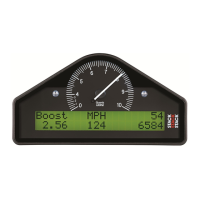
ST8130 Series
Road Car Display Systems
Users Guide
3DUW 1R 

Table of Contents

Questions and Answers

  • J
    Jonathon MoyerSep 12, 2025
    What to do if the low oil pressure message doesn't appear on my Stack Monitor?
    • D
      David RamosSep 12, 2025
      If the Low Oil P message does not appear on power up and the warning light is not turned on, the pressure sensor may have failed (replace sensor), the sensor connections may be faulty (check for continuity on sensor lead), or the oil pressure alarm may be disabled (check that the oil pressure alarm is set on).
  • D
    David JacksonSep 12, 2025
    Why does my Stack Monitor show a fixed pressure reading of 0 PSI?
    • J
      James JonesSep 12, 2025
      A fixed pressure reading of 0 PSI or 0.0 Bar, or a suspected low/slow reading, may be caused by a failed pressure sensor (replace sensor) or faulty sensor connections (check pressure connections).
  • A
    Alan FoleySep 9, 2025
    Why are the display values unclear on my Stack Monitor?
    • H
      Holly WalkerSep 9, 2025
      If the display values and messages are unclear or unreadable due to poor contrast, the display may be too hot or too cold (ensure that the display is operated within the specified temperature range) or the ECU interface may be shorted (if fitted) - check the two core screen ECU wires for short circuits.
  • A
    amyphillipsSep 8, 2025
    Why is my Stack Monitor fuel level reading stuck?
    • K
      kcowanSep 8, 2025
      If the fuel level reading does not change, it could be due to incorrectly connected fuel sender wiring, a faulty fuel sender, a fuel sender not suitable for use with ST8130 Display System, or the fuel sender not being calibrated. Check the wiring and fuel sender. Check with your Stack dealer for a suitable alternative. See Chapter 4 for information on how to calibrate the fuel sender.
  • E
    Eddie BanksSep 7, 2025
    Why is my Stack Monitor showing a fixed temperature reading?
    • M
      Mitchell MaloneSep 7, 2025
      If the water or oil temperature display shows a fixed reading of 0°C or 0°F when the water temperature is above 12°C or 55°F, or the air temperature display shows a fixed reading of -99°C or -99°F when the ambient temperature is above -20°C or -4°F, a temperature sensor may have failed (disconnect sensor and short its leads together; if the reading changes, replace the sensor) or there may be faulty sensor connections (check continuity of sensor leads for open circuits).
  • S
    Sandra ByrdAug 23, 2025
    How to fix a dead display on a Stack Monitor?
    • J
      James NormanAug 23, 2025
      If the display is dead, with no backlight or green dial lights, the possible causes are: the ignition is off (turn the ignition on); the battery is dead (recharge or replace the battery); or there is a faulty power connection to B + or B - (check if the battery is connected correctly and check power lead continuity).
  • B
    bretthallSep 5, 2025
    Why does the speed reading die after a short time on my Stack Monitor?
    • J
      Jessica SalinasSep 5, 2025
      If the speed reading dies after a short time, the ambient temperature may be too high. Shield the sensor from radiated heat from brakes and bearings and insulate sensor from conducted heat with fibre washers.
  • D
    Derek MonroeSep 4, 2025
    Why is the speed reading erratic on my Stack Monitor?
    • J
      Jerry MyersSep 4, 2025
      If there is no speed reading or if the speed reading is erratic, with the value jumping high or low, it could be due to a faulty sensor and/or wiring (check sensor indicator for correct operation) or an incorrect sensor gap (too far or too close) - check that the gap is approximately 1mm / 40thou.
  • D
    Debbie BraySep 3, 2025
    Why does my Stack Monitor display a fixed temperature reading of 999° C?
    • S
      Samantha SullivanSep 3, 2025
      If the display shows a fixed temperature reading of 999° C or 999° F, it may be due to a failed temperature sensor (replace sensor) or faulty sensor connections (check the continuity of sensor leads: with the sensor disconnected and the display powered up, there should be 6.25V between the sensor leads).
  • C
    Christina ZamoraSep 2, 2025
    What causes a fixed pressure reading of 999 PSI on a Stack Monitor?
    • W
      Wesley SilvaSep 2, 2025
      A fixed pressure reading of 999 PSI or 99.9 Bar may be caused by a failed pressure sensor (replace sensor) or faulty sensor connections (check continuity of sensor leads for open circuits).

Summary

Chapter 1. Introducing the Display Systems

Chapter 2. Getting Started

Connecting the Components

Step-by-step guide for initial component connection and power-up.

Chapter 3. Operating the Display System

Peak Values (Tell Tales)

Functionality for viewing recorded maximum parameter values during a run.

Alarms and Warnings

Explanation of the system's built-in warning and alarm features for driver alerts.

Chapter 4. Configuring the Display System

Switching Alarms On or Off

How to enable or disable specific alarm warnings for different parameters.

Calibrating the Fuel Level

Detailed procedure for accurate fuel level sensor calibration using multiple points.

Wheel Pulses and Circumferences Setup

Configuring speed sensor parameters for accurate speed and distance readings.

Chapter 5. Installing the Display System

Fitting the Display Module

Instructions for physically mounting the display unit into the dashboard cut-out.

Warning Lights and Engine Speed Measurement

Connecting the RPM signal and understanding the function of built-in warning lights.

Ignition System Connections

Guide to connecting the system's RPM input to various types of ignition systems.

Sensor Installation

Procedures for installing pressure, temperature, and wheel speed sensors.

Pulse Amplifier Interface (ST492-Option)

Details and installation instructions for the pulse amplifier for speed signal conversion.

Chapter 6. Troubleshooting

Appendix A. Template for the Display Module

Appendix B. Wiring Harness Diagram

Appendix C. Summary of Switch Functions

Returned Goods Procedure

Stack st8130 series Specifications

General IconGeneral
BrandStack
Modelst8130 series
CategoryMonitor
LanguageEnglish

Related product manuals