EN
- 34 -
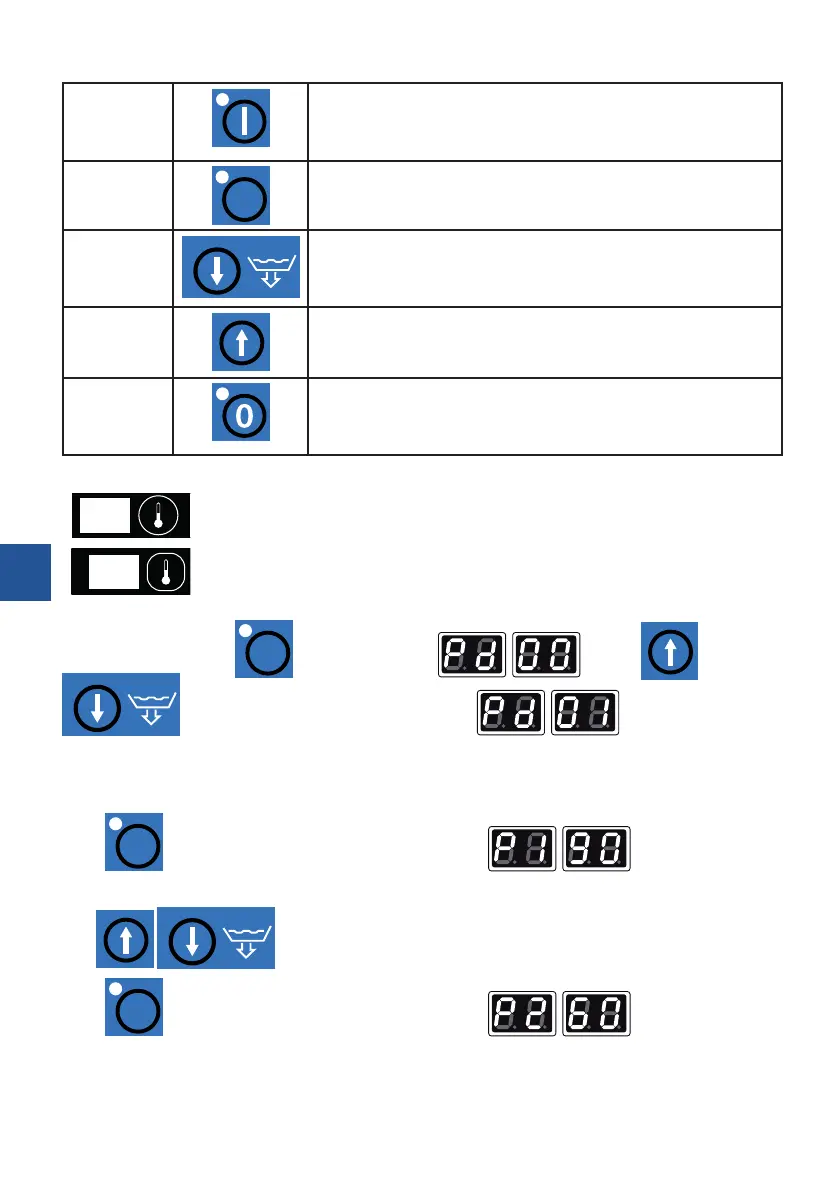
2. Button functions
Start button
• turns the device on
• Pressing the button with the door open, launches the STOP
function. You can then close the door without starting the wa-
shing cycle. To turn the function o, press the button again
Set button
SET
• conrmation of the introduced input data, setting of the
password
• access to data setting: P1, P2, P3, P4, P5, P6
Down arrow
• reduces the washing or rinsing temperature
• drain pump (optional)
Up arrow
• increases the washing or rinsing temperature and increases
the duration of the wash or rinse cycle. C1-90 sec. C2-120 sec.
C3-180 sec.
Stop button
• turns the device o (does not disconnect the device from power
supply, the complete disconnection of the device occurs after
the plug is removed from the socket or the main external switch
is turned o), stops the washing and rinsing process
3. Displays
19
display 1 – indicates the rinsing and sanitization temperature; washing cycle length
C1 – C2 – C3
22
display 2 – indicates the washing temperature
4. Parameter setting
After the rst pressing of
SET
the display will show . Use the
arrows to change the data on display 2 into: . This is the factory-set
password.
a. programming of temperatures and times
CUSTOMER SETTINGS
Press
SET
again. The displays will show the following data: - sanitization-rinsing
temperature (70-95
o
C)
The
arrows can be used to adjust the temperature on display 2.
Press
SET
again. The displays will show the following data: - washing water
temperature (40-70
o
C).


 To Next Page