EasyManua.ls Logo

Standard Horizon QUANTUM AIS GX6000 - User Manual

Standard Horizon QUANTUM AIS GX6000
158 pages
Print Icon
To Next Page IconTo Next Page
Loading...
QUANTUM AIS GX6000
25 Watt VHF/FM Marine Transceiver
Owners Manual
z Capable of connecting two optional wired RAM4 or one wired RAM4 and up to four Wireless
RAM4W remote access microphones using SCU-30 wireless access point
z Integrated NMEA 2000 interface supporting all PGNs for Navigation, GPS, AIS and DSC functions
z Integrated Dual Channel AIS (Automatic Identication System) receiver
z GPS Compass, Waypoint and GPS status pages
z Dual Zone 25W PA / Loud Hailer with preprogrammed horn, siren, fog signals and listen back
z Submersible IPX8 (5 feet or 1.5 meters for 30 minutes)
z Integrated 32 Code Voice Scrambler and 4 Code Voice Scrambler
z AIS / AIS SART target display: MMSI, Call Sign, Ship Name, BRG, DST, SOG and COG
z Front panel microphone can be connected to rear panel and extended 20 feet using MEK-4
mic extension kit
z Programmable CPA or TCPA collision avoidance alarms
z Advanced 80 dB commercial Grade Receiver with Local / Distance Attenuator
z Intercom feature allows you to communicate between the radio, RAM4 and Wireless RAM4W
microphones
z Integrated Voice Recorder to play back up to two minutes of RX receive audio

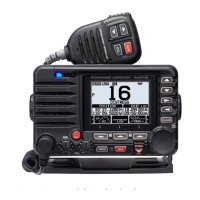
Table of Contents

Questions and Answers

  • T
    Tommy BrownAug 13, 2025
    Why does my Standard Horizon QUANTUM AIS GX6000 Transceiver say “HI BATTERY” or “LO BATTERY”?
    • T
      Teresa JohnsonAug 13, 2025
      If your Standard Horizon Transceiver displays a “HI BATTERY” or “LO BATTERY” message when you turn it on, this indicates that the power supply voltage is either too high or too low. Verify that the connected power supply voltage is between 11 volts and 16.5 volts DC.
  • A
    Anne BrownAug 17, 2025
    How to fix a Standard Horizon QUANTUM AIS GX6000 that fails to power up?
    • A
      andersontracyAug 17, 2025
      If your Standard Horizon Transceiver fails to power up, the issue might be due to no DC voltage reaching the unit or a blown fuse. First, check the 12VDC battery connections and the fuse. Also, ensure that you press and hold the power key to turn the radio on.
  • J
    Jeff JohnsonAug 20, 2025
    What to do if Standard Horizon QUANTUM AIS GX6000 Transceiver blows fuse?
    • P
      ploveAug 20, 2025
      If your Standard Horizon Transceiver blows a fuse when connected to the power supply, the power wires may be reversed. Check the power cable for DC voltage and replace the fuse (7A). Ensure the red wire connects to the positive (+) battery post and the black wire to the negative (–) battery post.
  • J
    Jorge ParksAug 25, 2025
    Why does my Standard Horizon QUANTUM AIS GX6000 Transceiver have low transmit power?
    • M
      Melissa BlackAug 25, 2025
      If a receiving station reports low transmit power from your Standard Horizon Transceiver, even when it's set to HI power, the antenna might be the problem. Have the antenna checked, or test the transceiver with another antenna.
  • A
    amanda89Aug 28, 2025
    Why is my position not displayed on my Standard Horizon QUANTUM AIS GX6000 Transceiver?
    • G
      Gilbert HammondAug 28, 2025
      If your position is not displayed on the Standard Horizon Transceiver, check the SCU-31 cable connection and the accessory cable connection. Some GPS units use the battery ground for NMEA connection. Also, check the output signal format of the GPS navigation receiver. This radio requires NMEA 0183 and NMEA 2000 format with GLL, RMB, or RMC sentence as an output signal. If the GPS has a baud rate setting make sure to select 4800 and parity to NONE.
  • B
    Benjamin BrownSep 1, 2025
    How to stop popping noise in Standard Horizon QUANTUM AIS GX6000 speaker?
    • L
      Lori DixonSep 1, 2025
      If you hear a popping or whining noise from the speaker of your Standard Horizon Transceiver while the engine runs, it could be engine noise. Try re-routing the DC power cables away from the engine. You can also add a noise suppressor on the power cable, change to resistive spark plug wires, and/or add an alternator whine filter.
  • J
    Joshua RoySep 4, 2025
    What to do if Standard Horizon Transceiver has no sound from speaker?
    • H
      Heather SpenceSep 5, 2025
      If sound is not emitted from the internal or external speaker of your Standard Horizon Transceiver, check the connections of the accessory cable. The external speaker cable (WHITE/SHIELD) may be shorted together.
  • J
    Jessica CarterSep 8, 2025
    Why is there no sound from the PA speaker on my Standard Horizon Transceiver?
    • C
      catherineharrisSep 8, 2025
      If sound is not emitted from the PA speaker of your Standard Horizon Transceiver, check the connections of the accessory cable. The PA speaker cable (RED/SHIELD) may be shorted together.

Summary

Quick Reference Guide

1 GENERAL INFORMATION

5 GETTING STARTED

Provides initial guidance for using the marine VHF transceiver, covering essential setup and operational basics.

6 CONTROLS AND INDICATORS

Details the front panel, microphone, and rear panel controls and indicators of the transceiver.

7 INSTALLATION

Covers safety, location, mounting, and electrical connection procedures for installing the transceiver.

8 BASIC OPERATION

Explains fundamental operations including turning on/off, reception, transmission, and menu navigation.

9 GPS OPERATION

Describes how to display and check GPS position information and operate the GPS logger.

10 DIGITAL SELECTIVE CALLING (DSC)

10.1 GENERAL

Introduces Digital Selective Calling (DSC) as a semi-automated method for maritime radio communication.

10.2 DSC DISTRESS ALERT

Explains how to transmit and receive DSC distress messages, including alert procedures.

10.4 INDIVIDUAL CALL

Details how to set up and transmit individual DSC calls to other vessels.

10.5 GROUP CALL

Describes how to contact a group of vessels using DSC radios for collective communication.

10.11 DSC LOG OPERATION

Covers reviewing and resending transmitted logged calls and managing the DSC log directory.

11 NAVIGATION

11.1 WAYPOINT OPERATION

Explains how to start, stop, and manage waypoint navigation using the directory or manual entry.

11.2 ROUTING OPERATION

Details how to add, edit, delete, and start navigation for routes using waypoints.

13 AUTOMATIC IDENTIFICATION SYSTEM (AIS)

13.1 GENERAL

Provides an overview of the Automatic Identification System (AIS) and its purpose in collision avoidance.

13.2 AIS OPERATION

Explains how to display AIS targets, change range, and transmit individual calls to AIS ships.

13.3 AIS SETUP

Details configuration settings for AIS, including CPA and TCPA alarm parameters.

15 CONFIGURATION SETUP

15.1 DISPLAY MODE

Allows selection of display mode (Day/Night) based on operating time.

15.3 DISPLAY CONTRAST

Adjusts the display contrast level to suit the user's operating environment.

15.8 SOFT KEYS

Enables assignment of desired functions to soft keys and setting their display duration.

15.9 RESET

Provides options to reset setup categories or return the transceiver to factory settings.

18 GPS SETUP

18.1 ORDER OF PRIORITY

Specifies the priority order for connection devices used when obtaining location information.

18.2 COMPASS DIRECTION

Allows selection of compass display direction (Course-Up or North-Up).

18.7 UNITS OF MEASURE

Enables setting of units for speed, distance, and altitude display.

18.9 NMEA 0183 IN;OUT

Configures NMEA 0183 baud rates for GPS input and DSC output.

19 SSM-70 H (RAM4) REMOTE MIC OPERATION

19.1 REMOTE MIC CONTROLS

Details the controls and functions of the SSM-70H (RAM4) remote microphone.

19.2 RAM4 SOFT KEY ASSIGNMENT

Explains how to assign functions to the RAM4 remote microphone's soft keys.

20 CONNECTING A USB DATA TERMINAL TO THE PC

21 MAINTENANCE

21.1 REPLACEMENT PARTS

Lists commonly requested replacement parts and their ordering information.

21.3 TROUBLESHOOTING CHART

Provides a chart of common symptoms, probable causes, and remedies for troubleshooting.

24 SPECIFICATIONS

24.1 GENERAL

Lists general specifications including channels, voltage, current drain, and display type.

24.2 TRANSMITTER

Details transmitter specifications like frequency range, output power, and audio response.

24.3 RECEIVER (for Voice and DSC)

Provides receiver specifications for voice and DSC operations, including sensitivity and selectivity.

24.7 DIMENSIONS

Displays the physical dimensions of the transceiver unit.

25 FCC RADIO LICENSE INFORMATION

25.1 STATION LICENSE

Information regarding FCC ship station license requirements for vessels.

25.4 FCC; INDUSTRY CANADA INFORMATION

Provides technical data necessary for FCC and Industry Canada license applications.

26 FCC NOTICE

Standard Horizon QUANTUM AIS GX6000 Specifications

General IconGeneral
BrandStandard Horizon
ModelQUANTUM AIS GX6000
CategoryTransceiver
LanguageEnglish

Related product manuals