Home
Stanton
Music Mixer
SCS.3m
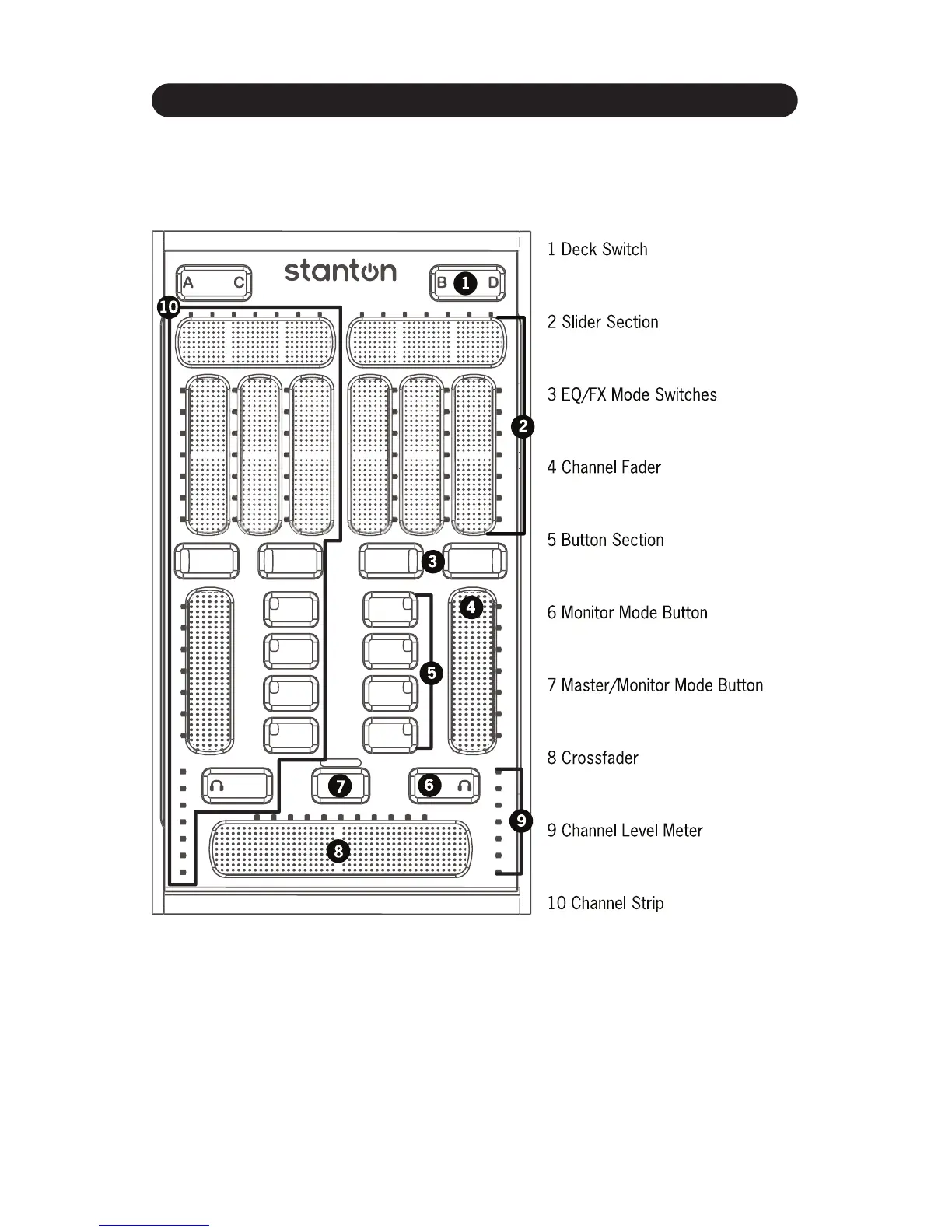
Page 12 (Top Panel Functional Groups)
Stanton SCS.3m - Top Panel Functional Groups
72 pages
Manual
Save Page as PDF
To Next Page
To Next Page
To Previous Page
To Previous Page
Loading...
+,*(4*1+*(.+4,
/
L=K
+,*(4*1+*(.+4,/
&AY+&1WV6,3-,*%0-6.1AK'%60
YA[L
^
2
C
100'10'.3-,-&-2&+A
F
X
E
Q
Q
E
Q
F
X
M
AS
T
ER
6
6
'%60YA[
11
13
Table of Contents
Main Page
Important Safety Instructions
2
Table of Contents
3
Introduction
5
Welcome to the Scs.3M
5
Overview
5
Unpacking
6
Connecting the Scs.3M
7
Connect USB
7
Connect Power
7
Connect Other Devices
8
Scs.3M Setups
9
Scs.3M Description
10
Scs.3M - Traditional Mixer Comparisons
10
Channel Gain
10
EQ Section
10
Channel Fader
11
Crossfader
11
Top Panel Functional Groups
12
Deck Switch
13
Slider Section
14
EQ/FX Mode Switches
15
Channel Fader
15
Monitor Button
16
Button Section
16
Master/Monitor Mode Button
17
Crossfader
17
Channel Level Meter
18
Channel Strip
18
Rear Panel
19
Inner Rear Panel
20
Installing Darouter
21
Installing and Configuring Darouter and Traktor LE
21
Installing on Windows
21
Downloading Darouter and Traktor LE
21
Installing Traktor LE
26
Activating Traktor LE
29
Installing on Mac
31
Installing Darouter
31
Installing Traktor LE
34
Activating Traktor LE
36
Configuring Darouter
37
Configuring Traktor LE
40
Using the Scs.3M with Traktor LE
41
A Traktor Tour
41
Decks
41
Mixer
42
Browser
43
Controller Overview
45
Mixer Section
46
Faders
46
Cue Buttons
46
Mode Buttons
47
EQ Mode
48
FX Mode
49
Your First DJ MIX
50
A Quick MIX
50
Loading a Song into a Deck
50
Setting a Cue Point
50
Using a Cue Point
51
Sync'ing Two Decks
51
Fading between Two Decks
53
Using the Eqs
54
Using the Effects (FX)
55
Next Steps
59
Using the Scs.3M with Other MIDI Applications
60
Selecting MIDI Channel
60
Selecting Built-In Preset
60
MIDI Learn
62
Advanced Control of Built-In Presets
62
Troubleshooting
63
Specifications
64
Configuring Your Audio Interface
65
Setting up a Native Instrument's Audio Interface
65
Appendix
65
Appendix Audio Interface Configuration
65
Audio Interface Configuration
65
Setting up a DIfferent Audio Interface
66
Setting Your Outputs
67
Traktor LE MIDI Interface Configuration
67
Registration Card
69
Stanton Warranty
70
Related product manuals
Stanton SCS.1m
56 pages
Stanton SK-2
4 pages
Stanton SA-8
6 pages
Stanton SA.3
12 pages
Stanton SK-6F
4 pages
Stanton SMX.501
12 pages
Stanton SMX.211
9 pages
Stanton SMX.202
8 pages
Professional Performance Mixer SK ONE
4 pages
Professional Performance Mixer SK FIVE
4 pages
Professional performance mixer SK SIX
4 pages
Stanton M.203
15 pages




 To Next Page