STAR TRAC PRO STEPPER O
WNER
’
S
M
ANUAL
15
Operating the STAR TRAC PRO STEPPER is very easy. Simply mount the Stepper, begin stepping, and press QUICK START.
Learning the features and incorporating the STAR TRAC PRO STEPPER into your members' fitness programs is just as easy.
In this chapter, you will learn the display functions and how to get the most out of every STAR TRAC PRO STEPPER workout.
IMPORTANT: Before operating the Stepper, you must be familiar with the following equipment limitations:
■ Maximum Weight: Your STAR TRAC PRO STEPPER is designed for a maximum user weight of 350 lbs/158 kg. DO NOT
exceed the maximum user weight.
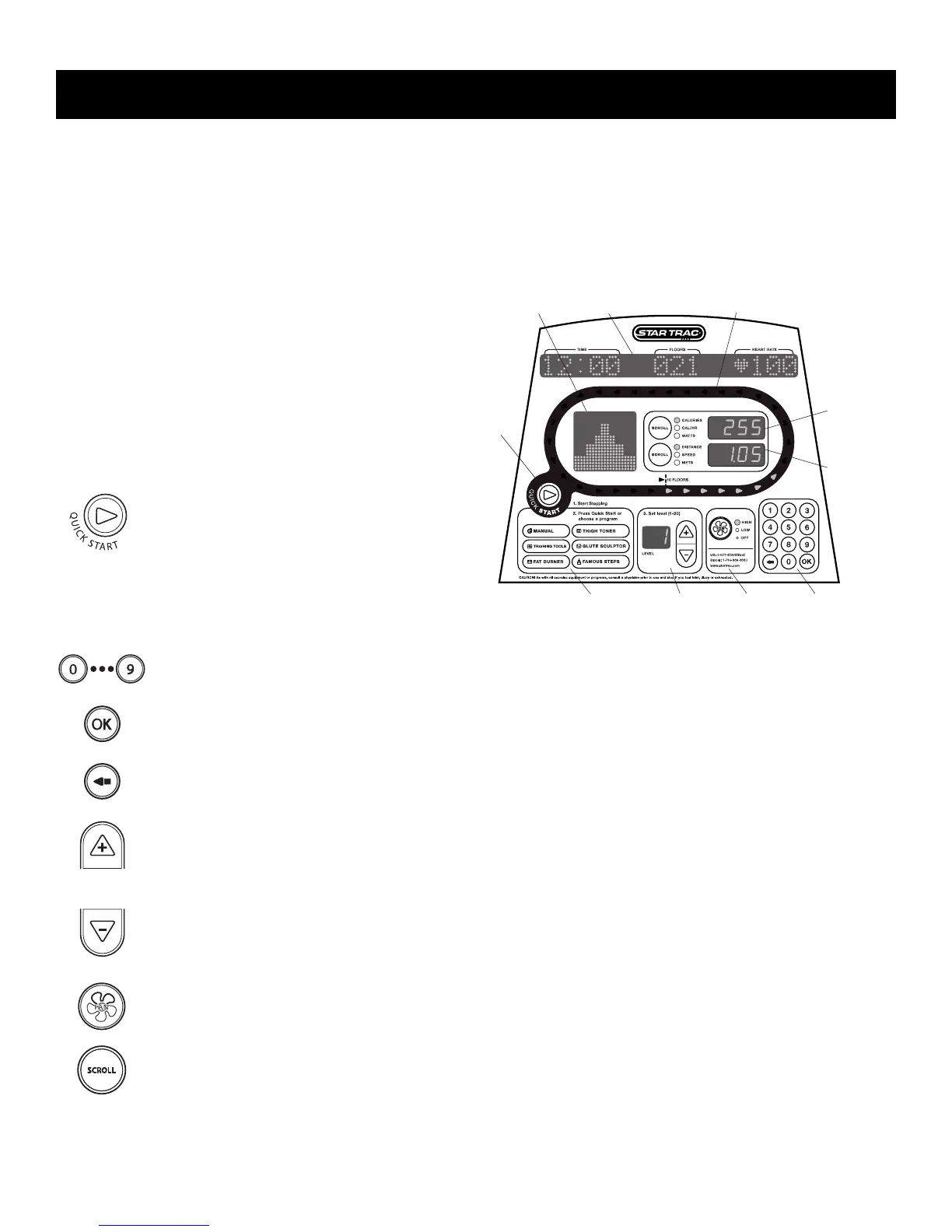
DISPLAY PANEL FEATURES
Your STAR TRAC PRO STEPPER is equipped to provide
you and your users unlimited exercise opportunities.
Experiment with its features to find the right combination for
your fitness regimen. The Display Panel provides the operat-
ing controls and display elements described in the following
paragraphs.
QUICK START Key: Enables the Stepper
for manual operation using a default weight
as set in Manager/Maintenance Mode, a
default LEVEL of "1", and a default time
limit as set in Manager/Maintenance Mode.
NOTE: Default time and weight are
adjustable through Manager/Maintenance
Mode.
Numeric Keypad: Allows you to enter specific values for program parameters during program setup. During a
program, these keys may be used to change difficulty level.
OK Key: (part of numeric keypad) Allows you to confirm selections during program setup and operation.
A
RROW Key: (part of numeric keypad) Allows you to make corrections to values entered during program setup.
Increase L
EVEL Key: Increases the difficulty level, in one-level increments; levels are from 1 (least difficult) to
20 (most difficult). Current level setting is shown in the LEVEL display window.
Decrease LEVEL Key: Decreases the difficulty level from 20 (greatest difficulty) to 1 (least difficulty), in one-
level increments. Current level setting is shown in the LEVEL display window.
NOTE: During program setup and while in Manager/Maintenance Mode, the Increase LEVEL and Decrease
L
EVEL keys increment or decrement the value shown in the Information Window.
Fan Key: Allows you to control the speed of the personal cooling fan, either OFF, HIGH or LOW.
SCROLL Keys: Scrolls the upper and lower data information windows between the three available data displays.
Preset Program Keys: Allow you to access a desired preset workout program.
O
PERATING
I
NSTRUCTIONS


 To Next Page