14
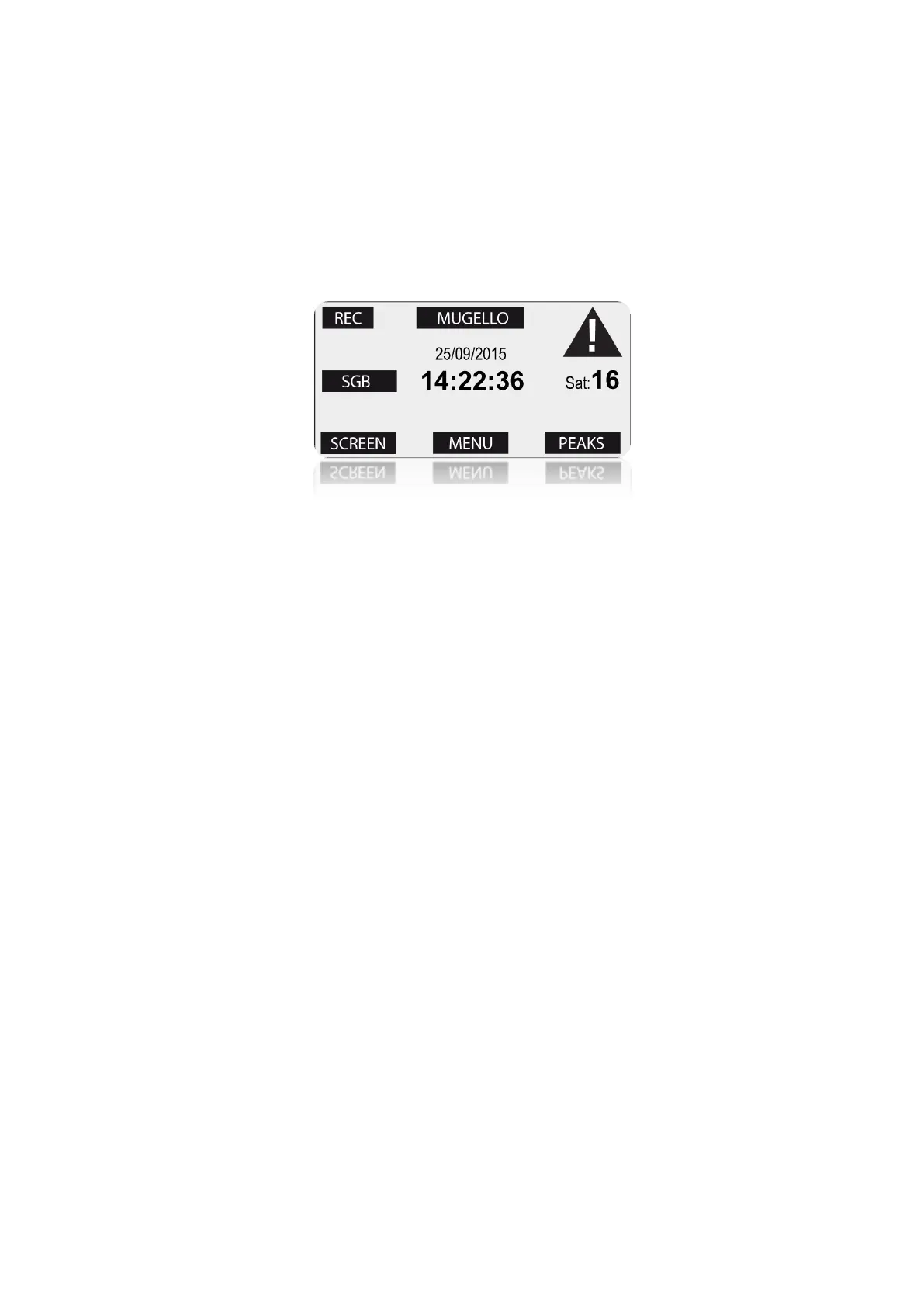
Access screen
Once the device is turned on press once the
power key to unlock the Touch Screen and
show the access screen. After 8 seconds
without action on the display the touch
screen will lock automatically returning to
the main screen.
Schermata di accesso
Dopo aver acceso lo strumento premere
una volta il tasto di accensione per
sbloccare il touch screen e visualizzare la
schermata di accesso. Dopo 8 secondi senza
azioni sul display il touch screen si blocca
automaticamente tornando alla schermata
principale.
In the bottom of the access screen are
made available the buttons:
• MENU: to access the multi-page menu.
• PEAKS: displays the minimum and max-
imum peaks of the last acquired
session.
• SCREEN: allows you to choose a differ-
ent main screen layout.
1-Press the SCREEN button.
2-Drag the finger horizontally on the
display as like as on a smartphone.
At the top of the access screen are made
available the buttons:
• SET TRACK: allows the direct access to
the track selection. If you already set an
active track the SET TRACK label is
replaced by the active track name, in
this way it is immediately possible to
verify the active track every time you
just unlock the touch screen.
• NOTIFICATION ICON: blinks in case of
system notifications as, e.g.: main
battery or WID battery low.
Clicking on the icon you can show the
related notifications.
When the vehicle is not running, in case
Nella parte bassa della schermata di acces-
so sono disponibili i bottoni:
MENU: da accesso al menu multi pagina.
PEAKS: visualizza i picchi minimi e mas-
simi dell’ultima sessione acquisita.
SCREEN:consente di scegliere una
diversa schermata principale.
1-Premere il bottone SCREEN.
2-Scorrere con il dito orizzontalmente
sul display come su un comune
smartphone.
Nella parte alta della schermata di accesso
sono disponibili i bottoni:
SET TRACK: consente l’accesso diretto
alla selezione del circuito. Se è stato
impostato un circuito attivo la scritta SET
TRACK viene sostituita dal nome del
circuito attivo, in questo modo è
immediatamente possibile avere
conferma del circuito impostato ogni
volta che si sblocca il touch screen.
ICONA di NOTIFICA: lampeggia in caso di
notifiche del sistema come, ad esempio,
tensione bassa sulle batteria principale o
su quella dei moduli WID. Cliccando
sull’icona è possibile visualizzare le


 To Next Page