41
Computer connections
CORSARO contains a Bluetooth module for
wireless communication with the comput-
er.
Collegamenti con il computer
CORSARO integra un modulo Bluetooth per
la comunicazione senza fili con il computer.
Pairing with your PC
To activate the communication between
the PC:
1. Make sure your PC is equipped with
Bluetooth functionality or buy a USB-
Bluetooth dongle.
2. Power on CORSARO and keep it not
more than 2 metres from the PC.
3. If your CORSARO comes with firmware
version higher than 1.82, enter the
Bluetooth menu on CORSARO and
activate the discoverability for 1 minute
trough the “Discoverability” feature:
Menu: BLUETOOTH > BLUETOOTH
DISCOVERABILITY
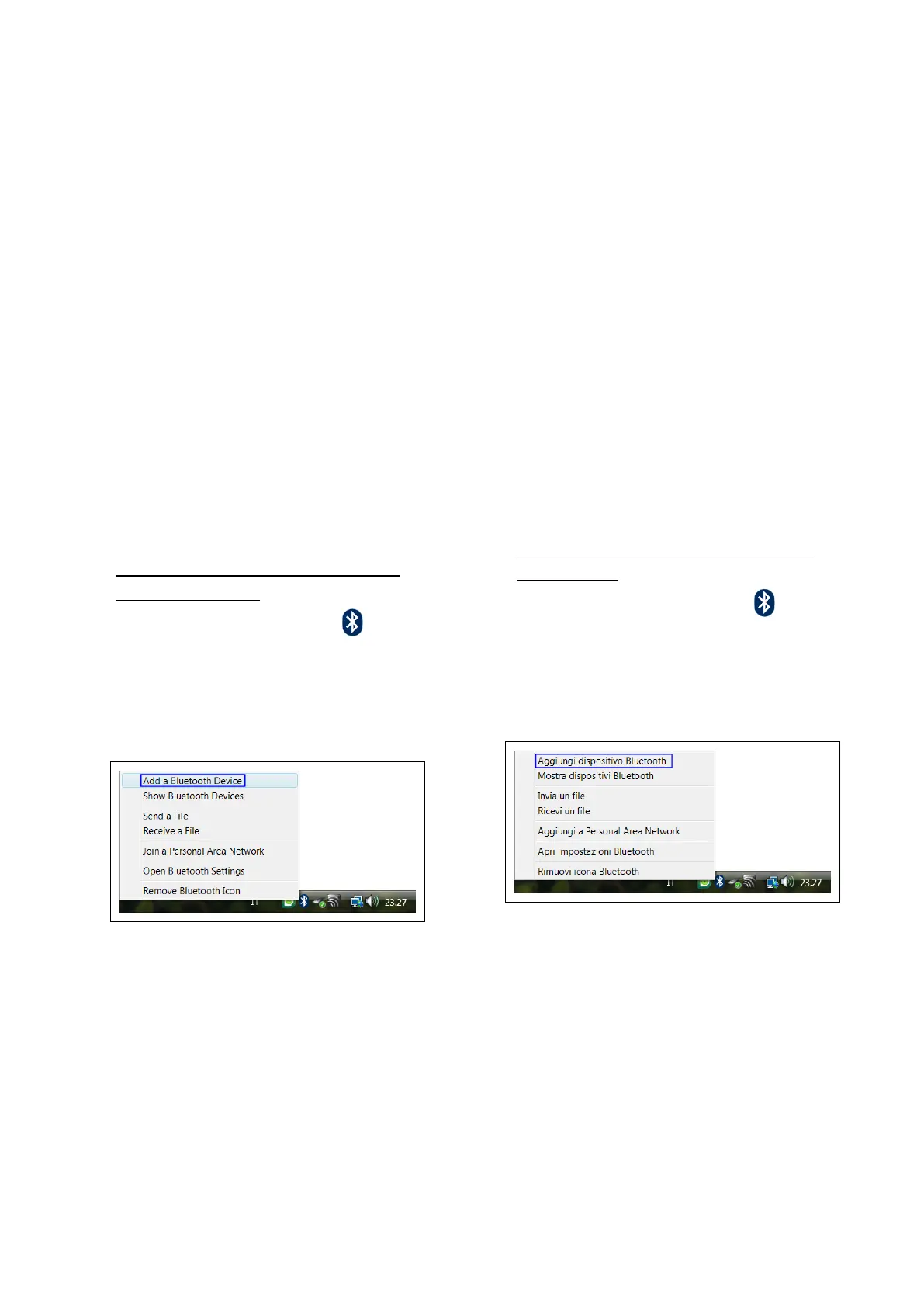
4. Click on the Bluetooth icon in the
Windows® notification area and select
the "Add a Bluetooth Device" item to
start searching for visible Bluetooth
devices.
5. From Add Bluetooth Device Wizard
window select the checkbox "My device
is set up and ready to be found" and
click on the "Next" button to search for
any Bluetooth device in the proximity.
Accoppiamento con il PC
Per attivare la comunicazione tra il PC:
1. Verificare che il proprio PC sia dotato di
funzionalità Bluetooth o acquistare una
chiavetta USB-Bluetooth.
2. Accendere CORSARO e posizionarlo en-
tro 2 metri dal PC.
3. Se il vostro CORSARO ha versione
firmware superiore alla 1.82, entrare nel
menu Bluetooth di CORSARO ed
attivare la visibilità per 1 minuto
con la funzione “Rilevabilità”:
Menu: BLUETOOTH > RILEVABILITA’
BLUETOOTH
4. Cliccare sull'icona Bluetooth presente
nell'area di notifica di Windows® e sele-
zionare la voce "Aggiungi dispositivo
Bluetooth" per attivare la ricerca dei
dispositivi Bluetooth visibili.
5. Nella finestra della procedura guidata se-
lezionare la casella "Il dispositivo è con-
figurato ed è pronto per il rilevamento"
e cliccare sul pulsante "Avanti" per ef-
fettuare una ricerca dei dispositivi Blue-
tooth presenti nelle vicinanze.


 To Next Page