4
The output format is 4800 BAUD, 8 bits, No Parity, 2 stop bits ASCII data.
Transmission is exactly 16 characters, followed by a carriage return and a
line feed.
Battery Replacement
The display will get dim and show a battery icon when the battery is getting
weak. To replace the batteries, follow the instructions under “Installation of
Batteries”.
A set of two coin cells can be obtained by ordering PT99492 from Starrett, or
purchasing two lithium CR2032 type coin cells at a local electronics supply
store.
Error Message:
The message “Err04” will appear on the display if the spindle is moved too
fast or the tool is dropped too hard. If this error occurs, press the ZERO/ABS
button to clear the message. Next, check the DATUM and reset if necessary.
Gasket
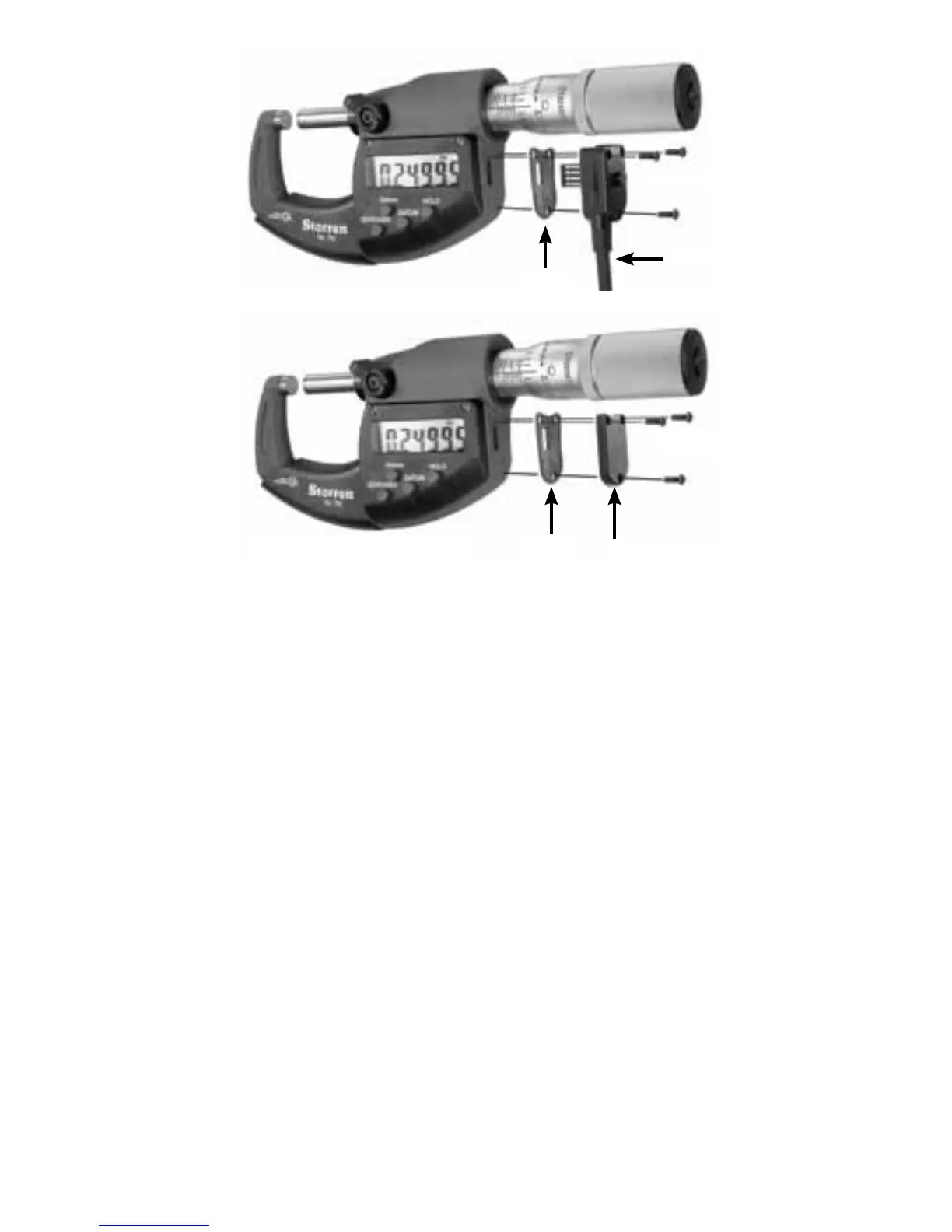
Screw (3)
Data Cable
Gasket
Data Port Plug
Screw (3)
Configuration when data
cable is not in use.



 To Next Page