13
Basic Set-up
2. Adjusting the Caliper Hinge
The second method of balance – for a finer adjustment of bottom-heaviness – involves expanding and
contracting the angle of the Merlin’s lower spar. This adjustment raises or lowers the weights relative to
the camera.
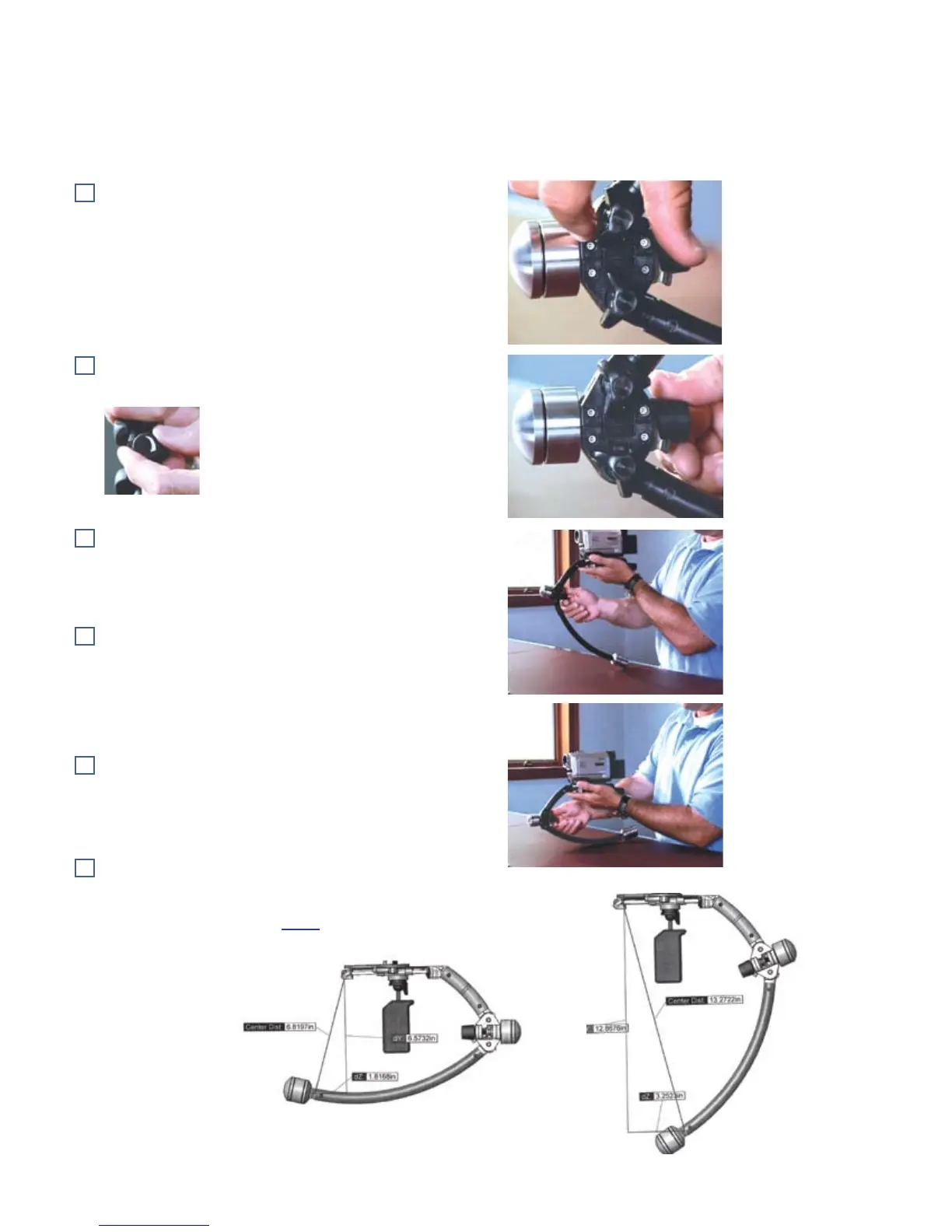
Identify the Caliper Hinge Locking Knobs. They tighten
the connection between the upper and lower spar and keep
the Merlin rigid to prevent vibration.
Loosen both Locking Knobs.
Identify the Caliper Adjusting Knob. It adjusts the angle
of the lower spar.
Notice the graphic on the knob. It tells
you which direction to turn to expand or
contract the Arc Size. Clockwise expands.
Counterclockwise contracts.
If weights have already been added, support the lower
spar rest on the surface of the table to make the Caliper
Adjusting Knob easier to turn. Turn the knob clockwise to
increase bottom-heaviness.
Continue until you reach the maximum expansion of the
Arc Size between the upper and lower spars – almost 13
inches (33cm) – but don’t force this adjustment further.
Use this maximum Arc Size for cameras weighing much
above two pounds (.9kg), so you can use as few weights as
possible.
Turn the Adjusting Knob counter-clockwise to reduce the
Arc-Size. You will reach the minimum arc size at just under
7 inches (17cm) This size is only used for the lightest 1/2 lb
(227g) camcorders.
If your camera is listed in the Online Cookbook, note the
Arc Size distance specified again here:
Arc Size for your camera: inches.
The distance is measured from the lower weight to the top of the Stage.


 To Next Page