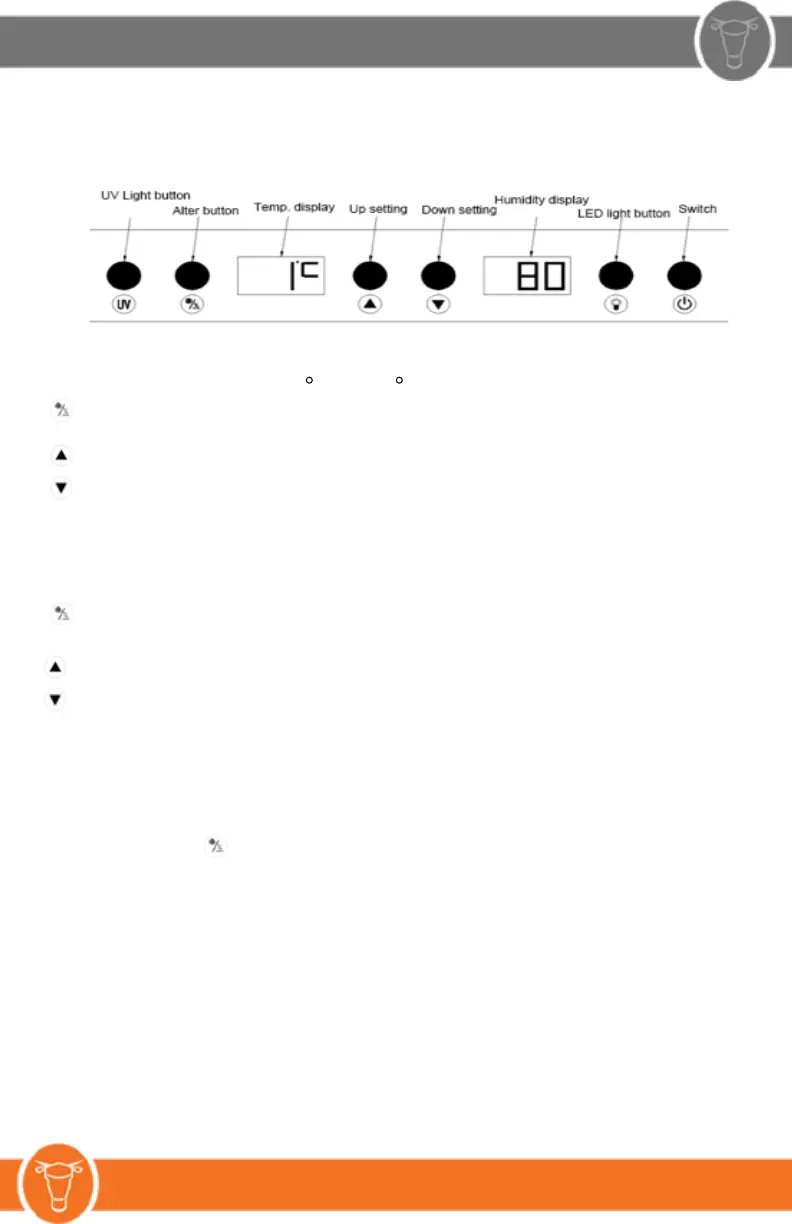
5. Temperature Setting
1. Temperature setting range is 1‐22 C (33‐72 F ).
Alter button, when press this button, the display screen of temperature will start to blink,
then, you can set the temperature.
Up setting, press one time, the temperature increase 1 degree
Down setting, press one time, the temperature decrease 1 degree
The system will save the current setting temperature after did not set for 3 seconds and quit the
temperature setting mode.
2. Humidity setting:
Humidity adjusting range is 50% ~ 85%,
Alter button, when press the alter button under two consecutive, the humidity display screen will
start to blink, then, you can set the humidity.
Up setting, press one time, the humidity increase 1%
Down setting, press one time, the humidity decrease 1%
The system will save the current setting humidity after did not set for 3 seconds and quit the humidity
setting mode.
3. Conversion of Celsius and Fahrenheit:
Press the Alter button and UV light button at the same time for 3 seconds to convert from
Celsius and Fahrenheit.
Light button, control the ON/OFF of LED light
UV Light button, control the ON/OFF of UV light
Switch, control the ON/OFF of the whole system
4. Sound alarm:
The alarm will sound when the door open after 1 minute; and the appliance will stop after the alarm
sound last for 3 minutes, press the switch button, the appliance will re-start.


 To Next Page