23
742.114 | 14.50
EN
Operation
√ The controller shows the status display.
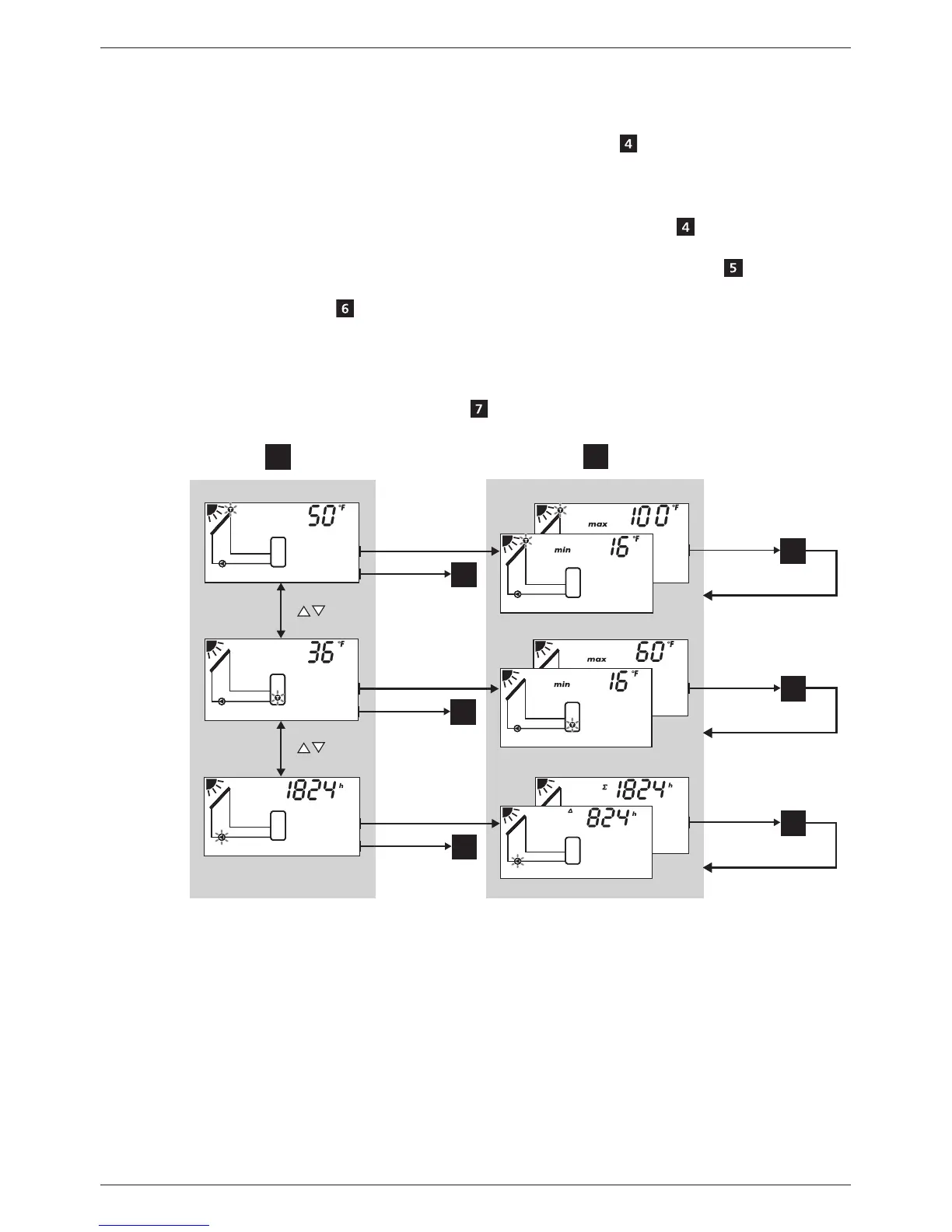
You can display the status of external components as follows:
X Press to display the status of other components ( , shown using system 1.1 as
an example).
You can display and reset the stored min./max./difference values as follows:
1. Press as required, in order to display other components (
, component
flashes).
2. Press SET. The min./max./difference values are displayed alternately
.
3. If desired, press and hold the SET button for 2 seconds to reset the currently (!)
displayed value .
4. Press ESC. The status display is shown.
5. Repeat steps 1 to 4 if necessary.
You access the settings menu as follows:
X Press and hold SET for 2 seconds . The settings menu appears.
SET
SET
7
2 s
SET
SET
7
2 s
SET
SET
7
2 s
SET
6
2 s
SET
6
2 s
SET
6
2 s
4
5
9 Settings menu
9.1 Overview
The following graphic provides an overview of the structure of the settings menu.


 To Next Page