TURNTABLE OPERATION
GETTING STARTED:
- Lift up the hinged cover and remove any sticky tape and any other packing
materials.
- Remove the black tie-wrap and lift off the hold-down clip, which secure the
Tone Arm to the Tone Arm Rest (23) during transportation.
- Slide forward and remove the white protective needle cover to expose the
Stylus. The Record Player is now ready for use.
PLAYING A RECORD
1. Slide the Function Selector (9) to select “PHONO” function to activate the record player.
2. Move the 33/45/78rpm Speed Selector Switch (22) to the correct setting for the record to be played.
3. Place a record on the turntable platter. Use the 45rpm Spindle Adaptor if required.
Note: To play a 45rpm record, which has the centre clip missing, first place the supplied 45rpm Spindle Adaptor
(21) onto the centre spindle. Please note this will not be necessary if the record centre clip is still in place.
4. Lift the Tone Arm and move it slowly towards the record - the turntable will start rotating - then gently lower it
onto the edge of the record - the record will start playing.
5. Adjust the sound volume to the desired level by turning the Power/Volume Knob (17),
aligning the dot on the bevelled rim with one of the 3 markers at the side of the knob.
6. To adjust the spinning speed while a record is playing, rotate the Pitch Control Knob* (18).
7. When the record has stopped playing, the turntable will automatically stop rotating.
8. Lift the Tone Arm and return it to the Arm Rest (23).
Note: *Pitch Control
This unit has Pitch Adjustment (18). While playing a record, adjust the spinning speed as required by turning
the knob in small increments to “ – “ or “ + “.
AUTO-STOP FUNCTION
Some longer records will stop playing before the last track has finished, as the Auto-Stop area is set outside the
area pre-set for the unit. If that is the case, move the Auto-Stop On/Off Switch (25) on the rear of the unit to the
“OFF“ position, the Tone Arm will then carry on playing to the end of the record. However, the turntable will
continue rotating and will not stop automatically. To stop the turntable rotating, turn the unit off (17) or switch the
Auto-Stop Switch back to the “ON“ position, then return the Tone Arm manually to the Arm Rest (23).
Note: With the Auto-Stop Switch set at the “OFF” position, the turntable will start rotating as soon as the Phono
Function (9) is selected.
STYLUS and STYLUS ASSEMBLY REPLACEMENT
If you need to replace the factory fitted Stylus, a replacement universal sapphire needle (or stylus) is available for
purchase direct from the manufacturer – this will play 33
1
/
3
, 45 & 78rpm records.
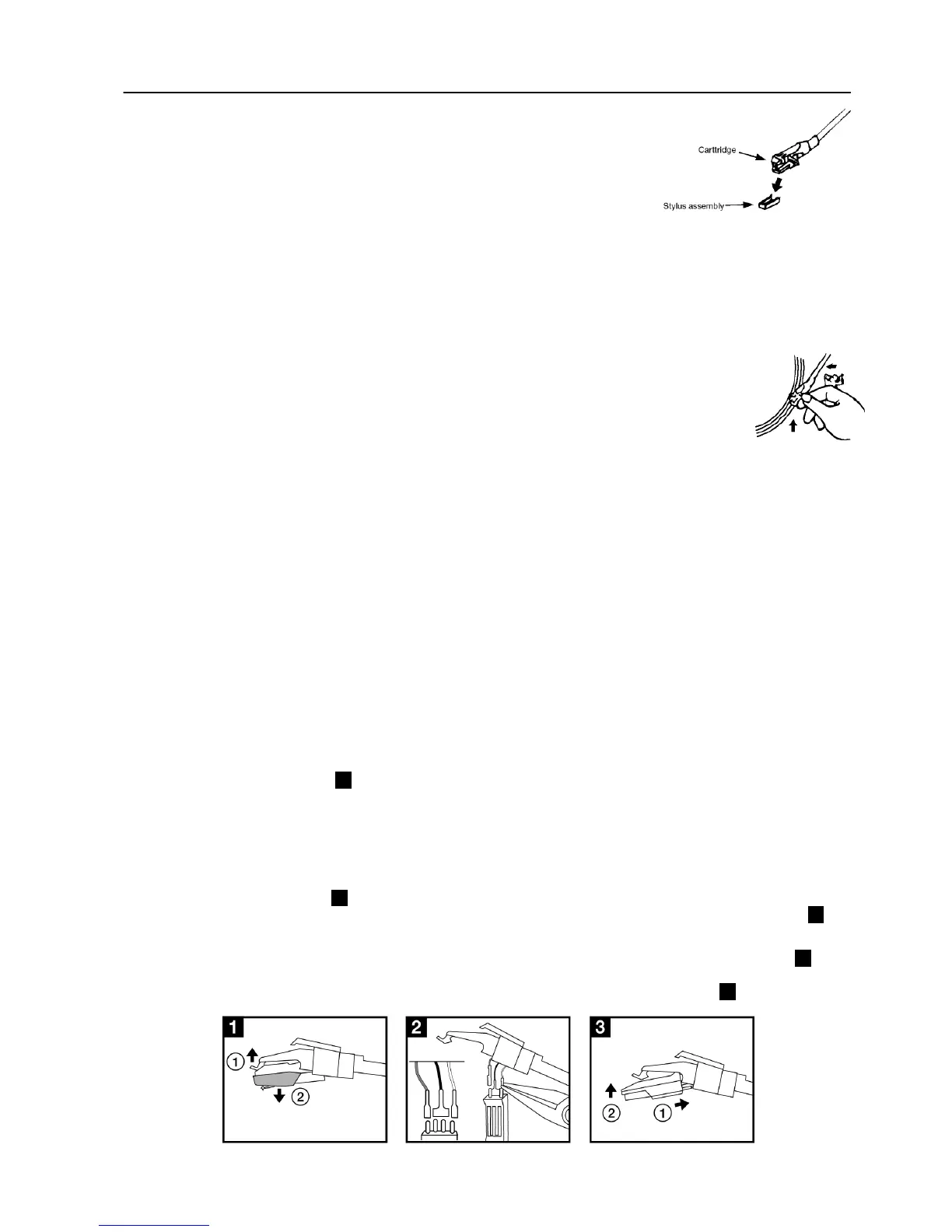
(1) To remove the Stylus from the Tone Arm, hold the Tone Arm Head steady, while grabbing the red plastic
stylus holder with two fingers - then gently pull the complete red stylus holder towards you and down, as
shown in the diagram below .1. (2).
(2) To fit another Stylus, hold the sides of the red plastic stylus holder, ensuring the needle is facing downwards.
Gently push the back of the stylus holder against the black cartridge at the end of the tone arm and clip it
upwards, until you are sure it is securely fitted. Refit the protective needle cover, if so required
.
(3) To remove the whole Stylus assembly from the Tone Arm, hold the Tone Arm Head steady, lift up the black
tab above the stylus holder .1. (1) whilst grabbing the red plastic stylus holder with two fingers - then gently
pull the complete red stylus holder and tone arm cartridge downwards, as shown in the diagram below .1. (2).
(4) To remove the whole Stylus/pick-up assembly, use small pliers to carefully disconnect the wires .2., then
change to another stylus cartridge and connect the wires to the new stylus again with the pliers. (Do not pull
the pick-up wires directly as this may cause damage to the wires). Refit as in Diagram .3. (1) (2).
E-2


 To Next Page