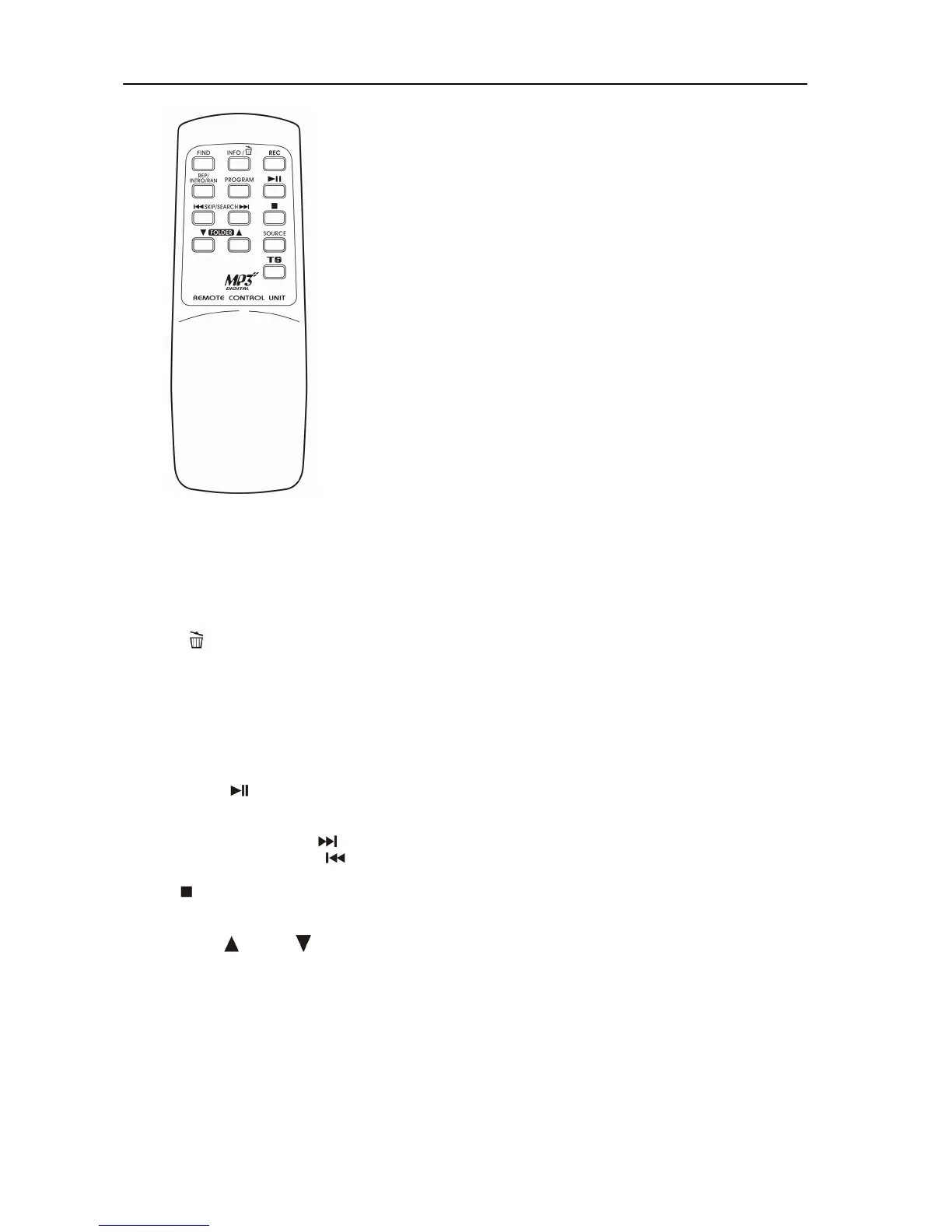
REMOTE CONTROL TRANSMITTER
BATTERY INSTALLATION (Batteries not supplied)
The Infra-Red Transmitter (Remote Control Handset) requires 2 x “AAA”/1.5V size batteries for operation.
BUTTON DESCRIPTION
1) FIND In MP3/WMA Mode, press to activate File/Folder Name Search Function
2) INFO / In Phono Stop Mode, press to select the Encoding Bit Rate
Press for USB/SD File deletion function
3) REC Press to activate Recording or Copy Function
4) REP/INTRO/RAN In USB/SD Mode, press to activate Repeat/Intro/Random Function
5) PROGRAM In USB/SD Mode, press to activate Programming Function
6) PLAY/PAUSE
In USB/SD Mode, press once to Start Playback.
Press again to enter Pause Mode
7) SKIP/SEARCH FORWARD
Press once to skip to the next track, press & hold to search forward
SKIP/SEARCH BACKWARD
Press once to skip to the previous track, press & hold to search backward
8) STOP
In USB/SD Mode, press to Stop Playback or cancel a stored program or
exit the Delete Mode
9) FOLDER UP
/DOWN In MP3 Mode, press to select Folder Up or Down
10) SOURCE In USB/SD Mode, press repeatedly to select USB or SD function
11) TRACK SEPARATION Press to separate the turntable tracks during recording
E-7


 To Next Page