EF315_r5.1(v12.22) – 03/2023 page 20
ELECTROCHEMICAL CALIBRATIONS
pH Calibration
Preparation:
a) Check availability and expiration date of the calibration solutions, buffers at pH 7 and pH 4 (or 9)
b) Check the buffer solution temperature (if the temperature is significantly different from the working
temperature, use the immerse the temperature compensation sensor into the buffer together with the
electrode; wait about 3 minutes for thermal equilibrium)
c) Close the water flow to the sensors
Calibration procedure:
1) Remove the electrode from its support, rinse it with distilled water, then dry it
2) Immerse the electrode into the pH 7.01 buffer solution
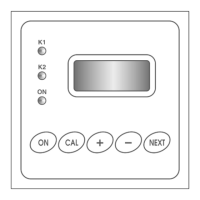
3) Press the CAL key
4) The display will show the first calibration screen
“CALIBR. M1 pH”.
Press ESC to quit calibration, or press CAL to
confirm; if calibration is confirmed, the display
shows two options
6) Press the key to proceed with the OFFSET
(pH 7.01) calibration
7) The unit automatically recognizes and displays
the buffer value
8) If necessary, use the keys to adjust the
calibration value
9) Press CAL to confirm the calibration, or ESC to
exit without saving (and the previous calibration
data are kept)
10) Rinse the electrode with distilled water, then dry it
11) Immerse the electrode into the pH 4.01 (or 9.01)
buffer solution
12) Repeat steps from 4 to 9, but pressing the key
at step 6, to choose the GAIN calibration
13) Install back the pH electrode and Pt100 probe (if
used) for normal control operations
14) Open the water flow to the system and press ON/OFF to resume normal operations
If you try to calibrate the gain at pH lower than 4 or higher than 9, the unit will provide the input value as
calibration point (no automatic recognition). If the input value is not compatible with the required
calibration, EF315 displays the message “Calibration Failed !”. Even if you try to calibrate the offset with
an incompatible input value, the message “Calibration Failed !” will appear.
Possible causes:
a) Wrong sequence of keystrokes during procedure
b) The buffer solution is contaminated / expired
c) The electrode is not working properly (damaged or exhausted)
d) The connection cable is damaged
C
a
l i b
r . M 1
p
H
S
c r o
l l m
e n
u
C
A
L
C
o
n
f i r m
E
S
C
Q
u
i t
C
a
l i b
r . M 1
p
H
O
f f s e t p
H
7
. 0
1
G
a
i n
p
H
4
/ 9
E
S
C
Q
u
i t
I
m
m
e
r
s
e
t h
e
e l e c t r o
d
e i n
t h
e
b
u
f f e r p
H
7
. 0
1
M e a
s 1
7
. 0
1
p
H
I
m
m
e
r
s
e
t h
e
e l e c t r o
d
e i n
t h
e
b
u
f f e r p
H
4
o
r 9



 To Next Page