EF315_r5.1(v12.22) – 03/2023 page 21
ORP (Redox) Calibration
Preparation:
a) Check availability and expiration date of the calibration solution (e.g. 230 mV)
b) Close the water flow to the sensors
Calibration procedure:
1) Remove the electrode from its support, rinse it with distilled water, then dry it
2) Immerse the electrode into the calibration solution (e.g. 230 mV)
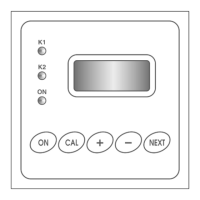
3) Press CAL
4) Press the key to display “CALIBR. M2 mV” and confirm by pressing CAL
5) Press the key to proceed with the OFFSET calibration
6) The unit can automatically recognize the redox standard solutions at 230 mV, 468 mV and 650 mV
7) If necessary, use the keys to adjust the calibration value
8) Press CAL to confirm the calibration, or ESC to exit without saving (and the previous calibration
data are kept)
9) Rinse the electrode with distilled water, then dry it
10) Install back the pH electrode for normal control operations
11) Open the water flow to the system and press ON/OFF to resume normal operations
The redox calibration is a single-point procedure (offset).
If you try to calibrate the offset with standards different from those in memory, the unit will provide the
input value as calibration point (no automatic recognition). If, after the calibration the “Calibration
Failed!” error appears, it may be due to one of the following causes:
a) The buffer solution is contaminated / expired
b) The electrode is not working properly (damaged or exhausted)
c) The connection cable is damaged
If you try to calibrate shortly after switching on, the error “Wait for chlorine probe stabilization!”
appears. Wait at least the time set in P18.
Chlorine Input Calibration
The zero/offset calibration is carefully performed at the factory. This adjustment is therefore
recommended to authorized personnel only and is not described. The user can (and has to, at least
monthly) only adjust the gain factor.
Preparation. Check that:
a) The pH level is stable at a value lower than 7.80
b) The cell polarization has been completed (working since at least 8 hours)
c) There is a proper and stable water flow
d) The chlorine level is high enough ( > 20% FS)
e) A portable photometer is available for chlorine analysis
Proceed as follows:
1) Take a water sample from the sampling valve on probe-holder and analyse it with the photometer
2) Press CAL, then press the key three time, until the message “CALIBR. M2 CL
2
” is displayed
3) Press the key to proceed with the GAIN calibration
4) Use the keys to adjust the displayed value to that read with the portable photometer
5) Press CAL to confirm
6) Press ON/OFF to resume normal operations



 To Next Page