Troubleshooting
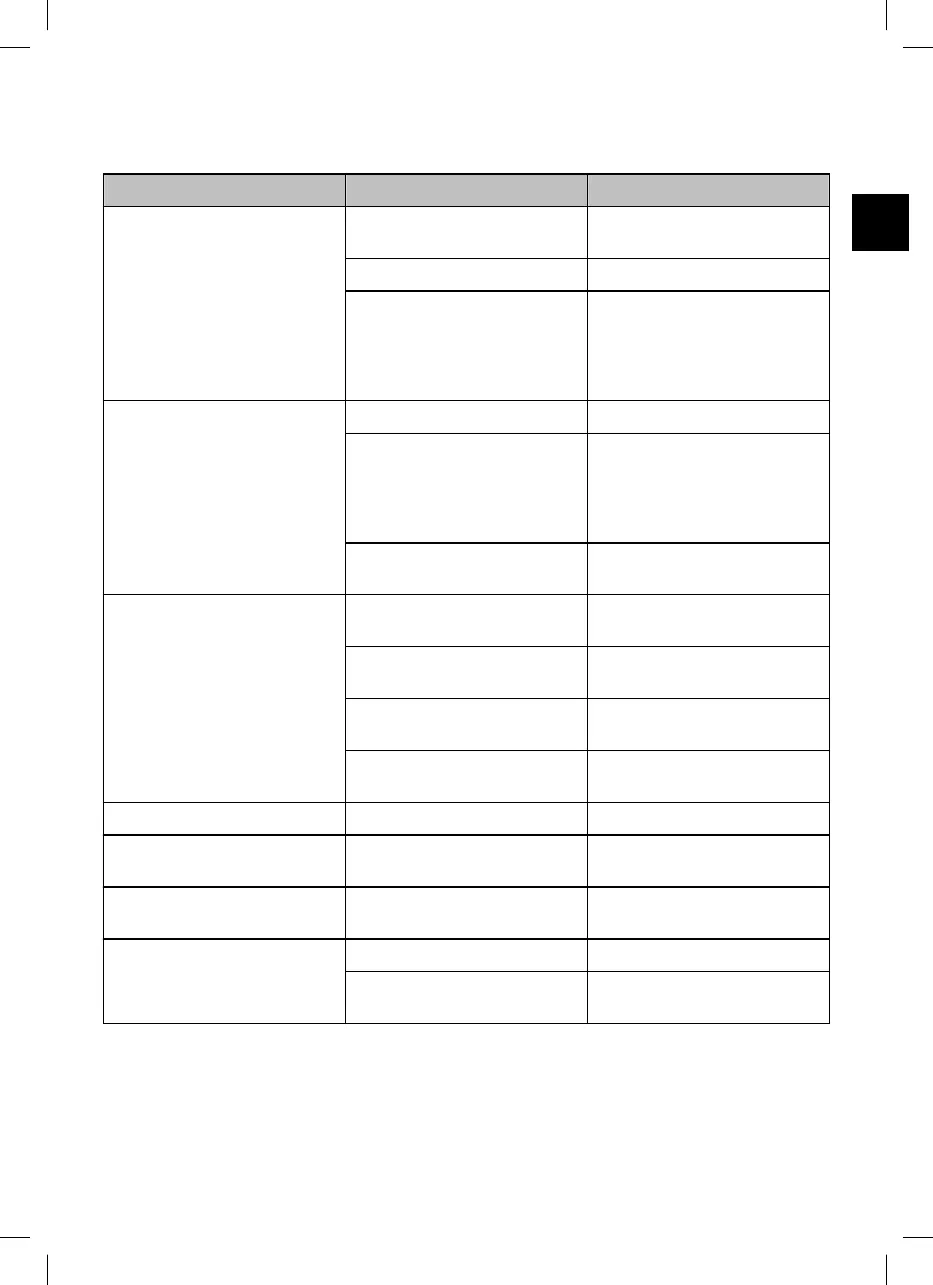
Fault description Cause Remedy
The cable is twisted or tangled. The device turns in the water during
cleaning (this is normal).
Switch off the device, disconnect the
cable and untangle it.
There are obstacles in the pool Remove the obstacles.
The cable in the water is too long. Pull the excess cable length out of
the water. The cable in the water
should only be long enough so that
the device can reach all spots in the
pool.
The device cannot reach all spots. The nozzle setting is not suitable. Change the setting of the nozzles.
The cable is too short. Let a sufficient length of cable into
the pool so that the device can
reach all spots in the pool. Observe
the minimum distance of the control
unit to the pool.
The water circulation of the pool is
switched on.
Switch off the filter system of the
pool.
The device does not function. The control unit is not completely
plugged in.
Check the plug connection of the
power cable and the control unit.
The control unit needs a different
voltage than the local one.
Contact customer service.
Too much air in the housing. Switch off the device and let all the
air escape.
There are foreign objects in the
drive.
Contact customer service.
The device does not turn around. The filter unit is full. Clean the filter unit.
The device does not sink. There is air in the device. Switch off the device and let all the
air escape.
The device does not clean optimally. The device swirls up dirt and does
not clean sufficiently.
Change the setting of the nozzles to
reduce the speed.
The device floats up or turns in a
circle on the pool floor.
Too much air in the housing. Let all air escape.
The salt content is too high and the
device has more buoyancy.
Set the correct salt content. See
section "Technical data".
If the problem cannot be solved, contact the customer service listed on the last page.
33


 To Next Page
 Loading...