Panel Controls and Terminals
UR242 Operation Manual 11
6 REV-X Return Level
Adjusts the return level of REV-X.
Range: - ∞ dB – +6.00 dB
7 Pan
Adjusts the pan position.
Range: L16 – C – R16
8 Mute
Turns the mute function on (lit) and off (dark).
9 Fader
Adjusts the signal level.
Range: - ∞ dB – +6.00 dB
MIX Area
Indicates the MIX object. The UR242 can be set only to
MIX1.
Headphone Area
Indicates the monitor signal that is sent from the
[PHONES ] jack. This is normally on.
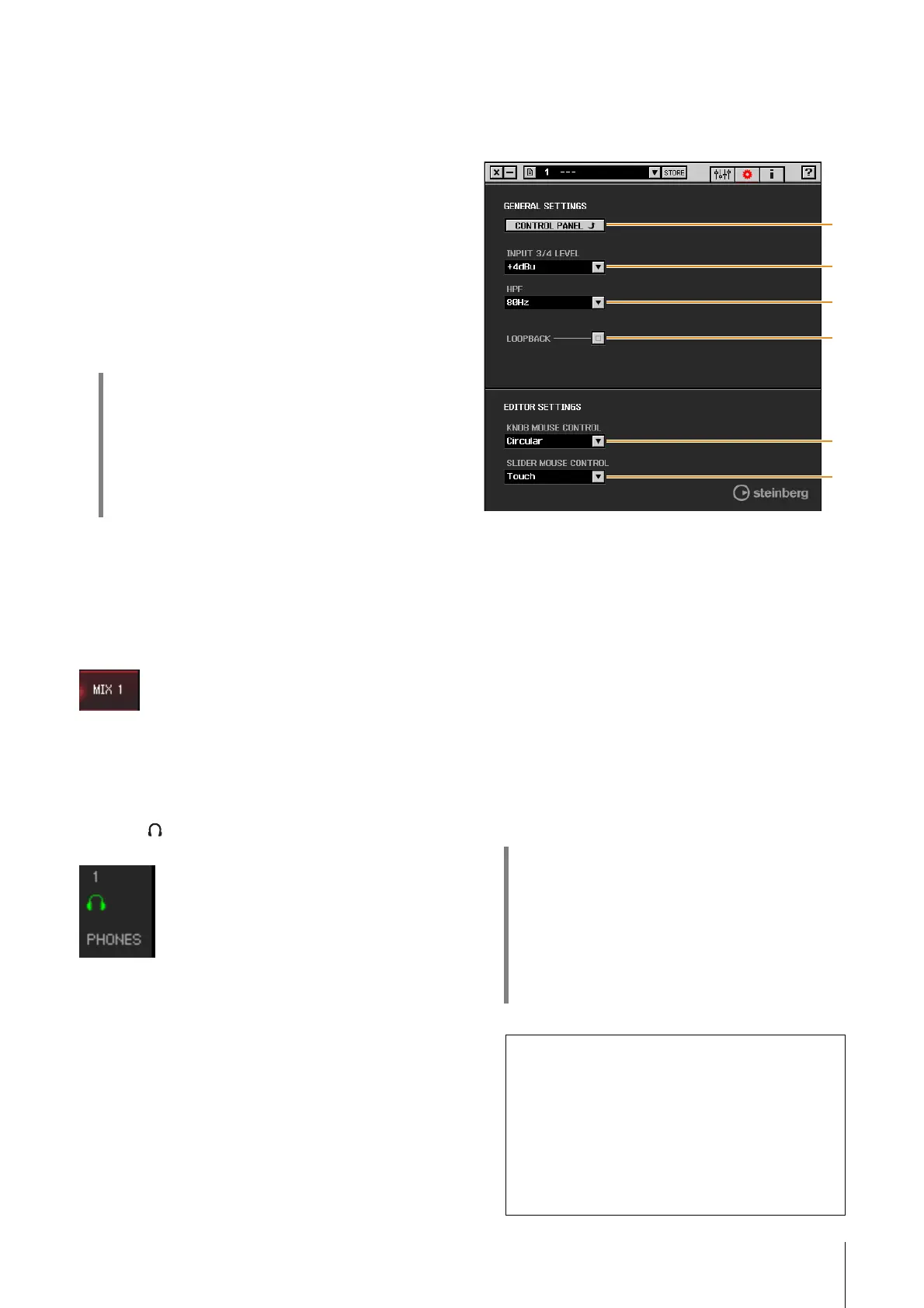
Setup Window
This window is for configuring the common settings of the
device.
1 CONTROL PANEL
For Windows, this opens the “Yamaha Steinberg USB
Driver” (page 6). For Mac, this opens Audio MIDI Setup.
2 INPUT 3/4 LEVEL
Selects the input signal level of [LINE INPUT 3/4].
Options: +4dBu, -10dBV
3 HPF
Selects the cutoff frequency of the high pass filter (not
available on [LINE INPUT 3/4] ).
Options: 120Hz, 100Hz, 80Hz, 60Hz, 40Hz
4 LOOPBACK
Turns the Loopback function on (lit) and off (dark).
HINT
Fader operations
• You can reset certain parameters to 0 dB by double-
clicking the fader.
• You can slide all fader channels at the same time by
holding [Ctrl]/[command] and [Shift] while you drag
on the faders.
HINT
What is Loopback?
Loopback is a convenient function for broadcasting
over the Internet. It mixes the input audio signals
(such as microphone and guitar) with the audio
signals playing back in the software in the computer
into two channels in the UR242, and sends them
back to the computer.
Loopback Function Precautions
If the Loopback function is on while you are
monitoring input signals from the UR242 via DAW
software, it will cause loud noise. This is because an
infinite loop of the audio signal is generated
between the UR242 and the DAW software. When
using the loopback function, turn off the monitor
functions on your DAW software.


 To Next Page