
 Need help?
Do you have a question about the Steiss CS300 and is the answer not in the manual?
Advises against leaving patients unattended, improper transport, and using arm rests forcefully.
Stresses using a flat surface, verifying operation, and avoiding flammable materials or incorrect voltage.
Alerts to low battery indicators and the need for regular cleaning to prevent contamination.
Clarifies the scale's purpose (weight determination) and warns against unauthorized modifications.
Explains CE marking and notified bodies for medical devices and weighing instruments.
States compliance with Precision Class III and EC Directive for NAWI.
Details manufacturer's ISO 9001 and ISO 13485 certifications for quality management.
Confirms compliance with EU's Restriction of Hazardous Substances directive.
Advises contacting dealer for product recovery and recycling.
Indicates Type BF APPLIED PART compliance for protection against electric shock.
Specifies capacity, graduation, operating/storage conditions, and humidity.
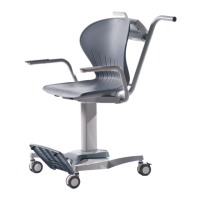
Provides overall product and chair seat dimensions in mm and inches.
Outlines key features like BMI, tare, and display type.
Details power-related features like auto power-off and battery types.
Lists available options such as AC adaptors.
Details insertion and securing of a rechargeable battery with a Y-shape unit.
Details insertion and securing of 6 AA dry cell batteries with a cover.
Explains connecting the RS232 cable to the 'COM' port.
Explains connecting the USB cable to the USB port.
Details connecting the power adapter to the 12V DC input.
Lists battery status levels (Max, Med, Low, Crit) and corresponding flag indicators.
Explains external power effect, flag update frequency, and backlight dimming.
Defines the function of display annunciators like ZERO, LOCK, HOLD, BMI, GROSS, NET.
Identifies indicators for Battery, USB, and WIFI (optional).
Explains the function of basic operation keys like power, print, zero, and hold.
Details keys for BMI calculation, value adjustment, and data entry.
Describes keys for clearing values, resetting, and performing tare functions.
Steps for performing BMI calculation in LB (Pound) mode, including height input.
Steps for performing BMI calculation in KG (Kilogram) mode, including height input.
Explains Hold/Release, Tare, and Manual Tare functions for weight management.
Details data transmission via RS232 to PC or printer.
Lists the data transmitted when printing in normal weight mode.
Lists the data transmitted when printing BMI results in kg and lb.
Explains the 'UNDER' or 'OVER' indicators sent for weight status.
 General
| Brand | Steiss |
|---|---|
| Model | CS300 |
| Category | Medical Equipment |
| Language | English |

 To Next Page
