6. Hand-Set / System Control
88
MODE
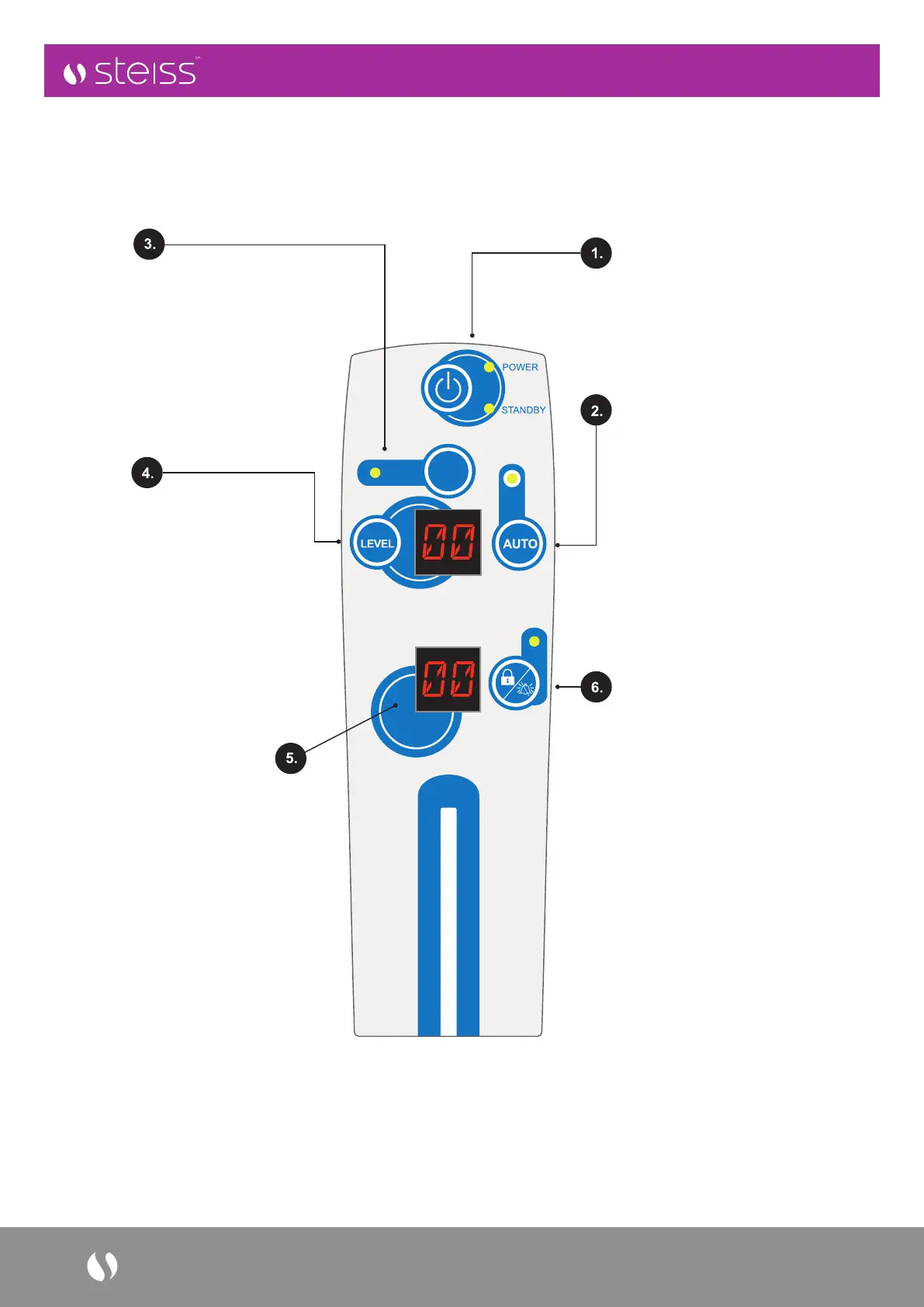
POWER -
Power On (Green LED),
Standby (Amber LED)
AUTO -
Weight Detection function,
is enabled by press “Auto” button
and will self-adjust the comfort
level by patient’s weight. NOTE:
The “AUTO” detection mode will
be disabled when comfort level is
manually adjusted. Press “AUTO”
again to re-activate the automatic
weight detection when needed.
MODE -
to select Auto Firm (AF), Alternating
(AL) and Static (ST), Therapy Modes
by repeatedly pressing “Mode” button
– the pump is set to alternating mode
by default with “AL” display on LED
window. UTS is programmed to default
back to alternating mode after 30
minutes of usage.
LEVEL -
allows for manual adjustment,
by repeatedly pressing “LEVEL”
button to accommodate an
individual’s comfort if needed.
Default manual setting will be the
level detected during “Auto” mode,
or at Level 2 if Auto detection is
incomplete. Display of “LEVEL”
will automatically go back to
“MODE” when not in operation
for 10 seconds.
ALARM CODES DISPLAY -
When LP (Low Pressure) occurs,
system will alert user with a visual
alarm displayed in LED display
window, and audible alarm will be
triggered 5 minutes after visual alarm.
PF (Power Failure) will be displayed
in LED window with an audio alarm to
indicate a power outage situation.
LOCK/UNLOCK/
ALARM MUTE BUTTON -
allows user to manually lock
(3 seconds) / unlock (3 Seconds)
the control panel to safeguard
against any unwanted attempt to
alter the settings.
Control panel will auto lock
when system is not in operation
for 5 minutes.
Alarm Mute: Press to mute the
audio alarm. The alarm will
re-activate after 20 minutes
if the problem is not resolved.
ALARM
CODE



 To Next Page