Page 14 | Stellar
®
Heavy-Duty Telescopic Crane Owner’s Manual
Shift Function Mode
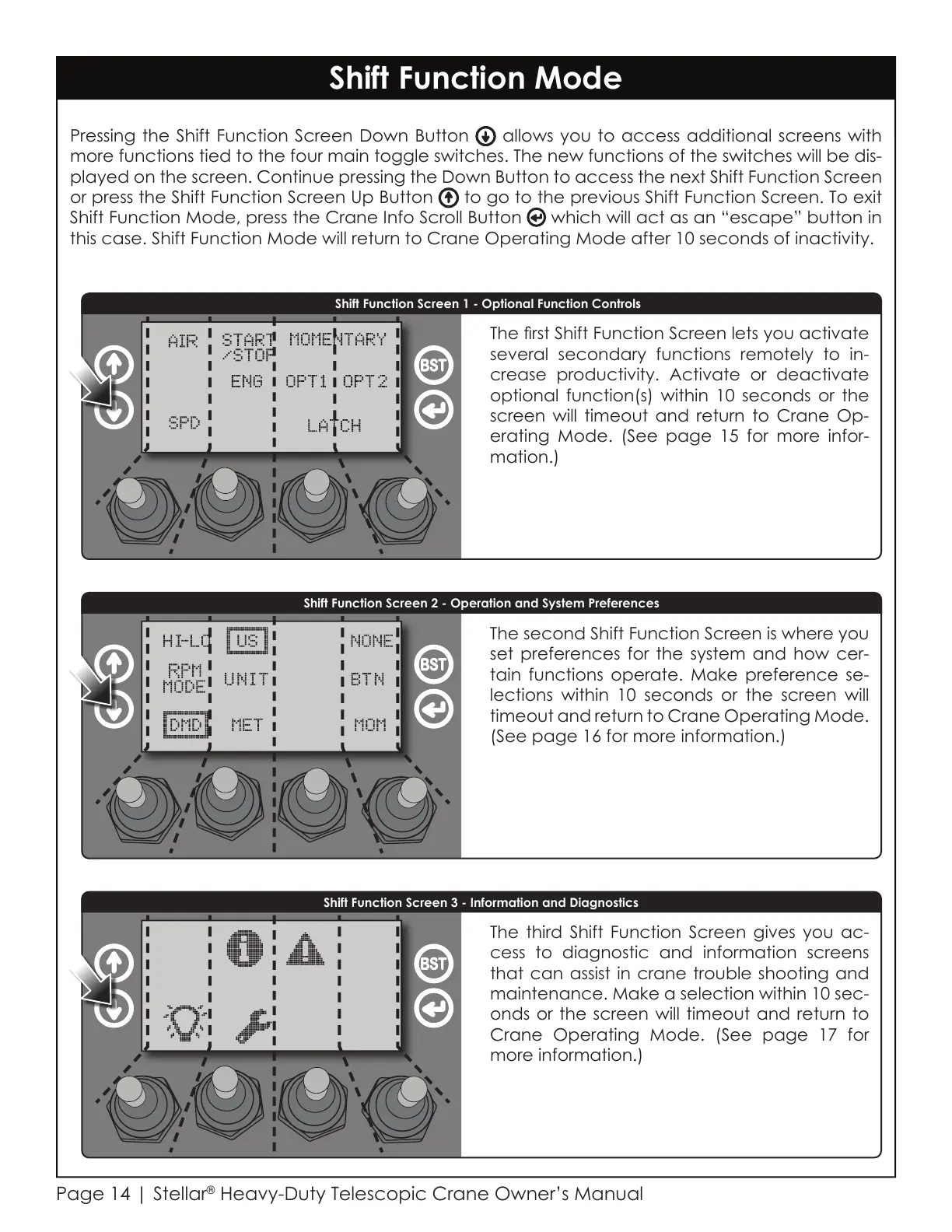
Pressing the Shift Function Screen Down Button allows you to access additional screens with
more functions tied to the four main toggle switches. The new functions of the switches will be dis-
played on the screen. Continue pressing the Down Button to access the next Shift Function Screen
or press the Shift Function Screen Up Button to go to the previous Shift Function Screen. To exit
Shift Function Mode, press the Crane Info Scroll Button which will act as an “escape” button in
this case. Shift Function Mode will return to Crane Operating Mode after 10 seconds of inactivity.
Shift Function Screen 2 - Operation and System Preferences
Shift Function Screen 3 - Information and Diagnostics
Shift Function Screen 1 - Optional Function Controls
The rst Shift Function Screen lets you activate
several secondary functions remotely to in-
crease productivity. Activate or deactivate
optional function(s) within 10 seconds or the
screen will timeout and
return to Crane Op-
erating Mode.
(See page 15 for more infor-
mation.)
The second Shift Function Screen is where you
set preferences for the system and how cer-
tain functions operate. Make preference se-
lections within 10 seconds or the screen will
timeout and
return to Crane Operating Mode.
(See page 16 for more information.)
The third Shift Function Screen gives you ac-
cess to diagnostic and information screens
that can assist in crane trouble shooting and
maintenance. Make a selection within 10 sec-
onds or the screen will timeout and
return to
Crane Operating Mode.
(See page 17 for
more information.)
Courtesy of CraneMarket.com



 To Next Page