Stellar
®
Heavy-Duty Telescopic Crane Owner’s Manual | Page 21
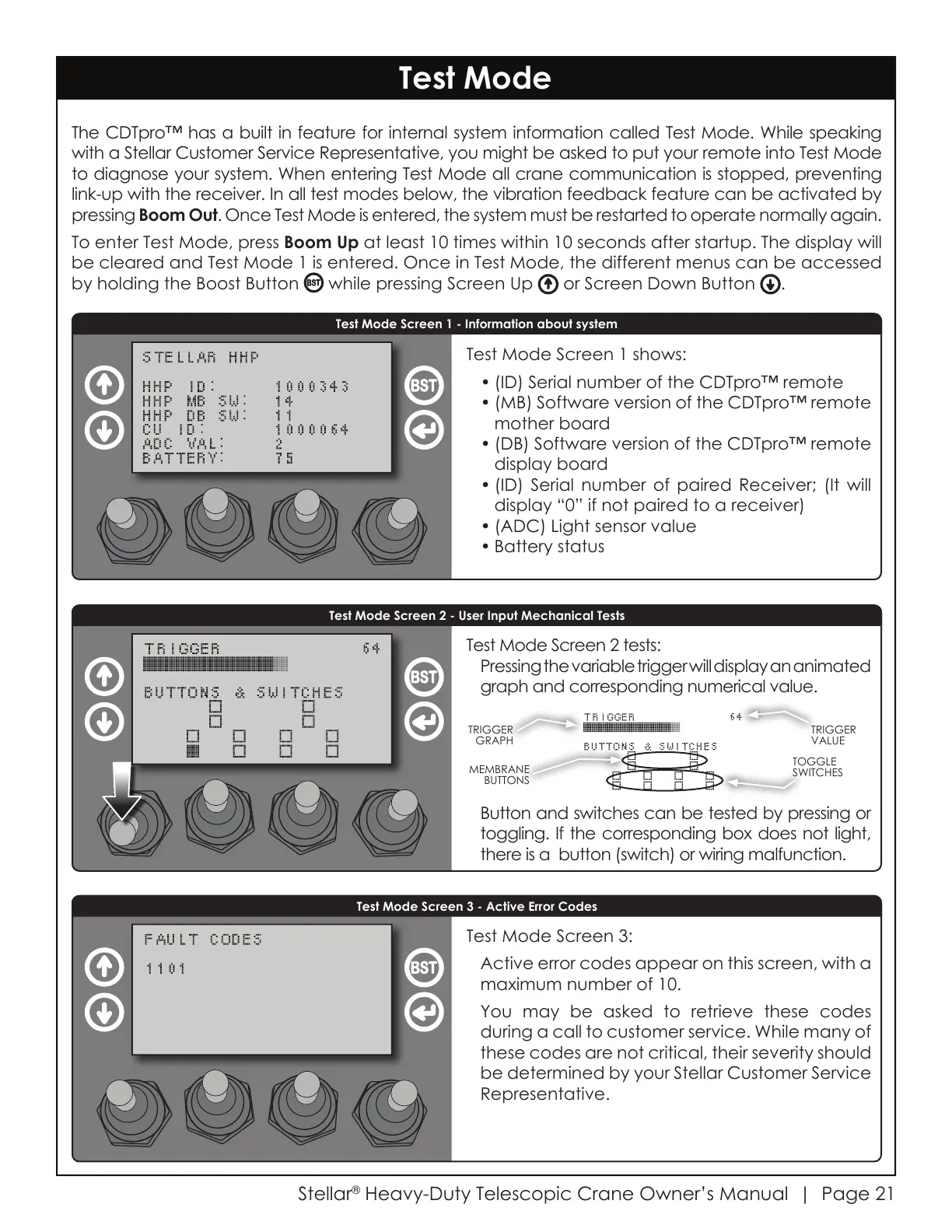
Test Mode Screen 2 tests:
Pressing the variable trigger will display an animated
graph and corresponding numerical value.
Test Mode
The CDTpro™ has a built in feature for internal system information called Test Mode. While speaking
with a Stellar Customer Service Representative, you might be asked to put your remote into Test Mode
to diagnose your system. When entering Test Mode all crane communication is stopped, preventing
link-up with the receiver. In all test modes below, the vibration feedback feature can be activated by
pressing Boom Out. Once Test Mode is entered, the system must be restarted to operate normally again.
To enter Test Mode, press Boom Up at least 10 times within 10 seconds after startup. The display will
be cleared and Test Mode 1 is entered. Once in Test Mode, the different menus can be accessed
by holding the Boost Button while pressing
Screen Up or Screen Down Button
.
Test Mode Screen 1 - Information about system
Test Mode Screen 2 - User Input Mechanical Tests
Test Mode Screen 3 - Active Error Codes
Test Mode Screen 1 shows:
• (ID) Serial number of the CDTpro™ remote
• (MB) Software version of the CDTpro™ remote
mother board
• (DB) Software version of the CDTpro™ remote
display board
• (ID) Serial number of paired Receiver; (It will
display “0” if not paired to a receiver)
• (ADC) Light sensor value
• Battery status
Test Mode Screen 3:
Active error codes appear on this screen, with a
maximum number of 10.
You may be asked to retrieve these codes
during a call to customer service. While many of
these codes are not critical, their severity should
be determined by your Stellar Customer Service
Representative.
Button and switches can be tested by pressing or
toggling. If the corresponding box does not light,
there is a button (switch) or wiring malfunction.
TRIGGER
GRAPH
TRIGGER
VALUE
MEMBRANE
BUTTONS
TOGGLE
SWITCHES
Courtesy of CraneMarket.com



 To Next Page