16
Call Annunciation System - CAS
WHAT IS CAS?
• A Call Annunciation System (CAS) con-
sist of up to 39 Call-in stations reporting
to 1-3 Operator stations.
• Calls from Call-in stations can queue up
in Operator stations and be attended to
one by one.
OPERATION
CAS Call-in station
• A CAS Call-in station can make a call
request to CAS Operator station(s) in
the following ways:
- Press the CALL button.
- Press the 9-key on a master station.
- Activate the Remote Input function.
- Automatic activation from an optional
Sound Detection Module DP996.
• The station lamp will fl ash green and a
short tone is heard
- or alternatively a message is received
from the Program Distribution channel.
• The Local Output function may switch
on a warning light e.g. in the corridor.
OPERATION
CAS Operator station
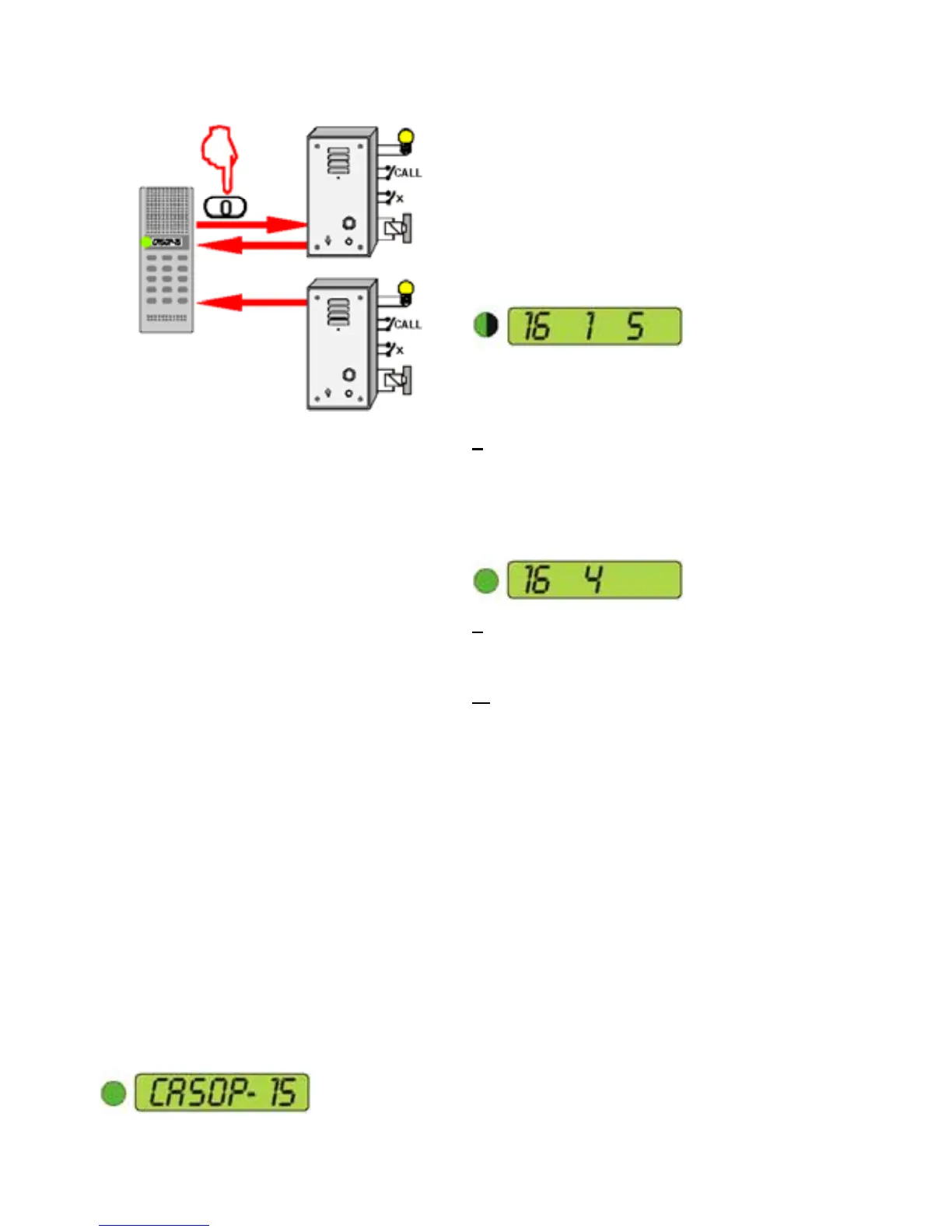
• The CAS Operator stations in idle state
will display their own extension number:
• A call request is indicated by a call tone
and a fl ashing green light.
- The tone can be heard once or
repeated every third second
- the CAS Operator station display will
show:
- caller in queue (16)
- queue index no. (1)
- number of calls in queue (5)
• The call can be accepted from any of
the CAS Operator stations. The opera-
tor has the following options:
1 Press the 0-key to accept the call.
- This will accept the fi rst caller in queue
- the accepted CAS Call-in station
number is displayed together with the
updated nos. of calls in queue. The
station LED will go steady green.
2 Press the T-key to scroll the queue.
- Use the 0-key to accept the displayed
extension number.
3 Press the X-key to move a CAS
request to the back of the queue.
- Up to 39 CAS Call-in stations can be
queued simultaneously.
RESET CALL REQUEST
• A guard can cancel the CAS request
locally from an external button connect-
ed to the local reset input in the CAS
Call-in station.
COMMUNICATION
• Press the 0-key to accept a CAS call
request
- the communication is established in
simplex listen mode.
• Use the T-key to control the speech
direction. Push to talk, release to listen.
SOUND DETECTION
• A Sound Detection Module can activate
a CAS request when the ambient noise
or voice volume exceeds a pre-
programmed level.


 To Next Page