Issue 3
Page 6 18/06/2015
6.7 Waiting in auto mode
If a starting request is made, the starting sequence will begin.
Starting requests can be from the following sources:
Activation of an auxiliary input that has been configured to remote start.
6.8 Viewing the instruments
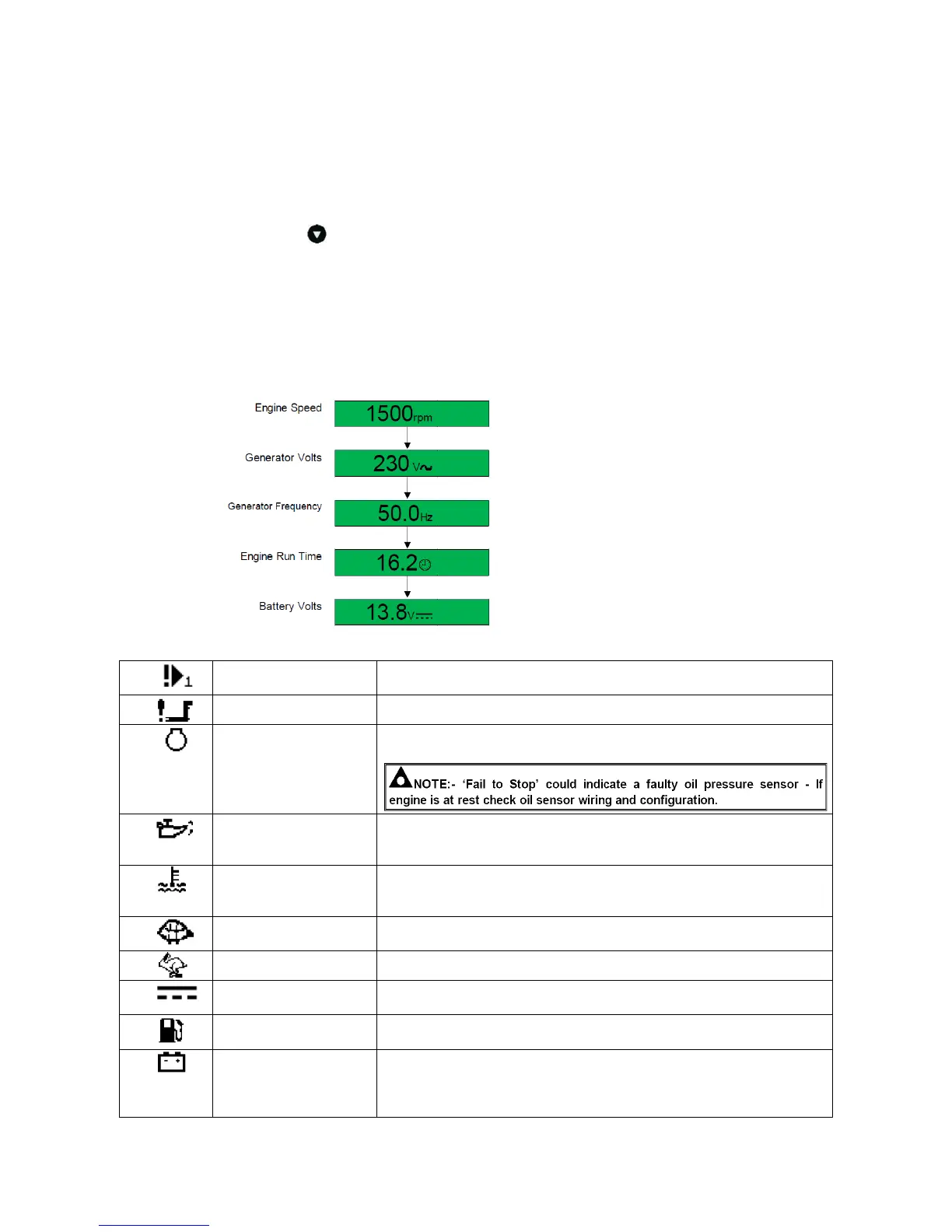
It is possible to scroll to display the different pages of information by repeatedly operating
the scroll button
Once selected the page will remain on the LCD display until the user selects a different
page or after an extended period of inactivity, the module will revert to the status display.
When scrolling manually, the display will automatically return to the Status page if no
buttons are pressed for the duration of the configurable LCD Page Timer.
If an alarm becomes active while viewing the status page, the display shows the Alarms
page to draw the operator’s attention to the alarm condition.
Page order:-
6.9 Fault icons
Auxiliary inputs can be user configured and will display the
message as written by the user.
The engine has not fired after the pre-set number of start attempts.
The module has detected a condition that indicates that the engine
is running when it has been instructed to stop.
The module detects that the engine oil pressure has fallen below
the low oil pressure pre-alarm setting level after the Safety On timer
has expired.
The module detects that the engine coolant temperature has
exceeded the high engine temperature pre-alarm setting level after
the Safety On timer has expired.
The engine speed has fallen below the underspeed pre alarm
setting.
The engine speed has risen above the overspeed pre alarm setting.
The auxiliary charge alternator voltage is low as measured from the
W/L terminal.
The level detected by the fuel level sensor is below the low fuel
level setting. (Optional)
BATTERY UNDER
VOLTAGE /
BATTERY
OVER VOLTAGE
The DC supply has fallen below or risen above the low/high volts
setting level.


 To Next Page