26
27
StingerElectronics.com StingerElectronics.com
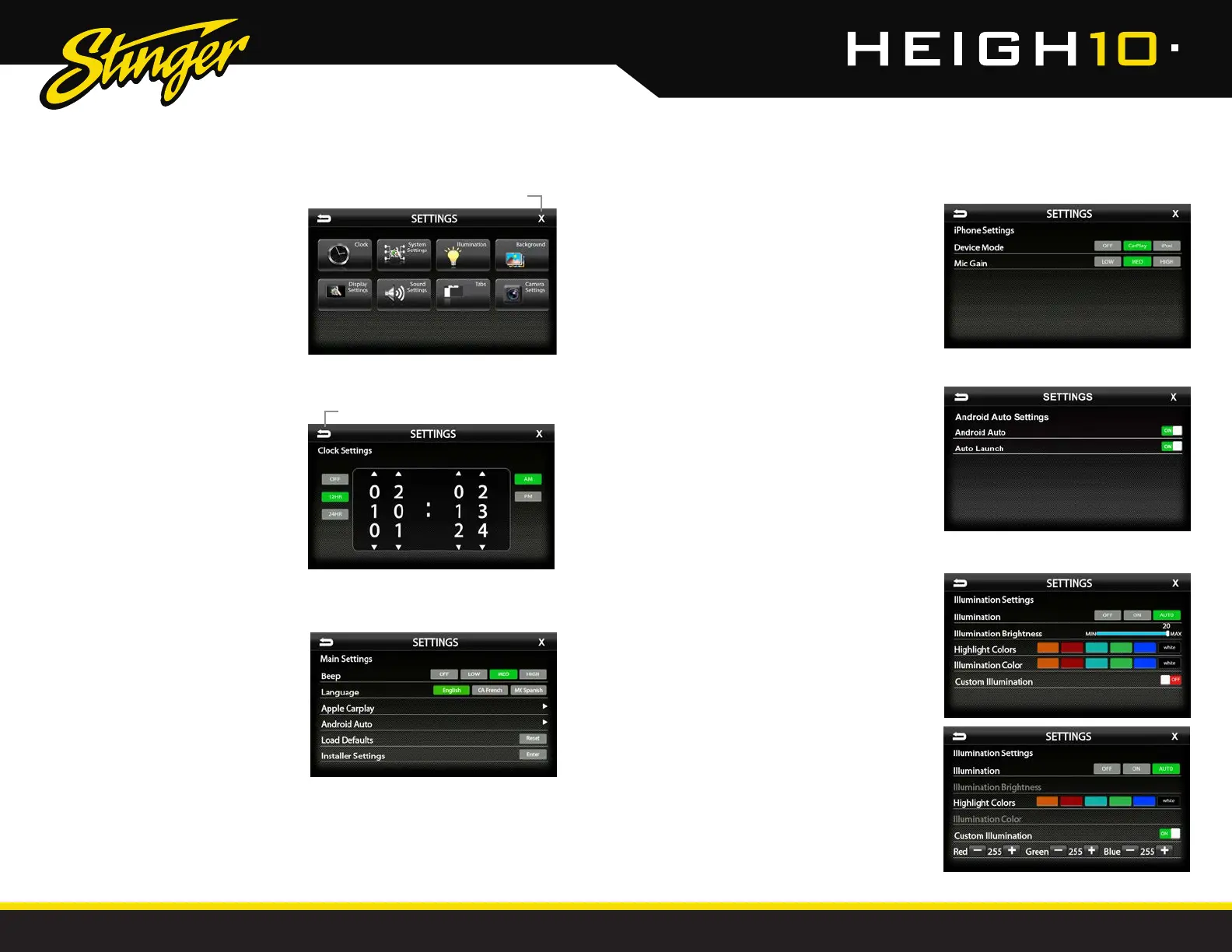
SETTINGS
Settings > System Settings
Beep [OFF-LOW-MED-HIGH]
Sets volume of conrmation beeps.
Language [ENGLISH-FRENCH-SPANISH]
Set display language
Apple CarPlay [See Page 27]
Android Auto [See Page 27]
Load Defaults [RESET]
Selecting Reset will reset all settings to factory
defaults. This process takes 5-7 minutes and
system must NOT be shut down during the
reset.
Installer Settings [ENTER]
See Installation Guide or Firmware Update
Instructions for more information.
Settings > Illumination
Illumination[OFF-ON-AUTO]
Turn button illumination ON/OFF. Set to AUTO
for buttons to illuminate only when vehicle
lights are on.
llumination Brightness[0-20]
Set brightness of button illumination
Highlight Colors
[AMBER-RED-AQUA-GREEN-BLUE-WHITE]
Set on-screen highlight color.
Illumination Color
[AMBER-RED-AQUA-GREEN-BLUE-WHITE]
Set button illumination color.
Custom Illumination [OFF-ON]
When Custom Illumination is set to ON, allows
custom illumination color based on RGB
values.
Settings > Clock
Clock Settings [OFF-12HR-24HR]
Select time format. Swipe or click arrows
to set time.
Press the HOME BUTTON > Settings
to access the Settings main menu.
Clock
System Settings
Illumination
Background
Display Settings
Sound Settings
Tabs
Camera Settings
SETTINGS
Settings > System Settings > Apple CarPlay
Device Mode [OFF-CarPlay-iPod]
Determines how iPhone will be used when
plugged into USB port. OFF is charging only.
Mic Gain [LOW-MED-HIGH]
Sets microphone gain (sensitivity) when using
Apple CarPlay.
Settings > System Settings > Android Auto
Android Auto [ON-OFF]
Set to OFF for charging only with Android devices.
Auto Launch [ON-OFF]
When set to ON, Android Auto will automatically
launch when compatible Android device is
plugged into USB port.
BACK to previous screen
EXIT current screen














 To Next Page