8
9
StingerElectronics.com StingerElectronics.com
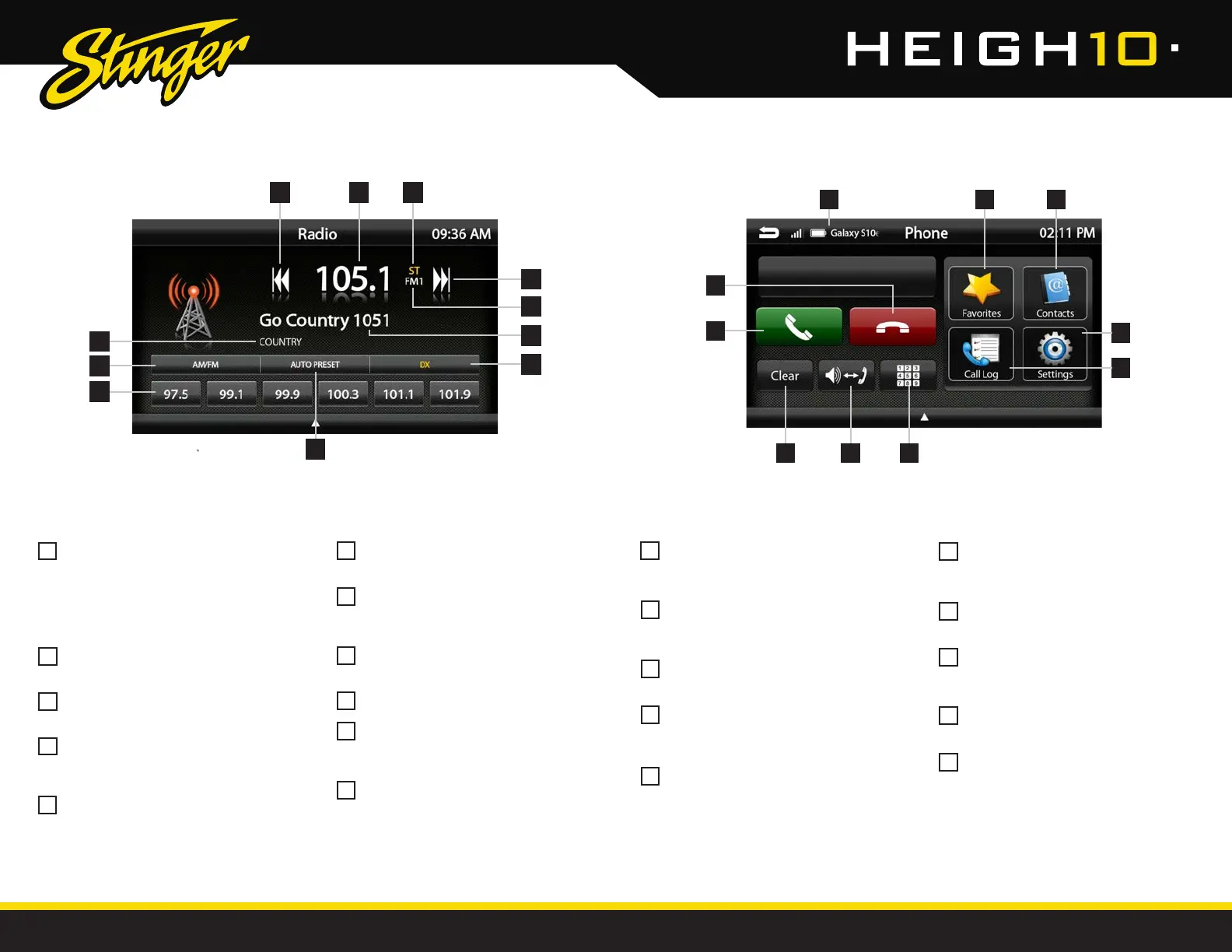
AM/FM RADIO
Bluetooth PHONE
Station Presets - To assign a preset,
go to desired station, press and hold
a preset location until preset button
highlights and station frequency
appears. A total of 18 FM and 12 AM
stations can be stored in memory.
AM/FM - Press to cycle through AM/FM
presets (FM1-FM2-FM3-AM1-AM2)
PTY Program Type - Indicates radio
station type.
Tune/Seek Down - Press and release to
Tune Down. Press and hold to Seek the
next available radio station.
Station Display - Displays current
frequency.
Number Pad - Touch to launch
the number pad for dialing phone
numbers.
Speaker/Phone - Switches phone calls
between the car speakers and the
phone handset.
Clear - Clear/delete last number
entered.
Call/Answer - Dials the number entered
on the phone or on the number pad.
Answers incoming call.
End/Decline - Press to end active call
or decline incoming call.
ST Indicator - Indicates when current
radio station is in Stereo.
Tune/Seek Up - Press and release to
Tune Up. Press and hold to Seek the
next available radio station.
Preset Bank - Indicates current preset
bank.
RT Info- station/title/artist information
DX/LOC - changes the radio tuner
sensitivity. Touch to toggle between
Distant (DX) and Local (LOC).
Auto Preset - Touch to automatically
set the 6 presets with current location
radio stations.
Device Info - Displays the name of
the currently paired device, signal
strength and battery status.
Favorites - Customizable list of
favorite contacts.
Contacts - List of contacts from
paired phone. Not supported by all
phones.
Settings - List of devices and settings.
Add or Delete devices.
Call Log - Recent Dialed, Received
and Missed calls.
2
1
123
6
6 7 8
10
9
1
1
5
5
2
2
6
6
3
3
7
7
4
4
8
8
10
9
10
11
9
3
4
5
9
8
Press the HOME BUTTON > Radio to select the Radio Press the HOME BUTTON > Phone to select the Phone
11
10
4
5
7














 To Next Page