20
Instructions (Cont.)
Automatic (delayed) start timer
The delayed start timer allows you to program the oven to start cooking at a later
time. To use this delayed start timer, the clock must be set to the correct time.
Example
It is 12:30pm now and you want the oven to start cooking at 2:20pm with 100%
microwave power for 9 minutes and 30 seconds:
Place food into the oven and close the door.
Step 1: Setting the clock (if the clock is already set to the correct time, omit
this step and go straight to Step 2)
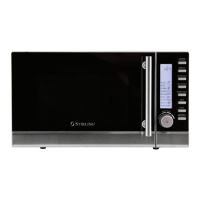
1.1 Press and hold the Preset/Clock/Defrost button for 3 seconds.
1.2 Rotate the Function Dial to set the correct hour [ 12 ].
1.3 Press the Preset/Clock/Defrost button once to confirm.
1.4 Rotate the Function Dial to set the correct minutes [ 30 ].
1.5 Press the Preset/Clock/Defrost button once to confirm, or wait for
5 seconds for the time to set. The current time [ 12:30 ] will now be
shown on the display.
Step 2: Setting the cooking menu and time
2.1 Press the Micro Power button to set the power level to 100P.
2.2 Turn the Function Dial to set the cooking time [ 9:30 ].
2.3 Press and hold the Preset/Clock/Defrost button for 3 seconds to
return to the current clock.
Step 3: Setting the start time
3.1 Rotate the Function Dial to set the delayed start hour [ 14 ], then
press the Preset/Clock/Defrost button once to confirm.
3.2 Rotate the Function Dial to set the delated start minutes [ 20 ], then
press the Preset/Clock/Defrost button once to confirm the menu.
The automatic (delayed) start timer has now been set and the microwave oven
will start the menu at 2:20pm.
Important notes
• To check the preset starting time, press the Preset/Clock/Defrost button.
• To start the set program immediately, press the Instant Start button.
• To cancel the automatic (delayed) start timer, press the Pause/Cancel button.
• WARNING: For your personal safety, do not program the timer and then
leave the microwave oven unattended. For food safety reasons, do not leave
easily spoilt foods in the oven for too long when using the timer.


 To Next Page