General Information
Introduction
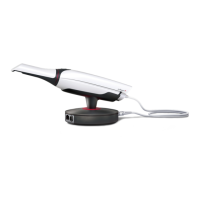
In this document you will find answers to about common questions regarding the 3Shape TRIOS
®
4 intraoral scanner.
Please refer to the Safety and Setup guide, the Manual, the Product Catalogue and Price List for more information.
New benefits with the TRIOS 4 intraoral scanner
The main improvements in the TRIOS 4 scanner include:
• A smart tip for 3D color scan
• Instant-heat technology for immediate scanning
• 30% longer battery lifetime
• Smart cord
TRIOS 4 wireless setup quick facts
How long does one battery last?
Instant-heating + 45 minutes of continuous scanning
How long does it take to recharge a battery?
3-6 hours depending on battery charge level when charging is initiated
What is the battery lifetime?
Approximately 80% after 300 cycles and 70% after 500 cycles
How long does it take to connect a wireless scanner to the PC/MOVE+?
Approximately 10 seconds
Does TRIOS 4 come as two separate wired and wireless configurations like TRIOS 3?
TRIOS 4 generation scanner has been improved and comes as one combined wired and wireless setup in the same
scanner. TRIOS 4 Pod comes with 2 individual pods for wireless and wired options to choose.
Order details, delivery time and price
Please refer to the TRIOS Product Catalog. Please contact your 3Shape Sales Manager for availability and pricing.
Supported software versions
The TRIOS
4 scanner requires TRIOS Software 19.2 (Dental Desktop
®
1.6.9.1 + TRIOS Module 1.18.3.7) or later versions.
It will not run on earlier versions.
1


 To Next Page