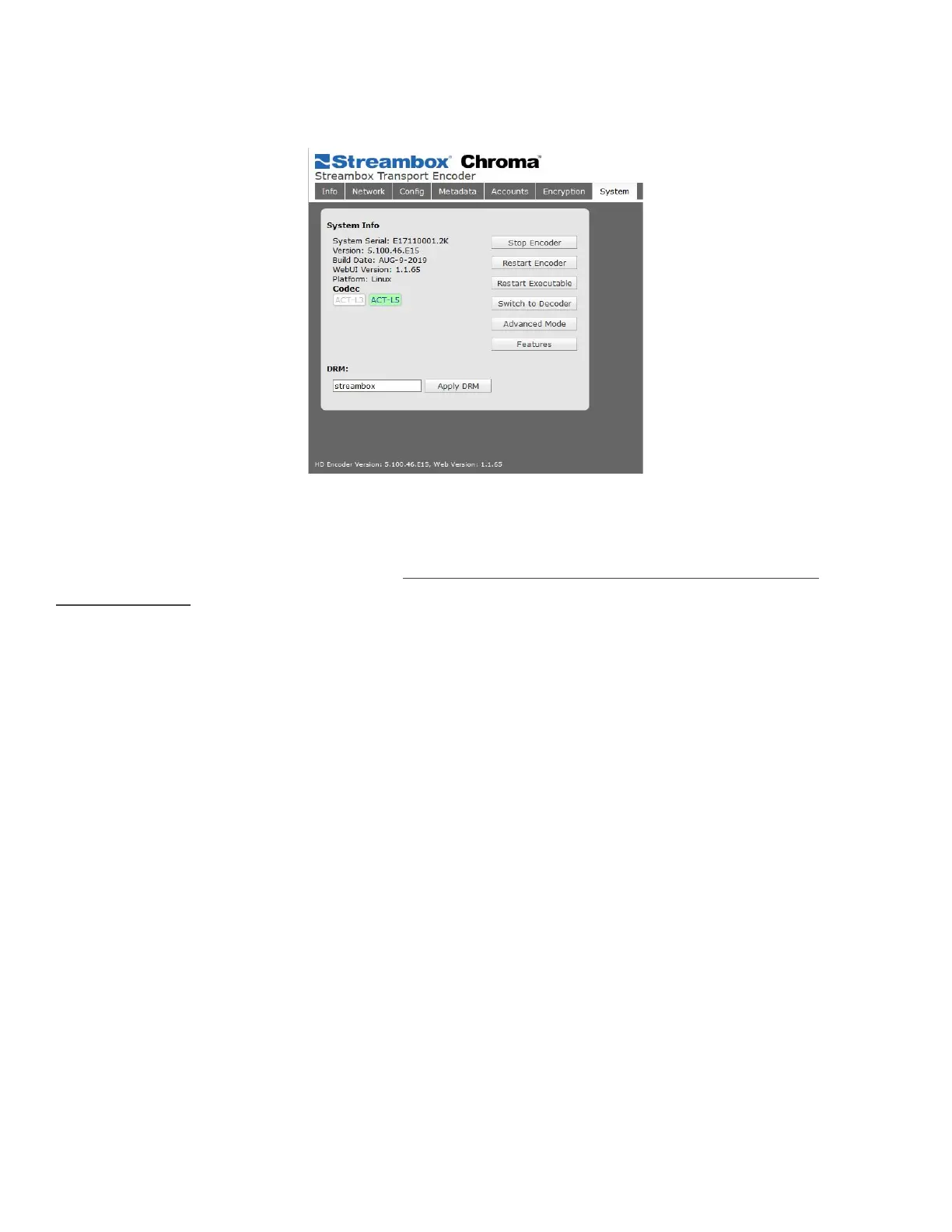
5.10 System Page
The system page allows system functions to be performed on the unit and it displays the serial number,
version and firmware. Here you can also switch between ACT-L3 and ACT-L5 codecs.
Figure 10 System Page
Codec: The current codec is highlighted green, and also indicated by the Version number, which will begin
with a 3 for ACT-L3, and version 5 for ACT-L5. Encoder and decoder must match codecs in order for a
successful stream.
Stop Encoder: Stop the video stream or video recording
Restart Encoder: restarts the Encoder software application; it takes only a fraction of a second but will
interrupt a stream.
Switch to Decoder: Stop the Encoder software and switch to Decoder mode.
Advanced Mode: Open the Legacy web UI which has additional settings and diagnostics
Features: Open the Features page to view current activations or add additional features.
DRM: Digital rights management (DRM) is the account designation assigned by Streambox. It is also called
Group or Network 1 in other Streambox products. This metadata field is necessary for streaming to Streambox
Cloud or Streambox Enterprise Server. When using the Sessions feature of Streambox Cloud, you enter the
Session code, starting with $, here. Click the “Apply DRM” button to save changes.



 To Next Page