12
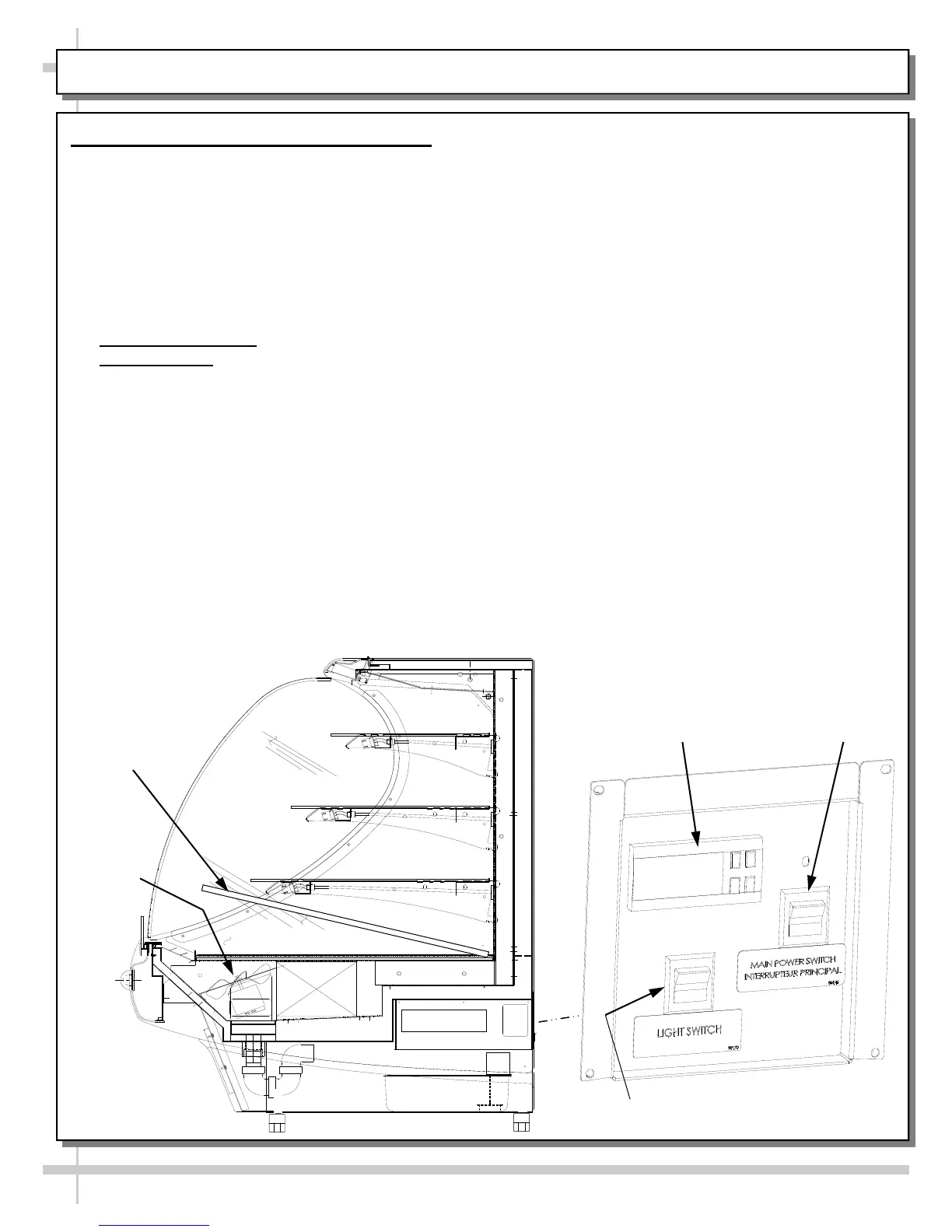
INSTALLATION: DISPLAY CASE START-UP (REAR ACCESS)
Coil Fans
Deck Removal (For
Coil Fans Access)
Main Power
Switch
Light Switch
Sample Carel®
Temperature Controller
16. Display Case Start-Up (Rear Access)
A. Case
Turn main power on at case rear.
From the front of the case, lift deck to check that
the coil fans are functioning properly.
Coil fans (and in self-contained units),
compressor motor should turn on.
B. Lights
Turn lights on.
> Self-Contained Units: Switch at rear.
> Remote Cases
: Usually, no light switch is
required (lights are hard-wired to always come
on when case is energized).
All lights will come on at the same time.
C. Temperature Controller (All Self-Contained
Units and some Remote Units)
Temperature controller varies depending upon
model. See TEMPERATURE CONTROLLER
sections in this operating manual to determine
which controller matches your unit’s model.
When case is energized, check that the
compressor symbol light is on.
After case has been operational for a few minutes,
check that temperature starts to drop.
If temperature controller does not begin cooling,
see TEMPERATURE CONTROLLER section in
this operating manual for adjustment instructions.
D. Saturated Suction Temperature (Remote Units)
See serial label on case for suction temperature
requirements and BTU requirements.
See serial label on case for defrost schedule and
temperature termination parameters.









 To Next Page