EasyManua.ls Logo

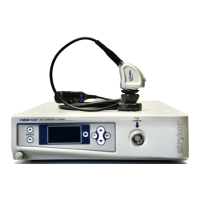
Stryker 1288 HD - User Manual

Stryker 1288 HD
53 pages
Print Icon
To Next Page IconTo Next Page
Loading...
Stryker Endoscopy
5900 Optical Court, San Jose, CA 95138
APPROVALS DATE TITLE
DRAWN BY:
S. Livaskani
01/26/09
ORIGINATOR
J. Henley
01/26/09
User Manual, 1288HD Video Camera
SIZE REV. DOCUMENT NO. SHEET OF
A C 1000-401-140 1 53
REVISIONS REVISIONS
LTR ECN NO. DATE APPROVED LTR ECN NO. DATE APPROVED
A ECO 114767 11/12/08 J. Henley
B ECO 115358 12/08/08 J. Henley
C ECO 116299 01/26/09 J. Henley
D
E
F
G
H
J
K
L
M
N
P
R
T
U
V
W
Y
Printing Instructions
1. Black and White
2. 5.5”W x 8.5”L
3. Select binding and paper weight based on cost
4. Source files are available from Engineering Services
Global Source
Archive this document as a user guide/manual.
This document contains the following languages:
1. English
Question and Answer IconNeed help?

Do you have a question about the Stryker 1288 HD and is the answer not in the manual?

Summary

Warnings and Cautions

Safety Definitions and Notices

Explains warning, caution, and note terms, and provides critical safety notices for device operation.

Symbol Definitions

Defines symbols used in the manual and on the device for proper understanding.

Product Description and Intended Use

Indications and Contraindications

Outlines medical procedures and specialties for which the camera is indicated and lists contraindications.

The Camera Console

Front Panel Overview

Details the front panel controls and features of the camera console.

Rear Panel Connections

Describes the various ports and connectors available on the rear panel of the console.

The Camera Head

Camera Head Components

Identifies and describes the parts of the camera head and its cable.

The C-Mount Coupler

Explains the C-mount coupler, its features, and how it attaches to the camera head.

Setup and Interconnection

Setting Up the Console

Step-by-step guide for connecting and setting up the camera console, including safety precautions.

Setting Up the Camera Head

Instructions for connecting the camera head to the console, with cautions to prevent damage.

Setting Up the Coupler

Guide on attaching the C-mount coupler to the camera head and securing the endoscope.

Operation

Powering and Basic Controls

Covers powering the camera on/off and using the camera head buttons for basic functions.

Touchscreen Interface Navigation

Explains how to navigate the touchscreen menus for system settings and picture adjustments.

Controlling Remote Accessories

Details how to use the camera system to control video accessories like recorders or printers.

Using the DVI Fiber Outputs

Information on the optional fiber output for transmitting DVI video signals.

Operating with a Light Source

Important safety and operational guidance for using the camera with a light source.

Troubleshooting

System Error and Connectivity Issues

Addresses problems like "Restart Camera Console" message, "System Error", and no video signal.

Picture Quality and Color Issues

Solutions for incorrect picture color, white balance, brightness, and clarity problems.

Interference and Image Clarity Problems

Solutions for noise, snow, color variability, and foggy pictures.

Cleaning, Reprocessing, and Maintenance

Camera Console Cleaning Procedures

Instructions for safely cleaning the camera console without sterilization.

Camera Head Reprocessing and Sterilization

Detailed procedures for cleaning, disinfection, and sterilization of the camera head and components.

Sterilization Methods

Outlines approved methods for sterilizing the camera head and cable, including EtO, Steris, and Sterrad.

User Maintenance

Replacing Fuses and Periodic Checks

Covers replacing fuses and outlines the periodic maintenance schedule for safety checks.

Product Disposal Guidelines

Guidelines for the proper disposal of the electronic equipment according to national and institutional policies.

Technical Specifications

Imaging, Scanning, and Video Outputs

Details the imaging system, scanning parameters, and available video output types and connectors.

Mounting, Conditions, and Ratings

Specifies mounting options, operating/storage conditions, and input electrical ratings.

Safety and Compliance Standards

Lists the medical safety, EMC, and laser product standards the system complies with.

Electromagnetic Compatibility

EMC Emissions and Environment Guidance

Information on electromagnetic emissions and guidance for the operating environment.

EMC Immunity and RF Separation

Details electromagnetic immunity tests and recommended separation distances for RF equipment.

Warranty and Return Policy

Product Warranty Terms and Exclusions

Outlines the warranty period, coverage, exclusions, and limitations for the product.

Product Return Procedure and Requirements

Details the process for returning products, including RMA requirements and restocking fees.

Summary

Warnings and Cautions

Safety Definitions and Notices

Explains warning, caution, and note terms, and provides critical safety notices for device operation.

Symbol Definitions

Defines symbols used in the manual and on the device for proper understanding.

Product Description and Intended Use

Indications and Contraindications

Outlines medical procedures and specialties for which the camera is indicated and lists contraindications.

The Camera Console

Front Panel Overview

Details the front panel controls and features of the camera console.

Rear Panel Connections

Describes the various ports and connectors available on the rear panel of the console.

The Camera Head

Camera Head Components

Identifies and describes the parts of the camera head and its cable.

The C-Mount Coupler

Explains the C-mount coupler, its features, and how it attaches to the camera head.

Setup and Interconnection

Setting Up the Console

Step-by-step guide for connecting and setting up the camera console, including safety precautions.

Setting Up the Camera Head

Instructions for connecting the camera head to the console, with cautions to prevent damage.

Setting Up the Coupler

Guide on attaching the C-mount coupler to the camera head and securing the endoscope.

Operation

Powering and Basic Controls

Covers powering the camera on/off and using the camera head buttons for basic functions.

Touchscreen Interface Navigation

Explains how to navigate the touchscreen menus for system settings and picture adjustments.

Controlling Remote Accessories

Details how to use the camera system to control video accessories like recorders or printers.

Using the DVI Fiber Outputs

Information on the optional fiber output for transmitting DVI video signals.

Operating with a Light Source

Important safety and operational guidance for using the camera with a light source.

Troubleshooting

System Error and Connectivity Issues

Addresses problems like "Restart Camera Console" message, "System Error", and no video signal.

Picture Quality and Color Issues

Solutions for incorrect picture color, white balance, brightness, and clarity problems.

Interference and Image Clarity Problems

Solutions for noise, snow, color variability, and foggy pictures.

Cleaning, Reprocessing, and Maintenance

Camera Console Cleaning Procedures

Instructions for safely cleaning the camera console without sterilization.

Camera Head Reprocessing and Sterilization

Detailed procedures for cleaning, disinfection, and sterilization of the camera head and components.

Sterilization Methods

Outlines approved methods for sterilizing the camera head and cable, including EtO, Steris, and Sterrad.

User Maintenance

Replacing Fuses and Periodic Checks

Covers replacing fuses and outlines the periodic maintenance schedule for safety checks.

Product Disposal Guidelines

Guidelines for the proper disposal of the electronic equipment according to national and institutional policies.

Technical Specifications

Imaging, Scanning, and Video Outputs

Details the imaging system, scanning parameters, and available video output types and connectors.

Mounting, Conditions, and Ratings

Specifies mounting options, operating/storage conditions, and input electrical ratings.

Safety and Compliance Standards

Lists the medical safety, EMC, and laser product standards the system complies with.

Electromagnetic Compatibility

EMC Emissions and Environment Guidance

Information on electromagnetic emissions and guidance for the operating environment.

EMC Immunity and RF Separation

Details electromagnetic immunity tests and recommended separation distances for RF equipment.

Warranty and Return Policy

Product Warranty Terms and Exclusions

Outlines the warranty period, coverage, exclusions, and limitations for the product.

Product Return Procedure and Requirements

Details the process for returning products, including RMA requirements and restocking fees.

Stryker 1288 HD Specifications

General IconGeneral
Sensor TypeCMOS
Zoom10x optical zoom
Sensor Size1/3 inch
Frame Rate30 fps
WaterproofNo
ShockproofNo
Video OutputHD-SDI, HDMI
Minimum Illumination1.0 lux
Video FormatMPEG-2, MPEG-4
AudioStereo
StorageSD/SDHC
Battery TypeLithium-ion
Operating Temperature0 to 40 °C

Related product manuals