EENN
www.stryker.com 2971-109-0 01 REV B 1-67
Troubleshooting
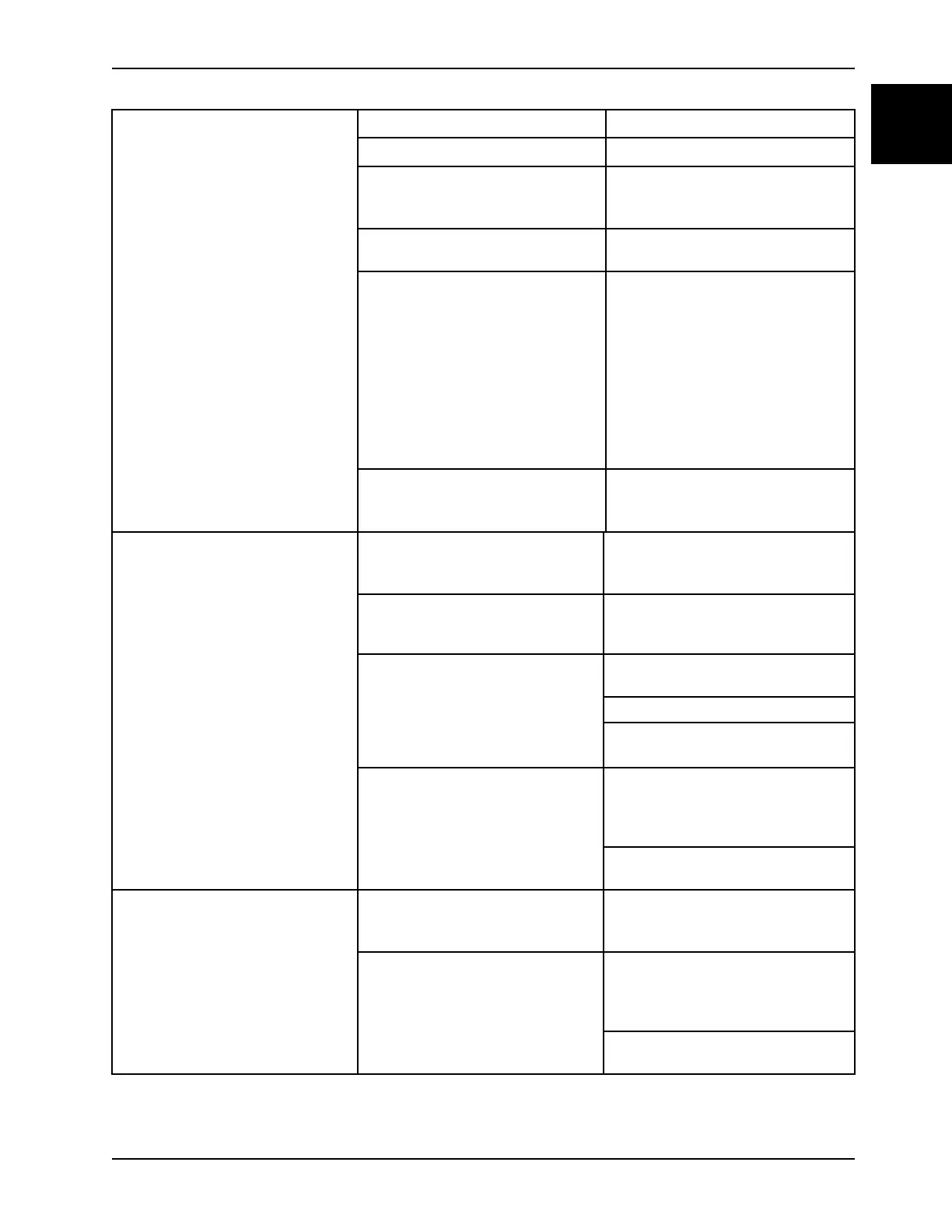
Support surface will not inflate The support surface has no power See no power
A CPR pull is active Pull down the CPR to reset
The support surface menu is
available on the InTouch bed screen
Check the connection of the support
surface integration cable (see
Installation on page 1-12)
Pod manifold connector is not set Set the pod manifold connector and
secure
The pump is not running when you
start Max Inflate
Check for 24VDC (variable) is going
to the pump on connector F on the
main board pin 1 (yellow) and pin 2
(black) (see Power supply assembly
on page 1-26)
1. If voltage is present, replace
pump assembly
2. If no voltage present, replace the
control board
Possible disconnect of hose
connections or solenoids or pod
assembly
Check the hose connections,
solenoids, and pod assembly
No left turn inflate Loose or disconnection of the left
turn bladder hose quick connection
coupler
Make sure that the left turn bladder
hose quick connection coupler is
together and locked
Loose or disconnection of the pod
manifold connector
Make sure that the pod manifold
connector is set into the manifold and
set
Possible leak in the turn bladder
Listen for air flowing into the turn
bladder
Look for a leak in the turn bladder
If you find a leak, replace the turn
bladder assembly
No air entering the turn bladder Make sure that the LED (D30) is lit to
show the TLI solenoid is energizing
(see Main power board assembly on
page 1-28)
If energized, replace the TLI inflate
solenoid
No left turn deflate Loose or disconnection of the left
turn bladder hose quick connection
coupler
Make sure that the left turn bladder
hose quick connection coupler is
together and locked
No air is exiting the turn bladder Make sure that the LED (D31) is lit to
show the TLD solenoid is energizing
(see Main power board assembly on
page 1-28)
If energized, replace the TLD inflate
solenoid














 To Next Page