EasyManua.ls Logo

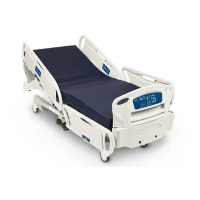
Stryker EPIC II - Service Manual

Stryker EPIC II
228 pages
Print Icon
To Next Page IconTo Next Page
Loading...
2016/09 D.1 2030-809-002 REV D www.stryker.com
Maintenance Manual
EPIC II
®
Critical Care Bed
REF
2030

Table of Contents

Questions and Answers

  • K
    Kimberly MartinAug 15, 2025
    What to do if the Stryker EPIC II bed's power LED is on but it doesn't function?
    • S
      samuelpopeAug 15, 2025
      If the ON/OFF switch is in the on position, the power LED is on, and the Stryker Medical Equipment bed does not function, the thermostat on the inverter/charger board may have tripped, indicating a temperature above 110°C (230°F). Wait approximately 3–5 minutes to allow the inverter/charger board to cool down. The power LED will then light again.
  • C
    Christopher WardAug 18, 2025
    Why is my Stryker Medical Equipment bed not charging?
    • T
      tasha55Aug 18, 2025
      If the bed power cord is plugged in but the Stryker Medical Equipment battery does not charge, it could be that the battery charger is not functioning. In this case: * Check the circuit breakers on the litter. * Check the battery charger. * Check all cable connections on the charger.
  • J
    Jeffrey MurilloAug 21, 2025
    How to fix a Stryker EPIC II Medical Equipment bed with no power LED?
    • S
      Shelby GomezAug 21, 2025
      If the ON/OFF switch is in the on position but the power LED is off and the Stryker Medical Equipment bed does not function, it might be due to no DC voltage from the batteries. To resolve this: 1. Check the fuse (F1) on the power board and replace it if necessary. 2. Check the voltage between battery + and battery – on the power board; it should be greater than 22VDC. 3. Verify the battery voltage is greater than 22 VDC. 4. Check the battery fuse and replace if needed. 5. Check the cable connections from the batteries to the display board. 6. Check the ON/OFF switch and cabling.
  • D
    Diane CurryAug 25, 2025
    What to do if Stryker EPIC II Medical Equipment bed won't work but the power LED is on?
    • L
      louiscarsonAug 25, 2025
      If the ON/OFF switch is in the on position, the power LED is on, and the Stryker Medical Equipment bed does not function, the display board may not be functioning or is locking out all functions. You can try the following: * Check the safety switches on the drive bar. * Verify the battery voltage is greater than 22 VDC. * Verify the display board is functioning. * Check all cable connections on the display and power boards.
  • M
    Mrs. Ashley StricklandAug 27, 2025
    How to troubleshoot Stryker Medical Equipment bed with no power?
    • J
      Jesse FullerAug 27, 2025
      If the Stryker Medical Equipment bed has no power, you can: * Check the circuit breaker on the bed. * Check for 120 VAC power at J1 on the power supply. * Check for DC voltages on J2 (Pins 1, 2, 3 & 6) on the power supply.
  • K
    kmcguireAug 30, 2025
    What to check if Stryker Medical Equipment bed won't move up?
    • E
      Erika ReyesAug 30, 2025
      To troubleshoot no bed up motion on the Stryker Medical Equipment, check for the following: * Check 120 VAC power on HDR33 and HDR34, Pin 1 and Pin 6, of the CPU board. * Check for 1.1–1.5 VDC signal on O5 and O7 Pin 1 and HDR2 Pin 5 of the CPU PCB.
  • T
    timothy93Sep 2, 2025
    How to resolve no Fowler down motion on Stryker EPIC II?
    • M
      Marcus FinleySep 2, 2025
      To troubleshoot no Fowler down motion on the Stryker Medical Equipment, check for the following: * Check for 120 VAC power on HDR29 Pin 3 and Pin 1 of the CPU board. * Check for 1.1–1.5 VDC signal on O4 Pin 1 and HDR2 Pin 5 of the CPU PCB.
  • E
    ellenfarmerSep 5, 2025
    What to do if Stryker EPIC II Medical Equipment Fowler won't move up?
    • S
      shepherdmatthewSep 5, 2025
      To troubleshoot no Fowler up motion on the Stryker Medical Equipment, check for the following: * Check for 120 VAC on HDR29, Pin 1 and Pin 3 of the power supply. * Check for 1.1–1.5 VDC on O2 Pin 1 and HDR2 Pin 5 of the CPU PCB.
  • S
    Shane YoungSep 8, 2025
    How to fix no Gatch down motion on Stryker EPIC II Medical Equipment?
    • G
      Gregory ReedSep 8, 2025
      To troubleshoot no Gatch down motion on the Stryker Medical Equipment, check for the following: * Check for 120 VAC power on HDR30 Pin 1 and Pin 3 of the CPU board. * Check for 1.1–1.5 VDC signal on O3 Pin 1 and HDR2 Pin 5 of the CPU PCB.
  • M
    michael11Sep 12, 2025
    What to check if Stryker Medical Equipment Gatch won't move up?
    • S
      Stephen TrujilloSep 12, 2025
      To troubleshoot no Gatch up motion on the Stryker Medical Equipment, check for the following: * Check for 120 VAC on HDR30, Pin 1 and Pin 2 of the CPU board. * Check for 1.1–1.5 VDC on O1 Pin 1 and HDR2 Pin 5 of the CPU PCB.

Summary

Introduction

Intended Use

Describes the purpose of the manual for maintaining the Stryker Epic II Critical Care Bed.

Specifications

Details the technical specifications of the Epic II Critical Care Bed, including dimensions and electrical requirements.

Warning; Caution; Note Definitions

Explains the meaning of WARNING, CAUTION, and NOTE used in the manual for safety.

Summary of Safety Precautions

Safety Tips and Guidelines

Provides essential safety advice and operational guidelines for using the critical care bed.

iBED Awareness Option Warnings

Highlights specific safety warnings and cautions related to the iBED Awareness system.

Setup Procedures

Initial Bed Setup Steps

Outlines the essential steps for properly setting up the Epic II Critical Care Bed before use.

Preventative Maintenance

Maintenance Checklist

Lists items to be checked annually for effective maintenance of the beds.

Cleaning Procedures

Details how to properly clean all surfaces of the bed to maintain hygiene and product integrity.

Troubleshooting Guide

No Power to Bed Troubleshooting

Provides troubleshooting steps for when the bed does not receive power.

No Bed Motion Troubleshooting

Offers solutions for issues related to the bed's inability to move up or down.

Gatch and Fowler Motion Issues

Addresses problems with gatch and fowler functions, including uneven or no motion.

iBED Awareness System Error Codes

Error Handling and Logged Errors

Explains how the system captures and logs errors, detailing error codes and their descriptions.

Error Messages

Lists and describes system error messages that appear during operation.

Electrical System Information

CPU Board Information

Details the standard and iBED Awareness CPU boards, including connections and test points.

Software Configuration Options

Explains how to configure the bed's software options for different functionalities.

Power Supply Details

Provides information on the power supply unit, including connector locations and voltages.

Service Information

Static Discharge Precautions

Outlines necessary precautions and equipment for preventing static discharge during service.

Brake Pedal Replacement Procedure

Step-by-step guide for replacing the brake pedal on the bed.

Lift Motor and Capacitor Service

Instructions for removing and replacing the lift motor and capacitor.

Lift Potentiometer Service

Details the procedure for replacing and adjusting the lift potentiometer.

Scale System Diagnostics and Calibration

Procedures for diagnosing and calibrating the scale system on standard beds.

Head End Motor Service

Instructions for removing and replacing the head end motor assembly.

CPU Board Service

Instructions for removing and replacing the CPU board.

Fowler Potentiometer Service

Details the replacement and calibration of the fowler potentiometer.

Base Assembly and Options

Standard Base Components

Exploded view and list of standard components for the bed base assembly.

EPIC II PLUS Optional Base Assembly

Exploded view and parts list for the optional base assembly of the Epic II PLUS.

Lift Assembly

Lift Assembly Components

Exploded view and part numbers for the lift assembly, head and foot ends.

Brake Shaft Assemblies

Exploded views and parts for the left and right brake shaft assemblies.

Head End Siderail Assembly

Head End Siderail Components

Exploded views of the head end siderail assemblies, left and right.

iBed Awareness Siderail Assemblies

Exploded views of iBed Awareness siderail assemblies for head end, left and right.

Foot End Siderail Assembly

Foot End Siderail Components

Exploded views of the foot end siderail assemblies, left and right.

Foot End Siderail Common Components

Lists common components for left and right foot end siderails.

Footboard Assembly Options

Standard Footboard Assembly

Exploded view and parts list for the standard footboard assembly.

Footboard Assembly - iBed Awareness Option

Exploded view of the footboard assembly with the iBed Awareness option.

EMC Information

Electromagnetic Immunity Guidance

Provides guidance on electromagnetic immunity for the Epic II Critical Care Bed.

Electromagnetic Emissions Guidance

Details guidance on electromagnetic emissions from the Epic II Critical Care Bed.

Warranty

Limited Warranty Terms

Outlines the terms and conditions of the limited warranty for the critical care bed.

Parts and Service Information

Provides information on how to obtain parts and service for Stryker products.

Stryker EPIC II Specifications

General IconGeneral
BrandStryker
ModelEPIC II
CategoryMedical Equipment
LanguageEnglish

Related product manuals