EasyManua.ls Logo

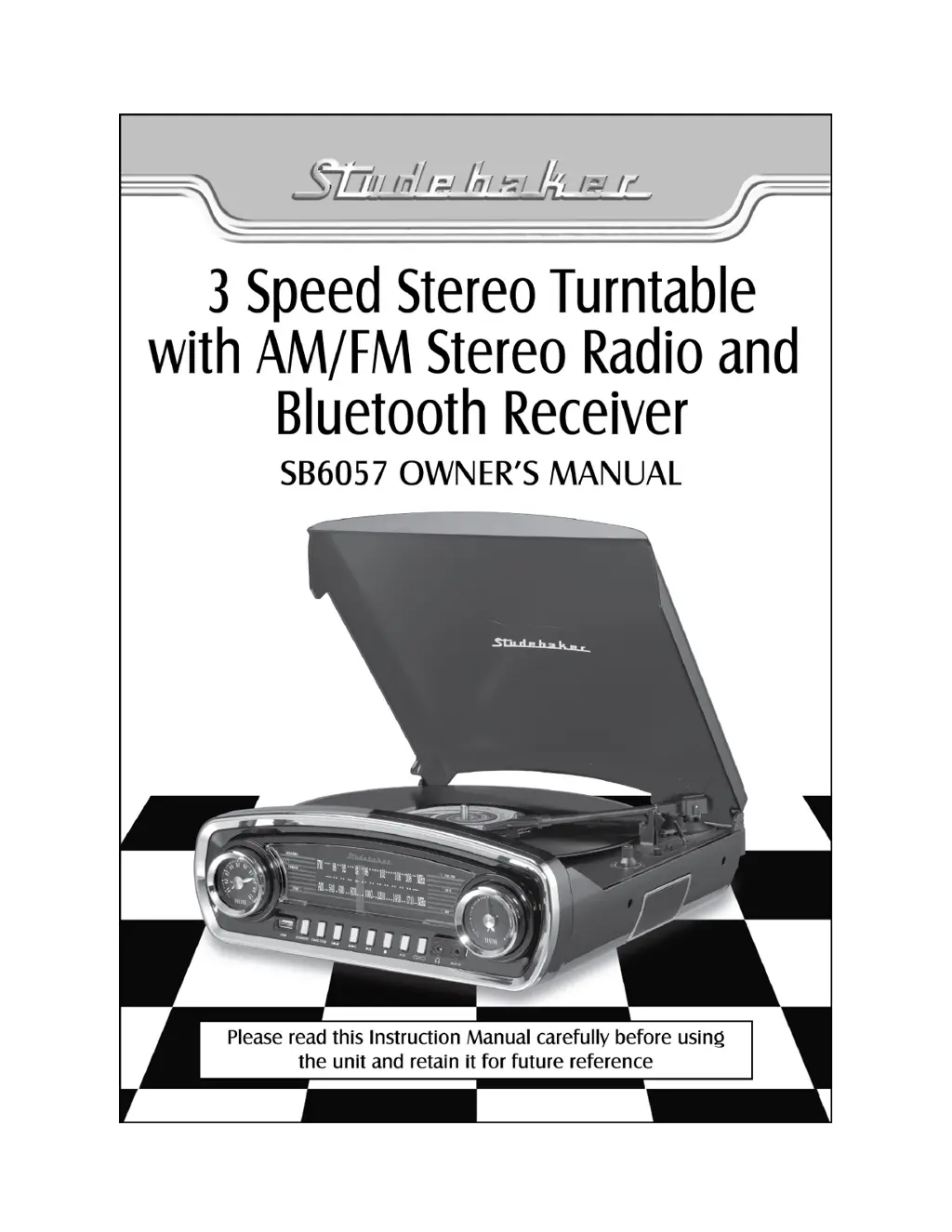
Studebaker SB6057 - User Manual

Studebaker SB6057
12 pages
Print Icon
To Next Page IconTo Next Page
Loading...

Questions and Answers

  • L
    Leslie ManningAug 5, 2025
    Why is there no sound coming from my Studebaker SB6057 Turntable?
    • S
      Stephanie MasonAug 5, 2025
      If your Studebaker Turntable has no sound, the volume control might be turned down. Try increasing the volume to resolve this issue.
  • T
    tonya67Aug 9, 2025
    What to do if the sound is distorted on my Studebaker SB6057?
    • J
      Jeremy ArmstrongAug 10, 2025
      If the sound from your Studebaker Turntable is distorted, the volume level may be set too high. Try decreasing the volume.
  • R
    Richard SanchezAug 14, 2025
    How to fix a Studebaker SB6057 that does not power on?
    • D
      David CoxAug 15, 2025
      If your Studebaker Turntable power does not come on, it might be due to an unstable power adapter connection. Reconnect the adapter to ensure a stable connection.
  • D
    dereksharpAug 20, 2025
    Why is there no Bluetooth sound on my Studebaker Turntable?
    • P
      Philip JohnsonAug 20, 2025
      If there is no sound via Bluetooth on your Studebaker Turntable, there might be several reasons: * The unit is not linked with your Bluetooth enabled device: Go through the “Bluetooth Operations” process to link the speakers. * Unit placement out of range: Relocate the unit within Bluetooth operating range (30 feet). * Your Bluetooth enabled device Volume set too low: Increase the volume level of your Bluetooth enabled device.
  • A
    Amber KirkAug 25, 2025
    What to do if AM or FM has no sound on Studebaker SB6057 Turntable?
    • I
      Isaiah RiceAug 25, 2025
      If there is no sound in AM or FM mode on your Studebaker Turntable, the unit may not be in the correct mode. Tap the FUNCTION BUTTON (#12) to select AM or FM mode.
  • T
    Tara TateAug 30, 2025
    What to do if my Studebaker SB6057 can’t read USB data?
    • D
      Deborah WheelerAug 30, 2025
      If your Studebaker Turntable can’t read USB data, it might be due to a faulty USB flash drive. Try using another USB flash drive.

Summary

Important Safety Instructions

FCC Compliance

RF Exposure Statement

Statement regarding compliance with FCC RF Exposure guidelines for safe installation.

Product Care and Customer Information

Customer Record

Section for recording product model and serial numbers for identification.

Location of Controls

Front Panel Controls and Indicators

Identifies and describes the buttons, dials, and indicators on the front panel.

Rear Panel Ports and Connections

Details the input/output jacks and power connection ports on the rear.

Turntable Mechanism Controls

Describes controls related to the turntable operation like speed and tonearm.

Care of Tonearm and Stylus

Pitch Adjust Control

Explanation of how to fine-tune the turntable's playback speed using the pitch control.

Operation Modes

USB Operation

Instructions for playing music files from a USB drive and managing tracks.

Bluetooth Operation

Steps for pairing devices and streaming audio wirelessly via Bluetooth.

AUX IN Operation

Care and Maintenance

Record Care and Maintenance

Guidelines for cleaning and preserving vinyl records for optimal playback.

Troubleshooting

Warranty and Service Information

Studebaker SB6057 Specifications

General IconGeneral
Built-in SpeakersYes
Bluetooth ConnectivityYes
USB PortYes
Speed Settings33 1/3, 45, 78 RPM
FeaturesRCA output
ConnectivityBluetooth, USB, RCA
TypeBelt-driven turntable

Related product manuals