7. Clip LED: This clip LED glows when the incoming audio signal is clipping. Please reduce gain levels to
avoid distortion of clip Led is glowing.
4. Output Section
9. Master (L/R) Output: This output is used to connect the master output of the mixer to the amplifier or powered
speakers using ¼”TS Unbalanced jack connector. The output level is determined by the master control.
Wiring configuration is as follows :
10. Power LED: This Blue LED Indicates that unit is powered ON.
11. Signal/Peak LED: Signal LED(green) glows when output is below clip level.
Clip LED glows when the output signal is clipping. Please reduce avoid distortion clip led is glowing.
levels to reduce clipping.
12. Master (L/R) Control : The Left & Right Control are the master output level control.
They determine the level of all signals going to output connector.
3
6. Channel control: This control is used to set the level going to the master output.
5. EFX: This knob is used to control the send level to the built in EFX section.
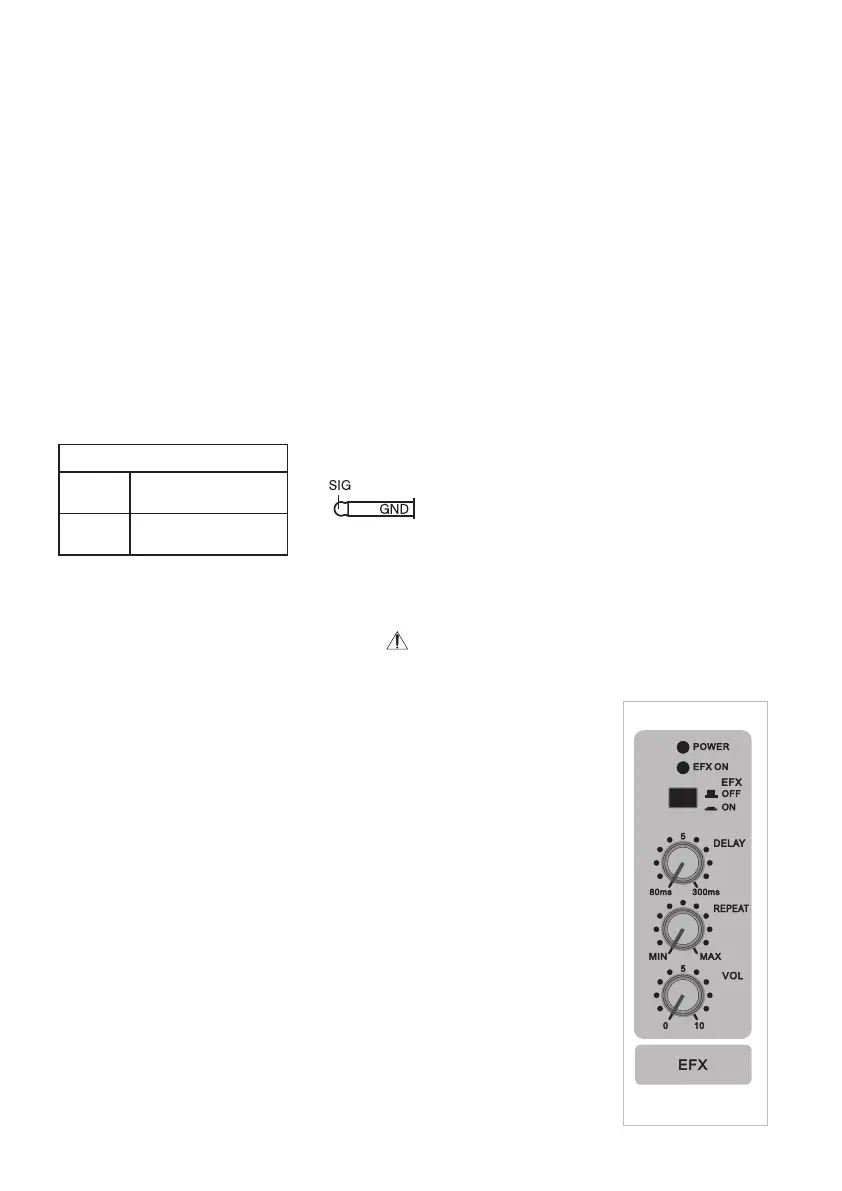
13. Delay Time Control: This control adjusts the delay time.
Turning the knob clock wise, will make the delay time longer.
14. Repeat Control: This control adjusts the feedback amount [the number of
repetition for the delay sound (echo)].
Turning the knob clock wise increases the number of repetition.
As you turn up the repeat knob clock wise, oscillations may occur. If this happens,
turn the knob down until the oscillation stops.
EFX Level Control15. : To Control the output level of Effect signal.
16. : To switch ON/OFF the Effects.Effect ON/OFF Switch
17. : This LED glass when EFX is selected.EFX ON LED
5. Effects Section
8. Sterea i/p:
A. Stereo INPUT/MONO: It is Unbalanced 1/4” Mono jack input suitable for high impedance sources.
This input may also be used as mono line input by plugging into the left/mono socket only.
B. RIGHT: It is same as for left channel above except input fed to this channel is routed to right channel only.
Un-Balanced TRS
Tip
Sleeve
Signal +ve Phase
Ground


 To Next Page
 Loading...