4
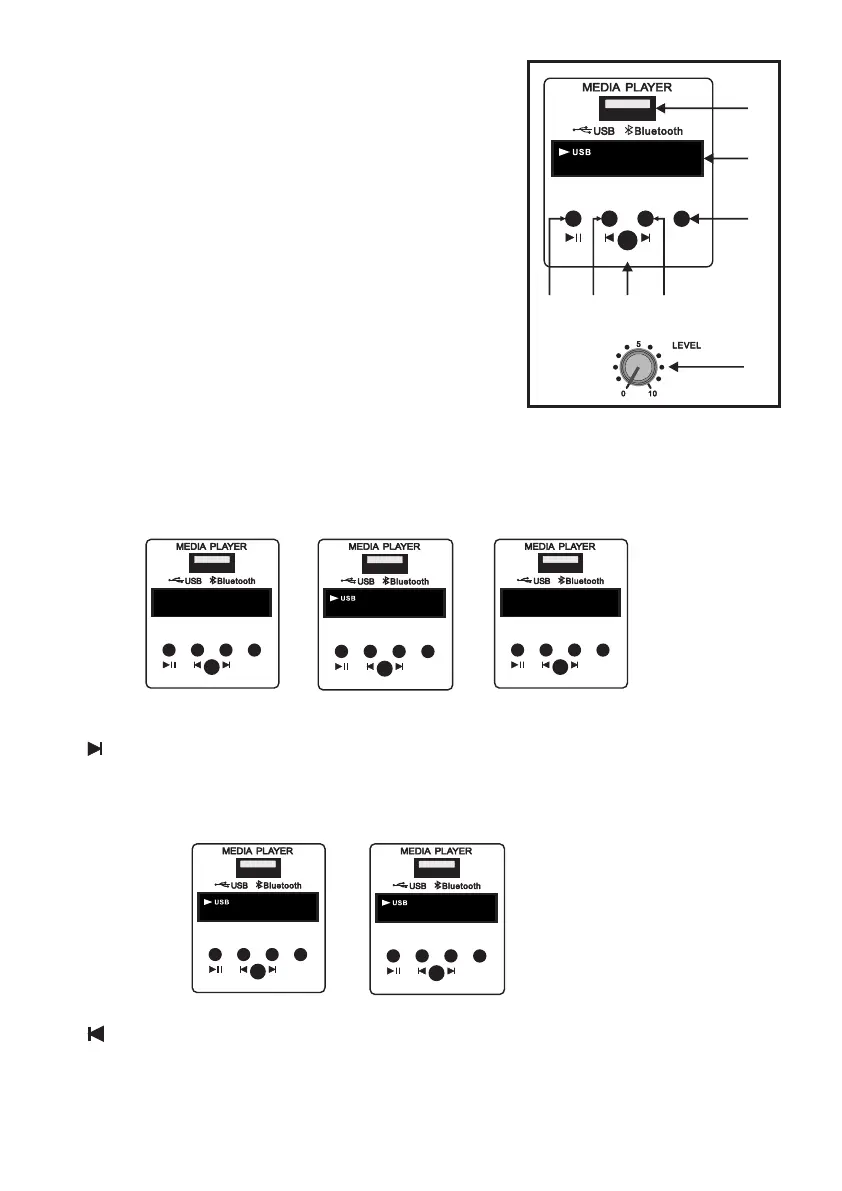
18. USB Input : USB input channel.
Terms of use : Studiomaster Professional respects intellectual
property rights and we request our users to do the same.
Please use MP3 downloads only for program which you have
legally purchased.
PLEASE DO NOT USE PIRATED MUSIC OR PROGRAM.
19. Display: The seven segment display is provided to visualize all
media player operation.
6. Media Player Section
/
PREV/
VOL-
NEXT/
VOL+
ON-OFF/
MODE
PLAY/
PAUSE
REPEAT IR
OFF
Media Player Off
/
PREV/
VOL-
NEXT/
VOL+
ON-OFF/
MODE
PLAY/
PAUSE
REPEAT IR
MP.3
00:04
Media Player On/
USB Mode
21. Next/Vol+:
• Single press this switch to go next track.
• Long press will increase volume of media player.
/
PREV/
VOL-
NEXT/
VOL+
ON-OFF/
MODE
PLAY/
PAUSE
REPEAT IR
MP.3
00:05
Next Track
/
PREV/
VOL-
NEXT/
VOL+
ON-OFF/
MODE
PLAY/
PAUSE
REPEAT IR
MP.3
U 15
Volume +
22. Prev./Vol-:
• Single pressing the switch will go to previous track.
• Long pressing the switch decrease the volume of media player.
/
PREV/
VOL-
NEXT/
VOL+
ON-OFF/
MODE
PLAY/
PAUSE
REPEAT IR
bt
Bluetooth Mode
20. On-Off/Mode Selection:
• Long press to switch On/Off the media player.
• USB is default mode.
• Single pressing will switch USB and Bluetooth mode (BT).
20
19
18
22 24 21
/
PREV/
VOL-
NEXT/
VOL+
ON-OFF/
MODE
PLAY/
PAUSE
REPEAT IR
MP.3
02:00
23
25


 To Next Page