8 | Sub-Zero Customer Care 800.222.7820
Touch Control Panel
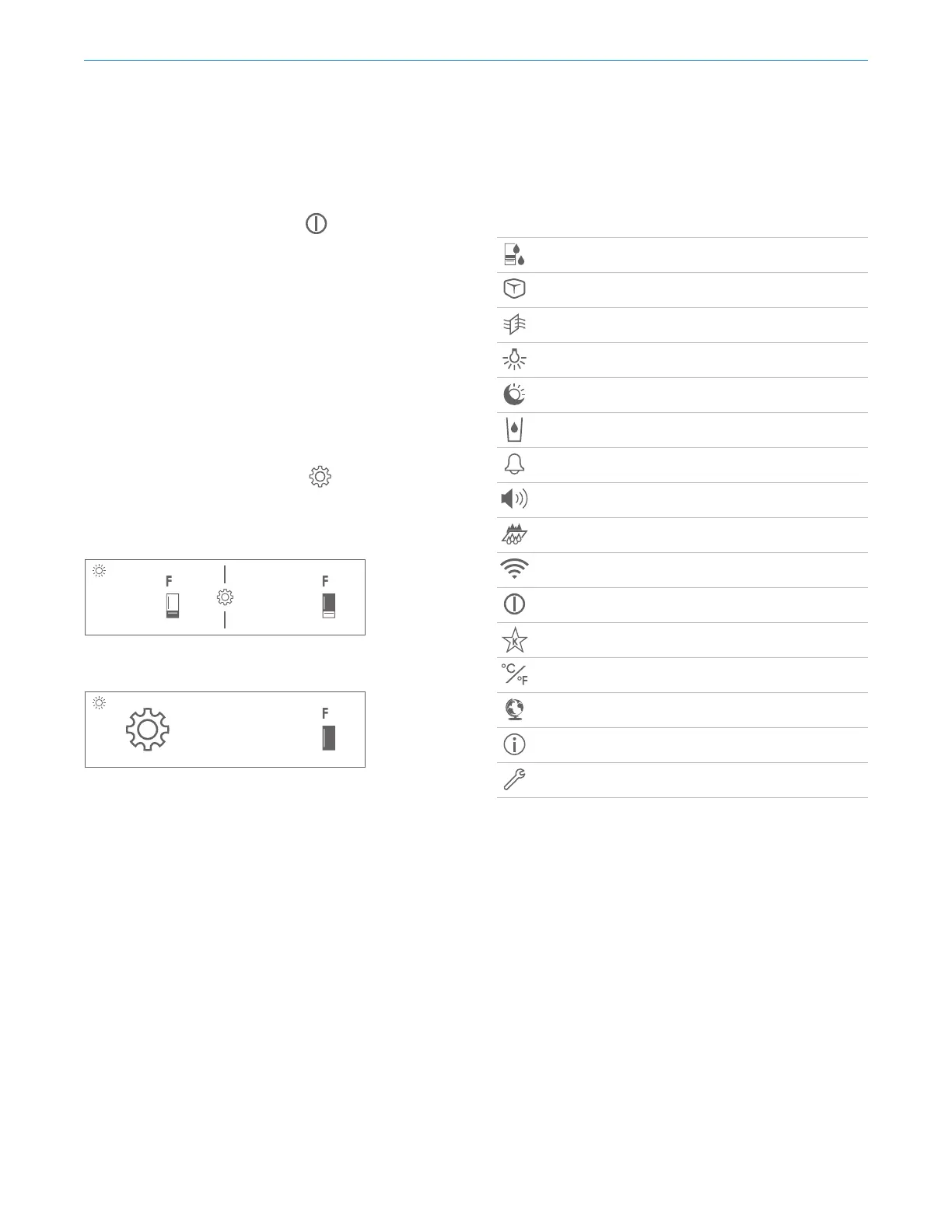
For initial start-up, touch and hold on the control panel
for 2 seconds.
The recommended temperatures are preset at 0°F
(-18°C)
for a freezer and 38°F
(3°C) for a refrigerator. The tem-
peratures are adjustable in one-degree increments. The
combination model has two temperature zones.
To adjust temperature:
1 Touch the temperature to be adjusted.
2 Touch + or – until the desired temperature is displayed.
Refer to the illustration below.
To adjust additional settings, touch
on the control
panel. Refer to the illustration below.
380
Dual-zone home screen
SETTINGS
Adjust refrigerator drawer temperature and humidity
Turn ice maker and max ice on or o
Turn air purifier on or o
Adjust soft on lighting and accent lighting (if applicable)
Turn night mode on or o
Turn the dispenser on or o
Turn door alarm on or o and adjust duration
Adjust door alarm volume and tone
Turn water filter reminder on or o
Turn connect on or o (if applicable)
Turn the unit on or o
Turn Sabbath on or o
Adjust temperature units
Select language
System information
View troubleshooting and service information
Touch Controls
38
Single-zone home screen


 To Next Page