15
LP Parameter.
0 1 0
Function: To lock keypad.
To change
the LP
parameter
press the
SET key.
Use UP/DOWN keys to set
desired range.
This parameter can lock the
keypad so that tampering is not
possible by by-standers.
0 = keypad unlocked
1 = keypad locked
When locked all parameters can
only be viewed, but not modified.
Min Max
Fac.
16
E1 Parameter
0 2
2
Function : Relay status on
Probe Failure.
Min Max
Fac.
To change
the E1
parameter
press the
SET key.
Use UP/DOWN keys to set
desired range.
When set to
0 = Relay status is ON.
1 = Relay performs a duty cycle
10 minutes ON and 4minutes
OFF.
2 = Relay status is OFF.
11
d0 Parameter
0 2 1
Function : To activate or deactive
digital input function.
To change
the d0
parameter
press the
SET key
Use UP/DOWN keys to set
desired range.
0: Digital input disable.
1: DI with 230VAC present
2: DI with 0VAC present.
Min Max
Fac.
Example :
If this parameter is set to 0,
controller will not sense any digital
input.
If set to 1, when 230VAC is
present, controller will treat it as a
fault and turn off the compressor
and DI ( )will flash.
If set to 2, when 0VAC is present,
controller will treat it as a fault and
turn off the compressor and
DI ( )will flash.
12
d1 Parameter
Function : To set reset mode for
digital input.
0 1 0
Min Max
Fac.
To change
the d1
parameter
press the
SET key
Use UP/DOWN keys to set desired
range.
0: Auto reset.
1: Manual reset.
Example :
If this parameter is set to 0, then
incase of a fault in d0 parameter,
unit will auto reset after fault is
cleared.
If this parameter is set to 1, then
incase of a fault in d0 parameter,
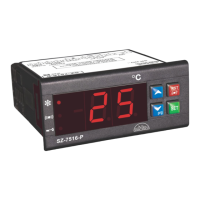
unit will allow reset after pressing
AUTO/MAN button. (after d0 fault is
cleared).
14
13
Use UP/DOWN keys to set desired
range.
This parameter sets the permissible
number of reset cycles of
compressor.
When number of compressor reset
cycles within 1 Hr. goes above the
d3 parameter, controller switch to
manual reset mode and “CCF”
led will be ON.
NOTE: This parameter saves the
compressor from multiple (more
than max.10 nos.) reset within 1 Hr.
Use RST key to reset this CCF
fault.
Use UP/DOWN keys to set desired
range.
0: CCF count increment with each
Comp. OFF and DI fault.
1: CCF count increment only with
DI fault.
d3 Parameter
d2 Parameter
0
0
10
1
5
0
Min
Min
Max
Max
Fac.
Fac.
To change
the d2
parameter
press the
SET key
To change
the d2
parameter
press the
SET key
Function : To set the number of reset
cycles of compressor.
Function : To set the count mode for CCF .
CCF- compressor count fault.
RST
AUTO
MAN



 To Next Page