(Add stop to Route)
Select to search for a waypoint
on the map or search screen
(→P.195) and then select
to add it to the current route.
(→P.201)
(Add to My Routes)
Select to name the current route
and register it to My Routes.
(Change Route Type)
Select to change the route type of
the current route and search for a
new route. (→P.201)
(Reorder Stops)
Select to change the order of
the currently set destination and
waypoints.
Select a destination, select
or to change its position in
the list, and then select
(Done) to conrm the change.
(Edit Stops): Select
to display the edit list screen.
(→P. 200)
(Play Route Preview)/
(Stop Route Preview)
Select to turn route preview mode
on/o. (→P.198)
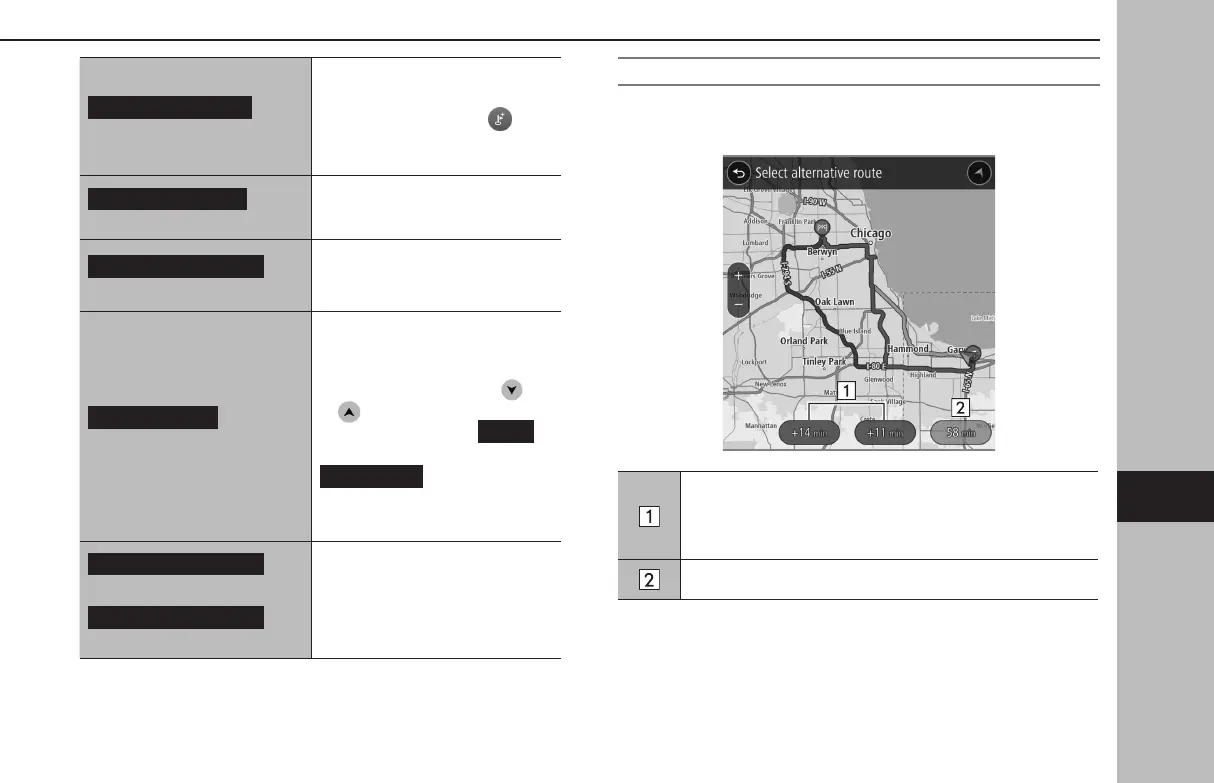
SELECTING AN ALTERNATE ROUTE
When the search for an alternate route is complete, the
following screen will be displayed.
Displays the dierence in travel time between the current
route and an alternate route.
Select to display the route conrmation screen for the
selected route. (→P.201)
Current route travel time
BASIC OPERATION
197
Navigation System
GB8_US.indb 197 2020/10/09 7:23:16














 To Next Page