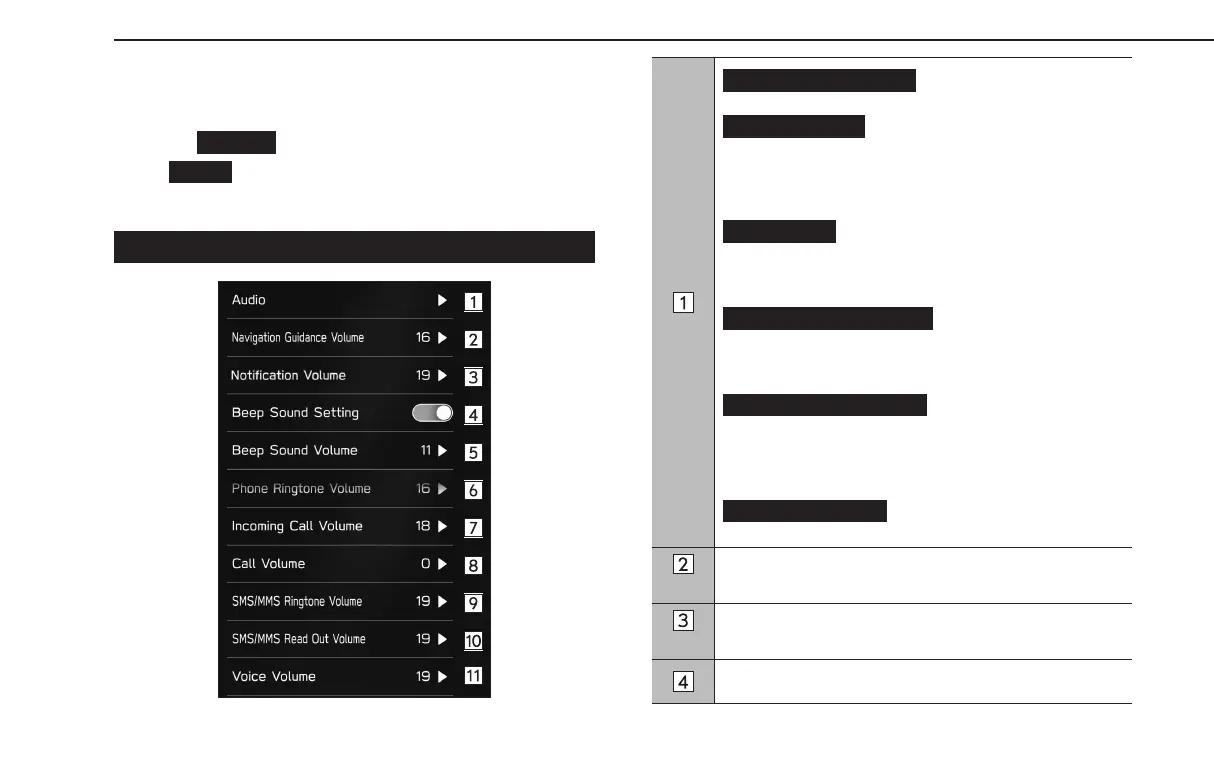
SOUND SETTINGS
1.
Display the home screen. (→P.18, 40)
2.
Select
(Settings).
3.
→
(Sound)
4.
Select the items to be set.
SOUNDSETTINGS SCREEN
(Sound Customization): Select
to display the sound customization screen. (→P.138)
(Sound Restorer)*
1
: Select to turn the
sound restorer function on/o.
This function plays compressed audio with quality near
original sound by adding the complement signal of high
tone.
(Virtual Bass)*
1
: Select to set the virtual
bass function.
This function corrects the bass sound by adding harmonic
sound.
(Dynamic Beat Enhancer)*
1
:
Select to set the dynamic beat enhancer function.
This function expands the dynamic range lost in data
compression and creates a sharp beat sound.
(Speed Volume Control)*
1
:
Select to set the speed volume.
The system adjusts to the optimum volume and tone quality
according to vehicle speed to compensate for increased
vehicle noise.
(AUX Volume Gain): Select to set
AUX volume gain.
Select to set the navigation prompt volume.
Select to adjust the interrupt guidance volume.
Select to turn the tone sound on/o.
OTHER SETTINGS
90
GB8_US.indb 90 2020/10/09 7:22:38














 To Next Page