北米Model "A2600BE-B" EDITED: 2020/ 10/ 1
! Driver profiles icon
s03bs050105
Touch (driver profiles icon) to confirm
the driver’s information. For details, refer
to the separate navigation/audio Owner’s
Manual.
! HOME icon
s03bs050106
Touch (HOME) to display the top menu.
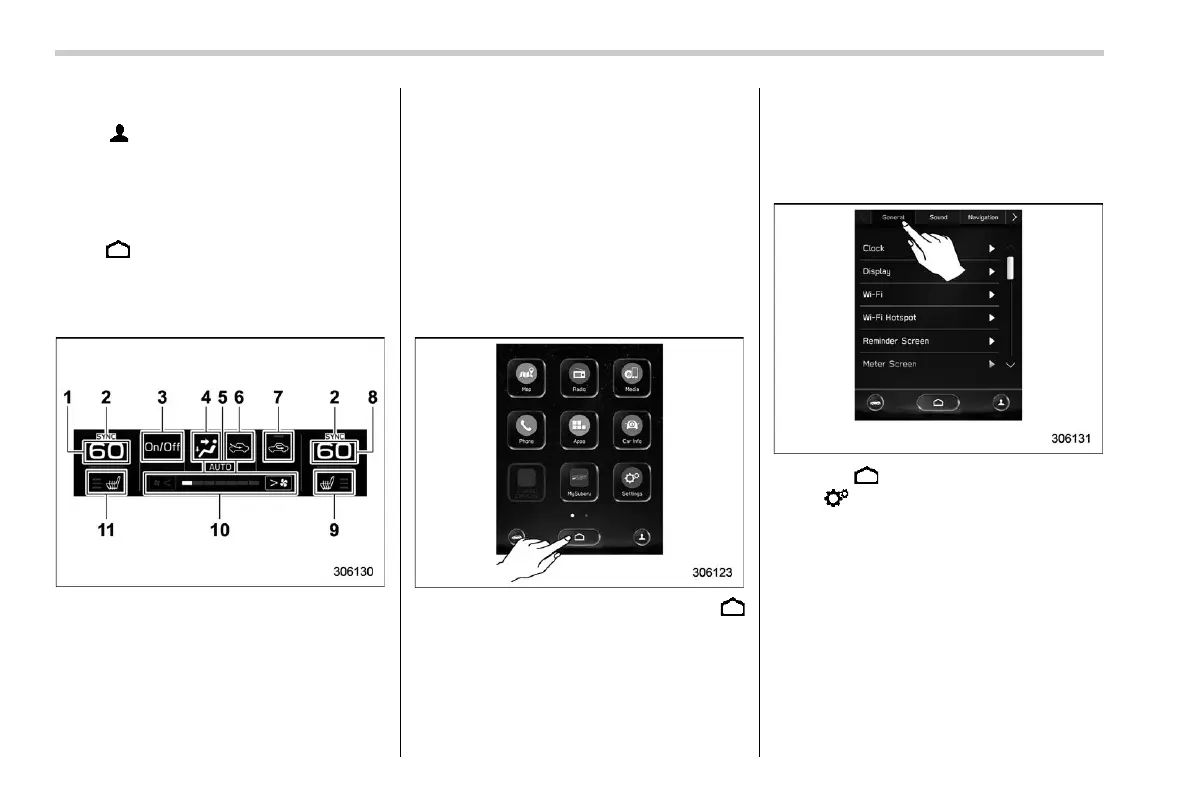
! Climate control screen
s03bs050107
The climate control status is shown on the
screen.
1) Set temperature indicator (left-hand side)
2) SYNC mode indicator
3) Climate control ON/OFF button
4) Airflow mode
5) Climate control mode
6) Air inlet selection
7) Customizable icon
8) Set temperature indicator (right-hand
side)
9) Seat heater/seat ventilation indicator*
1
(right-hand side)
10) Fan speed indicator
11) Seat heater/seat ventilation indicator*
1
(left-hand side)
*1: If equipped
When operating the climate control sys-
tem, the main screen switches to the
climate control screen. For details, refer
to “Climate Control Panel” FP279.
! Main screen
s03bs0502
To display the main screen, touch
(HOME).
In this Owner’s Manual, the following
settings will be explained. For details
about other items, refer to the separate
navigation/audio Owner’s Manual.
– “Settings” ? “General”
– “Settings” ? “Car”
– “Car Info”
! General settings
s03bs050201
Set the time and display general items.
1. Touch (HOME).
2. ?
(Settings)
3. ? “General”
4. Select the preferred menu.
Center Information Display (CID)
216














 To Next Page