3-5
#7013455 - Revision A - April, 2009
Electronic Control System
International W
International W
ine Storage
ine Storage
(ICBWS)
(ICBWS)
Series
Series
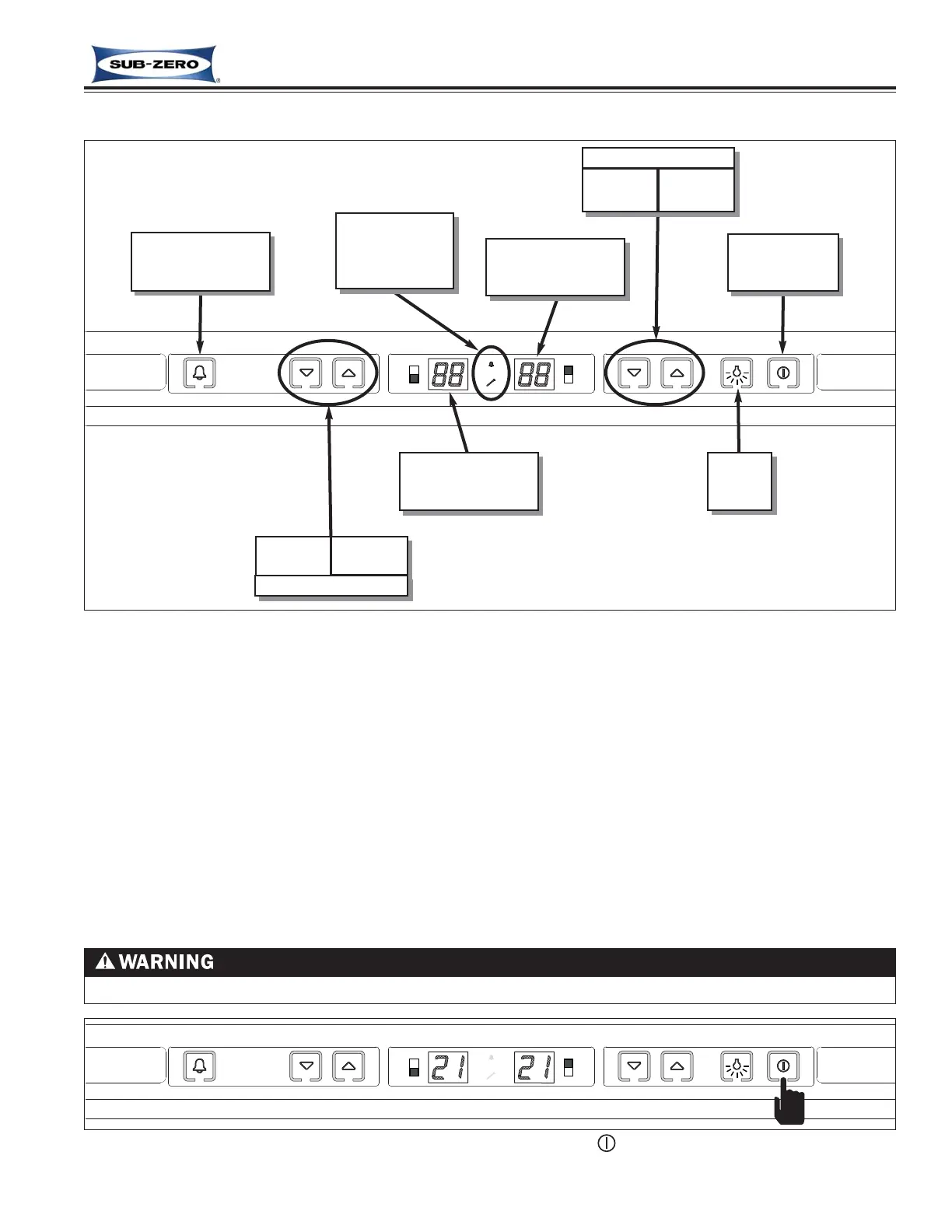
WINE STORAGE CONTROL PANEL LAYOUT
Figure 3-4. International Wine Storage Control Panel Layout
BASIC WINE STORAGE INPUT OPERATIONS
The following pages describe the basic input operations performed at the control panel (switching unit ON and OFF,
adjusting set-point (temperature adjustment), switching lighting system ON and OFF, and enabling and disabling the
temperature alarm feature). Please note that though possible to display temperatures in Fahrenheit or Celsius, in
most cases Fahrenheit readings are shown in this manual.
Unit ON/OFF
All units are shipped in the OFF Mode. When electricity is supplied to the appliance, a short power up is initiated
where the temperature units of measure (°F or °C) is displayed for one (1) second, followed by the model code for
five (5) seconds, then all components are switched OFF and the LED displays go blank. By pressing the POWER
key, electricity is allowed past the control board to the rest of the unit, indicated by the lights energizing, the cooling
functions beginning and temperatures appearing in the LED display windows. (See Figure 3-5).
TEMP ALARM
&
SERVICE
Icons/Indicators
Upper
Compartment LED
Display Window
Upper Compartment
COLDER
key
WARMER
key
Lower Compartment
COLDER
key
WARMER
key
Temperature
Alarm ON/OFF
key
UNIT POWER
ON/OFF
key
LIGHTS
ON/OFF
key
Lower
Compartment LED
Display Window
SHOCK HAZARD! WHEN IN OFF MODE, AC LINE VOLTAGE IS STILL PRESENT AT CONTROL BOARD!
Figure 3-5. Switching Unit ON or OFF - Press (POWER) Key.



 To Next Page