3-6
#7013455 - Revision A - April, 2009
Electronic Control System
International W
International W
ine Storage
ine Storage
(ICBWS)
(ICBWS)
Series
Series
Adjusting Set-Points (Temperature Adjustments)
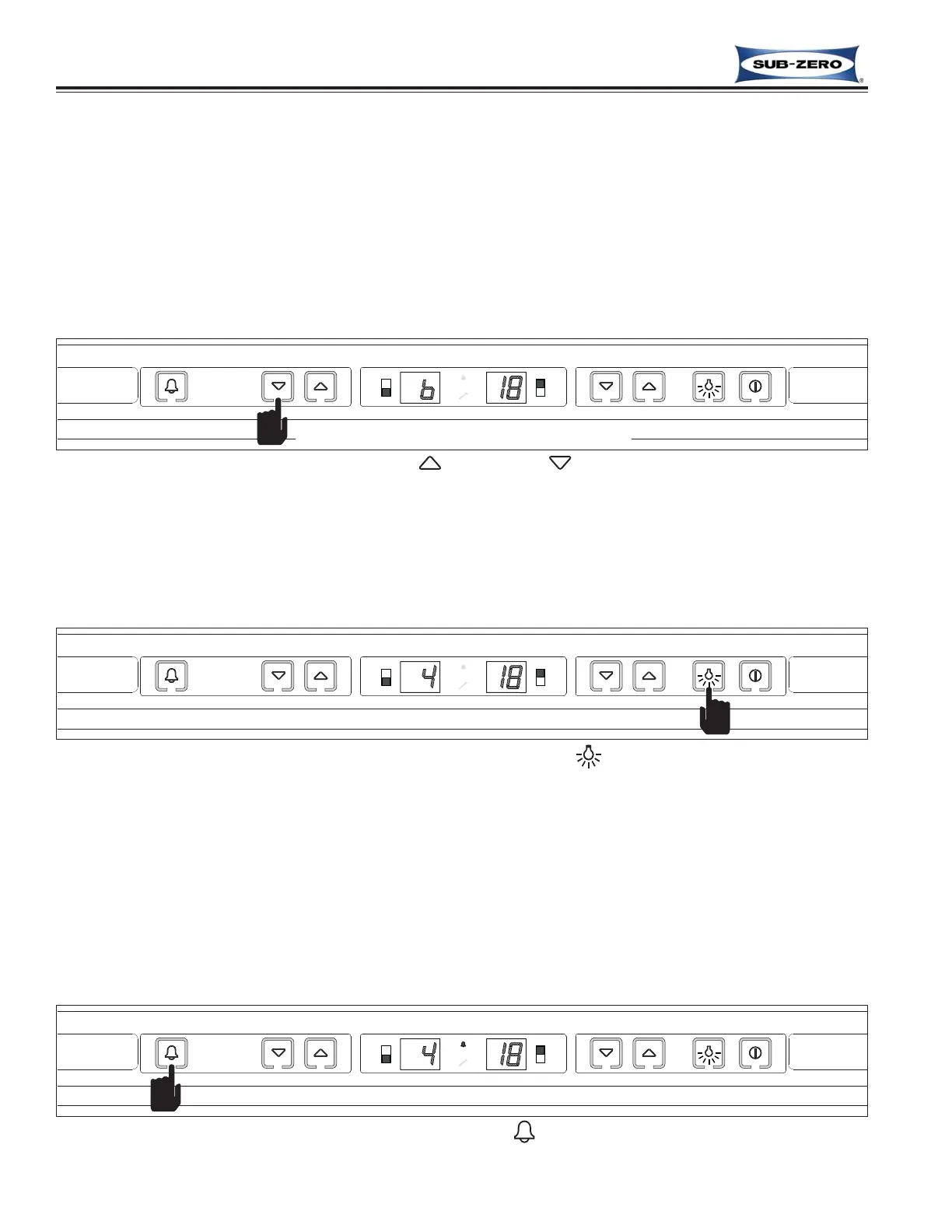
To adjust set-points, press the WARMER or COLDER keys on the control panel in multiple key strokes until the
desired set-point is achieved (See Figure 3-6). One key stroke equals a one degree change. The set-point will be
displayed for ten (10) seconds after the last key stroke. After ten seconds, the compartment temperature will be dis-
played. As the compartment temperature changes, the temperature displayed will change by no more than one
degree per minute.
NOTES:
• To check set points, press a WARMER or COLDER key, keeping in mind that the initial key stroke will change the
previous set-point by a one degree increment or decrement depending on key stroke choice.
• The temperature range in a wine storage compartment is 3°C (38°F) to 18°C (65°F).
Lighting System ON/OFF
For the purpose of displaying a wine supply, it is possible to energize the lights 100% of the time, even when the
door is closed. To do so, press and release the LIGHTS key (See Figures 3-7). To switch back to normal lighting
operation, press and release the LIGHTS key again.
Temperature Alarm ON/OFF
There is an audio/visual temperature alarm in a ICBWS series unit that can be enabled to warn a customer of tem-
peratures problems. To enable the alarm, press and release the ALARM key (See Figure 3-8). If the alarm is
enabled, then the alarm icon on the display will illuminate. To disable this feature, press and release the ALARM
key again, and the alarm icon will de-energize.
NOTE: If the alarm is enabled and temperature problems are experienced, the alarm icon will flash and the alarm
will beep. There are also provisions in a ICBWS series unit to allow for the alarm feature to be tied into a home’s
security alarm system.
Adjusting lower compartment set-point “colder”
Figure 3-6. Adjusting Set-Point - Press Desired (WARMER) or (COLDER) Key In Multiple Key Strokes
Figure 3-7. Lighting System ON or OFF - Press (LIGHTS) Key
Figure 3-8. Switching Temperature Alarm ON or OFF - Press (ALARM) Key, Bell Appears when Activated



 To Next Page