3-7
#7013455 - Revision A - April, 2009
Electronic Control System
International W
International W
ine Storage
ine Storage
(ICBWS)
(ICBWS)
Series
Series
UNIQUE WINE STORAGE INPUT OPERATIONS
The following pages illustrate unique input operations performed at the control panel, namely: Temperature Units
Selection Mode, Sabbath Mode and Showroom Mode.
Temperature Units Selection Mode (Selecting Degrees Fahrenheit or Degrees Celsius Display)
The electronic control in a ICBWS series unit is initially set to display temperature in Celsius (°C) units of measure.
Units of measure can be converted from °C to °F ( Fahrenheit), and/or back again. This operation is called
Temperature Units Selection.
NOTE: Temperature Units Selection must be performed within the first minute after switching the unit ON.
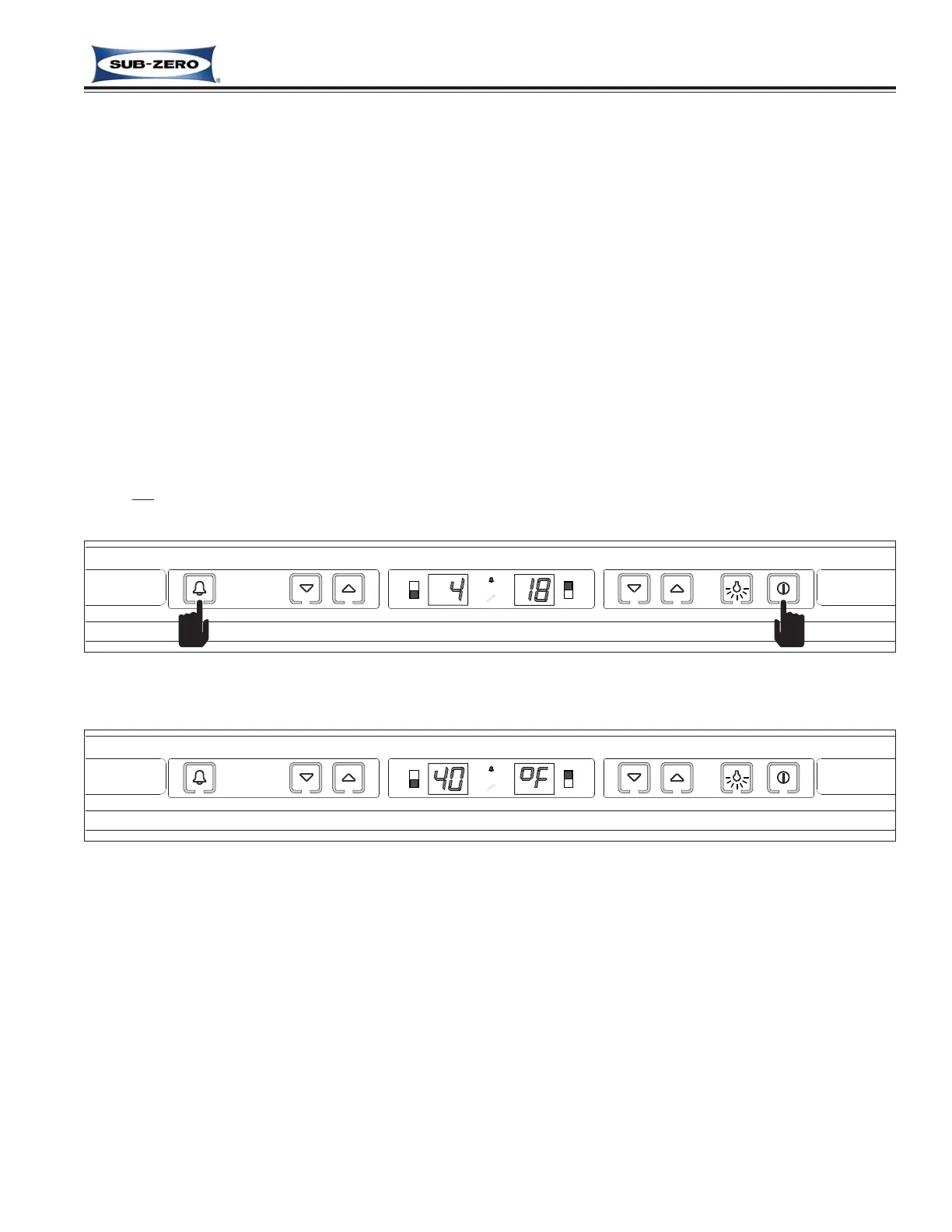
To convert temperature units of measure from Celsius (°C) to Fahrenheit (°F) readings, press and hold the ALARM
key and the POWER key simultaneously for five (5) seconds, then release the keys (See Figure 3-9). A temperature
is now shown in the left display window, and the right display window indicates the units of measure as °C or °F. In
this case, a temperature will be displayed in Fahrenheit (°F) units of measure. (See Figure 3-10)
To switch from Fahrenheit back to Celsius units of measure, repeat the steps above within one (1) minute of switch-
ing the unit on.
NOTES:
• Do not
press and hold the POWER key first, that will simply switch the unit OFF.
• Temperature Units Selection Mode will end ten (10) seconds after the last key stroke.
Figure 3-9. Initiating Temperature Units Selection Mode -
Press and Hold ALARM and POWER Keys for Five (5) Seconds
Figure 3-10. Temperature Units Selection Mode Initiated, Fahrenheit Units (°F) Displayed



 To Next Page