Basic settings
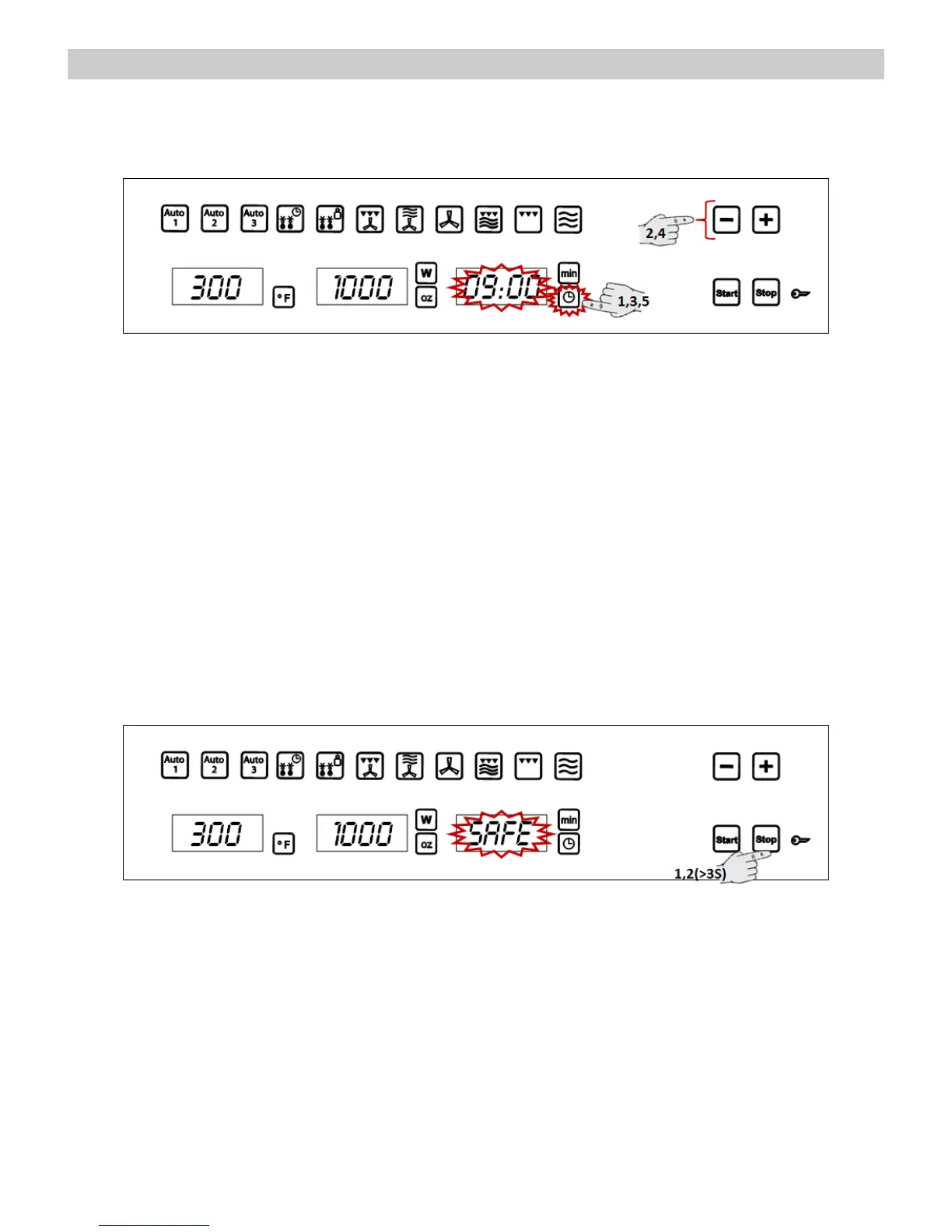
Setting the clock
After your microwave oven is first plugged in or after a power failure, the clock display will flash to
indicate that the time shown is not correct. To set the clock, proceed as follows:
1. Press the Clock key for 6 seconds (not
necessary on first plug-in or after a power failure).
The hour numbers will start to flash.
2. Press key “-” and “+” to set the hours.
3. Press again the Clock key to set the minutes.
The minute numbers will start to flash.
4. Press key “-” and “+” to set the minutes.
5. To finish, press the Clock key again.
Displaying the Clock
To save energy, the clock is normally hidden. If you want to see the clock, press the Clock key
briefly and the clock will be visible for 3 seconds.
Safety blocking
The oven operation can be blocked (for example, to stop it from being used by children).
1. To block the oven, press the Stop key for 3
seconds. You will hear a sound signal and the
display will show the word “SAFE”. The oven is
blocked in this state and cannot be used.
2. To unblock the oven, press the Stop key
again for 3 seconds. You will hear a sound
signal and the display will show the time
again.


 To Next Page