Special functions
Special Function Auto 2: Cooking
Use this function to cook fresh food.
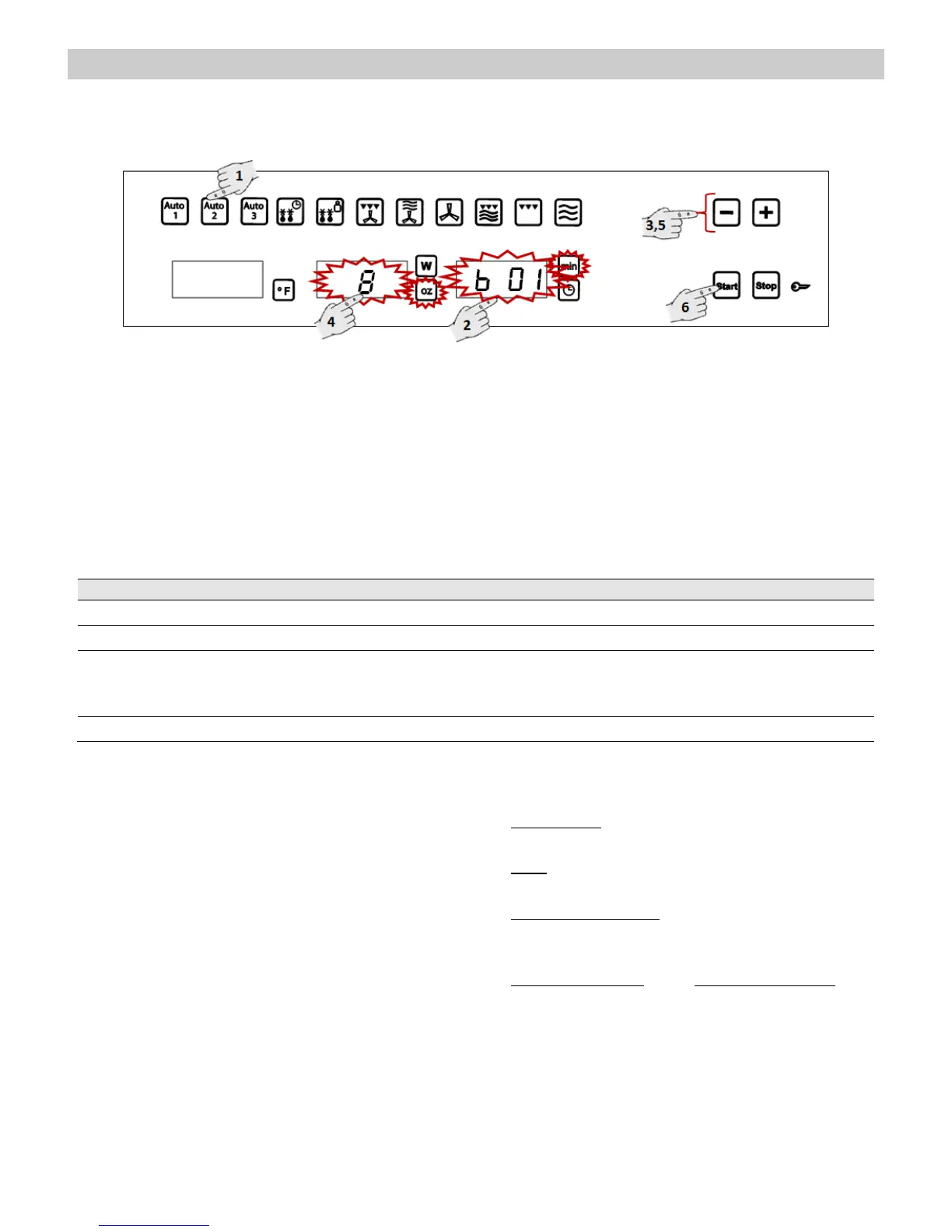
1. Press the function key Auto 2. The function
key lights up.
2. Press the Food Type selection key to
change the food type. The respective lights
will flash.
3. Press key “-” and “+”, to change the program,
e.g. “b 01” (see following table).
4. Press the Weight Selection key to define
the food weight. The respective light will
flash.
5. Press key “-” and “+”, to change the weight.
6. Press the Start key. The oven will start to
operate.
The following table shows the Special Function Auto 2 programmes, indicating weight intervals, and
defrosting and standing times (in order to ensure the food is of a uniform temperature).
Important Notes:
Always use dishes for use in the microwave
oven and a lid or cover to avoid loss of liquids.
Warning! After heating, the container may be
very hot. Although microwaves do not heat up
most containers, these may heat up through
heat transmission from food.
Preparation instructions:
Fish pieces – Add 1 to 3 soup spoons of water
or lemon juice.
Rice – Add water equivalent to twice times the
quantity of rice.
Unpeeled potatoes – Use potatoes of the same
size. Wash them and prick the skin several
times. Add 1 to 3 soup spoons of water.
Peeled potatoes and Fresh vegetables– Cut
into pieces of the same size. Add a soup spoon
of water for every 100 g of vegetables, and salt
to taste.


 To Next Page